OptimizerDuck 是一款免费开源的 Windows 优化工具,主打性能提升、隐私保护与操作简单,界面傻瓜化,一键即可完成系统精简与调优。适合想让老电脑更流畅、减少后台冗余与遥测、又不想手动折腾注册表的普通用户和游戏玩家。
核心亮点:
- 一键精简系统冗余组件与预装应用
- 关闭遥测与隐私追踪,保护使用数据
- 面向游戏与日常使用的性能调优选项
- 开源免费,界面直观,操作门槛低
当前版本 v2.29.0(2026-10-07 发布),开源协议 GPL-3.0,GitHub 12,982 star。


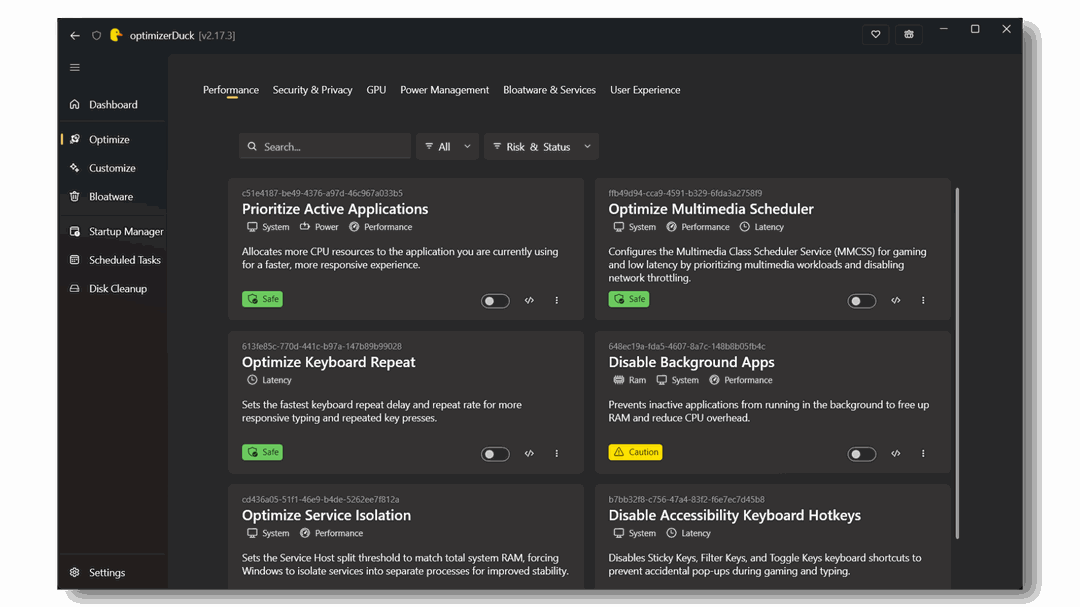
核心信息
| 软件名称 | OptimizerDuck(itsfatduck/optimizerDuck) |
| 当前版本 | v2.29.0 |
| 更新日期 | 2026-10-07 |
| 开源协议 | GPL-3.0 |
| 软件分类 | Windows 效率工具 |
| 关键词 | csharp、debloat、dotnet、gaming、open-source、optimization |
本次更新内容
- 新版本提供适配 ARM 设备的安装包,ARM 电脑用户可选用对应版本,普通电脑仍用原安装包。
- 系统信息卡片会完整显示你的 Windows 版本名称,不再把家庭版相关版本笼统归为一类。
- 新增波斯语界面,应用现已支持波斯语翻译,方便相关语言用户使用。
查看官方英文更新日志(原文)
This release ships native ARM64 builds, labels your Windows edition more clearly on the dashboard, and adds Persian to the language list. Thank you to @NimaHp for the full translation #91.

---

### New

-   **ARM64 builds.** Each release now ships two files, `optimizerDuck-Windows-x64` for most PCs and `optimizerDuck-Windows-arm64` for Snapdragon and other ARM machines. Pick the one that matches your PC. Thanks to @matze19999 #90.
-   **The dashboard names your edition in full.** The System card used to fold everything Home-related into plain `Home`. It now reads the `EditionID` and prints it next to the family name, for example `CoreCountrySpecific (Home)`.
-   **Persian translation.** For the first time, the full app is available in Persian (fa-IR). Thanks to @NimaHp #91.

## New Contributors
- @NimaHp made their first contribution in https://github.com/itsfatduck/optimizerDuck/pull/91

---

**Full Changelog**: https://github.com/itsfatduck/optimizerDuck/compare/v2.28.1...v2.29.0

> [!IMPORTANT]
> My Discord account was banned. See the [original announcement](https://discord.com/channels/1091675679994675240/1411371865217306693/1555928019669876747) for more details
下载地址
以下为官方原包,本站不二次打包;多个文件为不同包型,按需选择其中一个下载即可:
optimizerDuck-Windows-arm64-2.29.0.exe(官方安装程序 | 78.4 MB)
optimizerDuck-Windows-x64-2.29.0.exe(官方安装程序 | 83.3 MB)
✅ 上方 SHA256 与官方发布值一致,可自行核对。
快速上手
- 运行下载好的安装包,按提示完成安装并启动 optimizerDuck。
- 首次启动后,在界面中浏览性能、隐私等优化分类,了解可调整的项目。
- 按需勾选想应用的优化项,确认后执行优化,让工具完成相应系统调整。
- 若需还原改动,可在工具内找到恢复或撤销相关选项,将设置还原。
- 使用完毕后关闭程序,必要时重启电脑让优化设置完全生效。
提示:执行优化前建议先创建系统还原点,方便随时回退。
讨论(0 条)