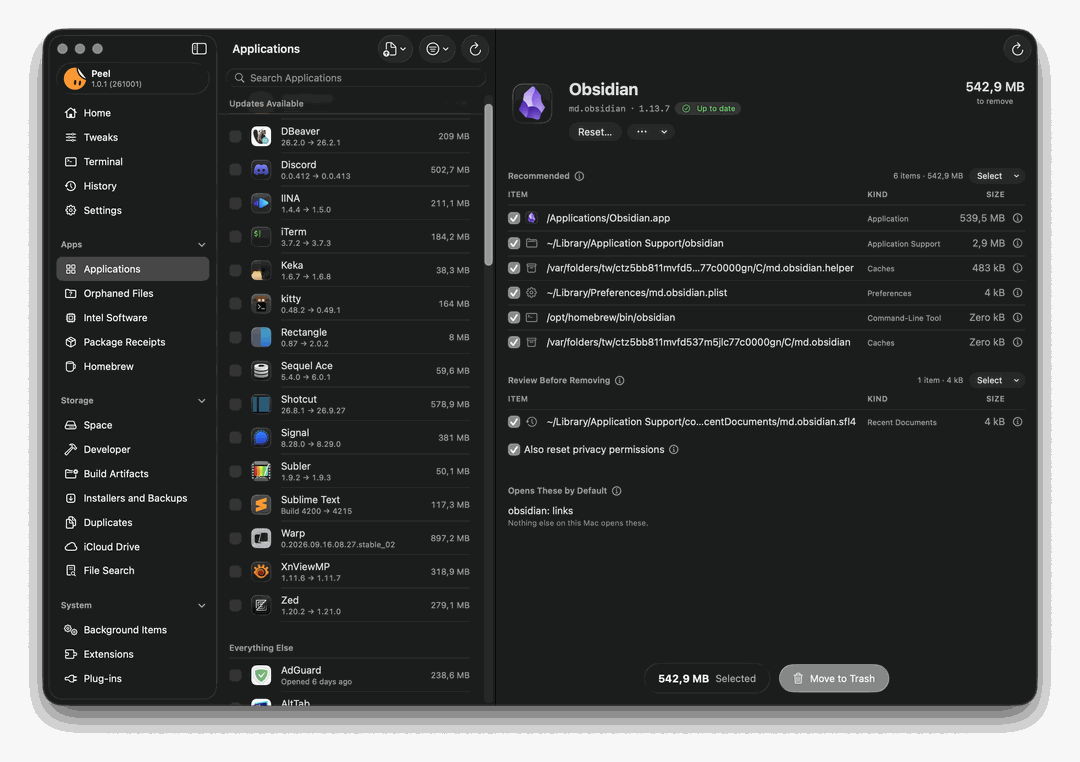
Peel 是一款免费开源的 Mac 应用卸载器,最大特点是会把每个残留文件为什么属于该应用可视化列出来,让你删得明白。它能清理应用本体、缓存、偏好设置和 Homebrew 关联命令,还支持删除前复核文档、重置隐私权限。适合在意磁盘空间、想彻底卸载又怕误删的 Mac 用户。
核心亮点:
- 可视化展示每个残留文件与应用的归属关系
- 卸载应用本体并清理缓存、偏好设置等残留
- 删除前可复核关联文档并重置隐私权限
- 免费开源,支持多语言界面
当前版本 v1.4.0(2026-11-21 发布),开源协议 GPL-3.0,GitHub 653 star。


核心信息
| 软件名称 | Peel(TuguiDragos/Peel) |
| 当前版本 | v1.4.0 |
| 更新日期 | 2026-11-21 |
| 开源协议 | GPL-3.0 |
| 软件分类 | macOS 软件 |
| 关键词 | cache-cleaner、cli、developer-tools、disk-cleaner、disk-cleanup、disk-space |
本次更新内容
- 新版本加强了安全防护:系统设置与任务不再被擅自改动,外部链接仅在确为网页时显示,历史记录加签防篡改,可疑更新源无法再让应用退出。
- 命令行工具与外部磁盘应用获得更好支持:临时文件不再误报,可添加外置磁盘的应用目录,应用文件夹中的别名不再导致孤立文件误判。
- 外置磁盘主目录与标准账户体验改进:移动操作更规范,助手安装状态有明确提示,管理员可代为配置。
- 历史记录新增勾选框,清空废纸篓后可一键遗忘对应记录;快捷指令可单独获取打开应用的密钥,通过该方式启动时不再自动退出。
- 修复了在早期测试版系统上启动后自动退出的问题,并优化了超大文件夹的处理。
查看官方英文更新日志(原文)
After 1.3.0 i watched, i listened, and i analyzed everything, from the comments around the internet where people found small problems, to the people here who took the time to write about the problems and weak spots they found. 1.4.0 is what came out of it. Thank you, all of you.

Peel needs macOS Tahoe 26 or later.

Install it with Homebrew: `brew install --cask peel`

## Safer

- Peel and its helper never move or put back the settings and jobs of macOS itself in the Library of the Mac. [GHSA-q6jw-8hhf-6mj4](https://github.com/TuguiDragos/Peel/security/advisories/GHSA-q6jw-8hhf-6mj4)
- The homepage of a Homebrew package, or the page the App Store names for an update, shows as a link only when it is a web page. [GHSA-x478-fjhp-jhw2](https://github.com/TuguiDragos/Peel/security/advisories/GHSA-x478-fjhp-jhw2)
- Homebrew, Git, and zsh, when it reads your startup files, now start on their own, without the permissions you gave Peel. Only a cask upgrade or uninstall you ask for still runs with them. [GHSA-pgg7-26m4-8pj5](https://github.com/TuguiDragos/Peel/security/advisories/GHSA-pgg7-26m4-8pj5)
- History now signs what it records with a key Peel keeps in your keychain, named Peel History, so a record another program wrote can no longer steer Put Back. What an earlier version or the `peel` command recorded goes back into Desktop, Documents, Downloads, iCloud Drive, or the data of another app only after you confirm. Remove Peel deletes the key. [GHSA-pgg7-26m4-8pj5](https://github.com/TuguiDragos/Peel/security/advisories/GHSA-pgg7-26m4-8pj5)
- An update feed or release notes built to make Peel quit no longer can. Smaller hardenings are under [Security in the changelog](https://github.com/TuguiDragos/Peel/blob/v1.4.0/CHANGELOG.md#security)

Please update.

## From Issues and Discussions

- **Command-line tools** (#11, thanks to @Bammede): a file a tool left in your temporary folder is no longer listed as left by an app, and This Belongs To… can name a Homebrew formula or a command in a `bin` folder.
- **Apps on another disk** (#12, thanks to @enkidu-jones): a disk you keep apps on, such as an external SSD, can be added in Settings > General > App Folders.
- **An alias in Applications** (#14, thanks to @jwDave-cbof and @jgrape): a file named like an app in an Applications folder, such as an alias, no longer leaves Orphaned Files empty.
- **A home folder on an external disk** (#15, thanks to @monkeynuts1469): what Peel moves from the startup disk goes to a Trash for your account there, and what only the helper could move from the Library in your home folder is left to an administrator, with the steps in Finder.
- **Early macOS 27.2 betas** (#16, thanks to @stuartforrest66): Peel no longer stops a few seconds after it opens on a beta that lacked two date comparisons.
- **Standard accounts** (#17, thanks to @pejax): Peel says whether its helper is installed, waiting to be allowed, or not answering, and that an administrator sets it up from their own account
下载地址
以下为官方原包,本站不二次打包;多个文件为不同包型,按需选择其中一个下载即可:
Peel-1.4.0.dmg(官方原包 | 42.4 MB)
Peel-1.4.0.zip(便携版·解压即用 | 42.4 MB)
✅ 上方 SHA256 与官方发布值一致,可自行核对。
快速上手
- 打开下载好的磁盘映像,把 Peel 拖入“应用程序”文件夹完成安装。
- 首次启动 Peel,按提示授予访问权限,以便它扫描应用及其关联文件。
- 在应用列表中选中要卸载的软件,查看它留下的支持文件、缓存与偏好设置。
- 确认勾选要移除的项目,在“Review Before Removing”中核对后移入废纸篓。
- 如需重置隐私权限或默认打开链接,按界面提示一并处理,完成清理。
提示:移入废纸篓后记得清空,才能彻底释放空间。
讨论(0 条)