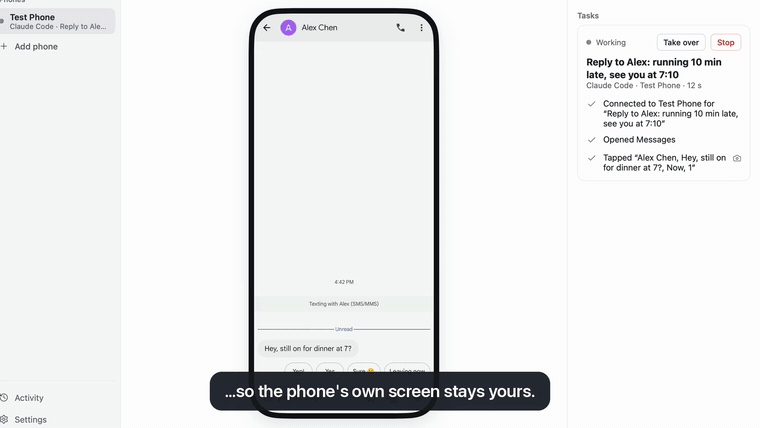
Pinky 是一款让 AI 帮你操作手机的开源工具,支持安卓和 iPhone。它通过 MCP 连接 Claude Code、Cursor 等各类智能体,也能在手机上独立运行。最大特点是每步操作都需你确认,支付、转账等敏感动作默认拦截,适合想用 AI 自动化手机任务又怕失控的人。
核心亮点:
- 跨平台运行,电脑端可远程操控安卓与 iPhone
- 支付、转账等敏感操作默认需人工点击确认
- 手机端可独立运行,无需电脑也能让 AI 干活
- 支持定时任务与记忆偏好,解锁可借生物识别
当前版本 v2026.1126.8(2026-11-26 发布),开源协议 Apache-2.0,GitHub 2,809 star。


核心信息
| 软件名称 | Pinky(DIYgod/pinky) |
| 当前版本 | v2026.1126.8 |
| 更新日期 | 2026-11-26 |
| 开源协议 | Apache-2.0 |
| 软件分类 | Android 开源 APK |
| 关键词 | ai-agent、android、claude-code、ios、iphone、mcp |
本次更新内容
- 新增免确认解锁功能,智能体执行任务时可自动输入密码,大幅减少人工干预。
- 解锁机制更智能,仅在任务执行中遇到锁屏时触发,定时任务不再误触发。
- 支持自定义解锁时长,用户可根据实际需求灵活设定有效时间,用完自动失效。
- 安全记录更透明,每次自动解锁均详细记录在任务活动中,方便用户随时查阅。
- 密码存储更安全,PIN 码仅保留在内存中,关闭软件或超时后自动清除。
查看官方英文更新日志(原文)
- You can now let Pinky unlock a phone for agents' tasks without asking each time, for 1, 4 or 8 hours: turn on Unlock without asking for the phone in Settings › Phones or in the ⋯ menu under its picture, and confirm once. It needs the phone's PIN saved and Unlock from this computer on in Settings › Safety. Thanks @ayu2210 for the idea.
- While it is on, Pinky enters the PIN only when a step of a running task finds the phone locked, never for a scheduled task at its set time, and each unlock shows in the task's Activity. The PIN stays in Pinky's memory only. It ends when the time is up, when you click End on the strip under the phone's picture, when Pinky quits or the PIN changes, and at once if the phone doesn't accept the PIN.

---

### 中文

- 现在可以让 Pinky 在 1、4 或 8 小时内为智能体的任务解锁手机,不用每次都问你:在「设置 › 手机」或手机画面下方的 ⋯ 菜单里为这台手机打开「免确认解锁」,确认一次即可。需要先保存手机的 PIN 码,并打开「设置 › 安全」里的「从这台电脑解锁」。感谢 @ayu2210 的建议。
- 打开期间,只有正在运行的任务有一步发现手机锁着时,Pinky 才会输入 PIN 码,到点自动运行的定时任务不会触发;每次解锁都记在这个任务的「活动」里。PIN 码只留在 Pinky 的内存里。时间到、点手机画面下方横条里的「结束」、Pinky 退出或 PIN 码修改时,它都会结束;手机不接受 PIN 码时会立刻结束。

---

**macOS:** `brew install --cask diygod/tap/pinky`, or the `.dmg` for your Mac below (`arm64` for Apple silicon, `amd64` for Intel).
**Windows:** `pinky-setup-2026.1126.8-amd64.exe`. **Linux:** `pinky_2026.1126.8_amd64.deb`, or `pinky-2026.1126.8-linux-amd64.tar.gz`.
**Claude Desktop:** with Pinky installed, open `pinky-2026.1126.8.mcpb` to add Pinky to Claude Desktop as an extension; Settings › Agents in Pinky connects Claude Code, Codex, Cursor and others with a click.
下载地址
以下为官方原包,本站不二次打包,点击直接下载:
pinky-android.apk(Android 安装包 | 25.6 MB)
✅ 上方 SHA256 与官方发布值一致,可自行核对。
快速上手
- 运行下载好的安装包,按提示完成安装并首次启动 Pinky
- 在设置中的 Agents 页面连接你使用的智能体,如 Claude Code、Codex 或 Cursor
- 连接手机后,在设置中的 Safety 页面选择哪些操作需要你点击允许
- 在手机上输入或说出任务,也可从浮动按钮询问当前屏幕内容
- 任务执行中在电脑窗口查看进度,遇到需确认的步骤点击允许后再继续
提示:把手机 PIN 存入 Pinky,之后解锁可用系统验证确认,智能体看不到 PIN。
讨论(0 条)