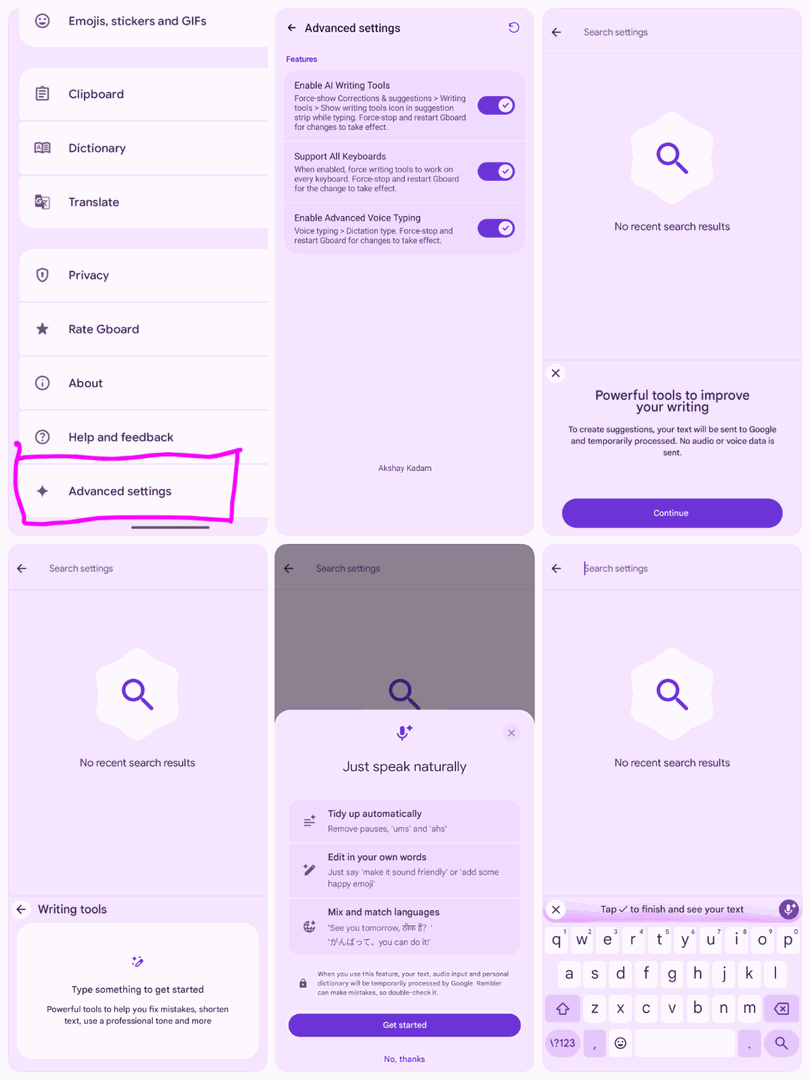
PixelBoard 是一款基于谷歌输入法的增强版安卓键盘,免 root 就能解锁 Pixel 系列的原生语音听写和 AI 写作助手。说句话自动去口癖、加标点,还能一键润色改写语气。它独立安装,能和原版输入法共存,适合追求高效输入、爱折腾安卓工具的用户。
核心亮点:
- 免 root 解锁原生语音听写,自动去口癖加标点
- 内置 AI 写作助手,一键校对并切换多种语气
- 独立包名与原版输入法共存,互不干扰
- 支持相机取词、剪贴板历史延长与截图建议
当前版本 v1.3.6(2026-11-22 发布),开源协议 GPL-3.0,GitHub 1,725 star。

核心信息
| 软件名称 | PixelBoard(Akshayykadam/PixelBoard) |
| 当前版本 | v1.3.6 |
| 更新日期 | 2026-11-22 |
| 开源协议 | GPL-3.0 |
| 软件分类 | Android 开源 APK |
| 关键词 | ai-writing-tools、android、apk、gboard、gboard-ai、gboard-mod |
本次更新内容
- 修复候选栏表情位置错乱,词语补全稳定居中,表情预测靠右不再挤占词语位置
- 语音听写更稳定:旋转屏幕不中断、编辑已有文字不再重复、替换指令不覆盖上下文
- 语音听写不再意外切换语言或漂移到相近语种,保持所选语言
- 修复AI写作工具连接失败问题,改写、校对和语气调整恢复可用
- 修复部分设备上触感反馈崩溃及开机未解锁时的设置初始化问题
查看官方英文更新日志(原文)
# PixelBoard v1.3.6

## What's New
PixelBoard v1.3.6 brings critical fixes for suggestion strip candidate rendering, emoji slot positioning, Morphe Manager bundle version metadata, and Advanced Settings stability:

* **Emoji Right Slot Placement**: Refined candidate slot index assignment (`candidate.l = i`). Primary word auto-completions now reliably occupy **Slot 1 (Center)**, while contextual emoji predictions are placed in **Slot 2 (Right)** without displacing word predictions.
* **Safe Haptic Feedback Hook**: Hardened haptic feedback invocation (`performHapticFeedback`) across devices and custom themes to prevent null pointer or context crashes.
* **Screen Rotation Grace Period for Rambler Voice Dictation**: Maintains continuous voice typing across device orientation changes by introducing a 1.5s grace period during display rotation, preventing sessions from abruptly aborting ([#146](https://github.com/Akshayykadam/PixelBoard/issues/146), PR [#165](https://github.com/Akshayykadam/PixelBoard/pull/165) by Francisco Valentim Castilho).
* **Speech Diff Preservation for Voice Edits**: Retains speech diffs for voice replacements and mid-sentence voice commands (such as *"replace X with Y"*), word edits in respoken phrases, and mid-sentence cursor placements without overwriting surrounding compositions ([#167](https://github.com/Akshayykadam/PixelBoard/issues/167)).
* **Strict Language Enforcement & Anti-Drift**: Disabled proactive parallel ASR and seamless fallback in Rambler stock policy to prevent voice dictation from unintentionally switching languages or drifting to similar locales (e.g., Czech → Slovak) ([#154](https://github.com/Akshayykadam/PixelBoard/issues/154)).
* **Eliminate Text Duplication on Dictation Start**: Fixed an issue where starting dictation in an editor containing pre-existing text or recently pasted clipboard items would duplicate text at the cursor ([#166](https://github.com/Akshayykadam/PixelBoard/issues/166)).
* **Gboard 18.6.3 Native Split Readiness Gate Check**: Added native library readiness gate verification on split components for Gboard 18.6.3 (`Lsmi;`, `Locf;`), ensuring smooth and stable JNI initialization on fused and split APKs ([#168](https://github.com/Akshayykadam/PixelBoard/issues/168)).
* **AI Writing Tools Connectivity Fix**: Repaired request timeout and prompt template evaluation in `GboardAiWritingToolsRuntime`, eliminating *"cannot connect to server"* errors and restoring reliable Rephrase, Proofreading, and Tone adjustments via Google's Gboard server backend.
* **Direct Boot & Secure Storage Safety**: Added user unlock state checks (`UserManager.isUserUnlocked`) ensuring crash-free preference initialization during direct boot before initial unlock.

---

## Installation Instructions

### Option 1: Direct APK Installation (Recommended)
1. Download **PixelBoard-1.3.6.apk** directly to your Android device.
2. Open the downloaded APK from your browser or file manager.
3. Allow install
下载地址
以下为官方原包,本站不二次打包,点击直接下载:
PixelBoard-1.3.6.apk(Android 安装包 | 121.8 MB)
✅ 上方 SHA256 与官方发布值一致,可自行核对。
快速上手
- 在手机上运行下载好的安装包,按提示允许安装未知来源应用并完成安装。
- 首次启动后进入系统设置,在输入法列表中启用 PixelBoard 键盘。
- 在任意输入框调出键盘,切换到 PixelBoard 即可开始打字使用。
- 点击键盘工具栏的语音按钮,使用 Rambler 自然语音听写与自动标点。
- 在键盘工具栏打开写作助手,对选中文字做校对、语法修正或语气改写。
提示:PixelBoard 与系统自带 Gboard 可共存,无需卸载原键盘。
讨论(0 条)