Prism File Explorer 是一款用 Kotlin 和 Jetpack Compose 打造的轻量安卓文件管理器,界面遵循 Material Design,支持多标签浏览、批量操作和内置媒体查看器。它能直接预览图片、视频、音频、PDF 和文本,还能解压和创建压缩包,适合喜欢清爽界面、需要高效整理手机文件的安卓用户。
核心亮点:
- 多标签浏览,同时管理多个目录
- 完整文件操作,支持批量处理
- 内置图片、视频、音频和PDF查看器
- 支持ZIP压缩包解压与创建
当前版本 v1.3.2(2025-09-12 发布),开源协议 GPL-3.0,GitHub 1,388 star。


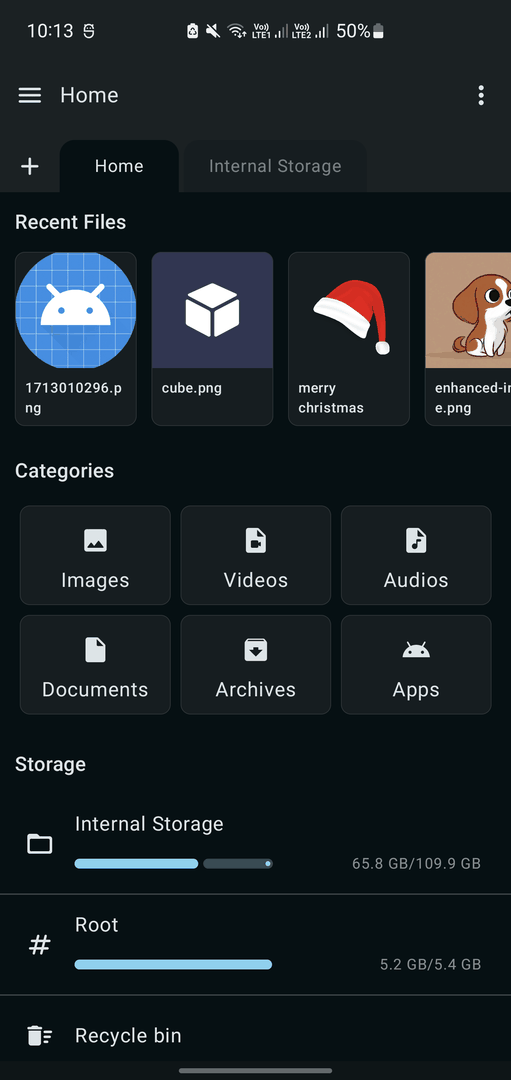
核心信息
| 软件名称 | Prism File Explorer(Raival-e/Prism-File-Explorer) |
| 当前版本 | v1.3.2 |
| 更新日期 | 2025-09-12 |
| 开源协议 | GPL-3.0 |
| 软件分类 | Android 开源 APK |
| 关键词 | android、fileexplorer、jetpack-compose、kotlin、material-ui |
本次更新内容
- 新增图片浏览与显示自定义选项,图片以原始画质呈现,媒体加载速度更快。
- 支持将文件固定到主页快速访问,可下滑关闭标签页,并能记住上次打开的标签。
- 分类标签按文件夹归类,可排除指定文件夹与隐藏文件,名称排序更合理。
- 偏好设置支持导出导入备份,可隐藏主工具栏,退出前会确认以防误关。
- 新增法语和西班牙语翻译,并修复多处问题、优化界面体验。
查看官方英文更新日志(原文)
# Release Notes

> [!NOTE]
> Due to school, development of this app (as well as the review of pull requests) will slow down. There are many suggestions and feature requests that have not yet been implemented. I’ve decided to publish the app anyway, as I won’t be able to do all of them at this time.

### 🖼️ Enhanced Display & Gallery Experience
- **Advanced Display Options**: Customize your viewing experience with new options including column count, item size, gallery mode, and crop-in thumbnails
- **Full Quality Image Viewer**: Images now display in their complete original quality
- **Improved Media Retrieval**: Significantly faster loading times for media files

### 📌 Quick Access & Navigation
- **Pin Files to Home**: Long-press any file and select "Pin to Home" for instant access (unpin by long-pressing in home tab and selecting delete)
- **Swipe to Close Tabs**: Close any tab with a simple downward swipe gesture to the tab header
- **Copy Path Feature**: Long-press files in the breadcrumbs bar to copy the current path
- **Remember Last Opened Tabs**: Your tab state is can be preserved between sessions (Preferences → Remember last session)

### 🗂️ Better Organization & Filtering
- **Folder-Based Category Tabs**: category tabs now have folder-based categorisation
- **Exclude Folders from Scanning**: Customize which folders to exclude in recent files and toggle hidden file scanning (Preferences→ Recent Files → Excluded Paths)
- **Neutral Name Sorting**: Sort by name now uses improved neutral ordering

### ⚙️ Settings & Customization
- **Export/Import Preferences**: Back up and share your preferences (Preferences → Other → Export preferences. To import, navigate and open the exported file)
- **Hide Main Toolbar**: Enable compact layout by hiding the main toolbar
- **Confirm Before Exit**: Added confirmation dialog to prevent accidental app closure
- **Binary Size Formatting**: File sizes now use proper binary prefixes (KiB, MiB, etc.)

### 🌍 Localization
- New translations have been added (**French** and **Spanish** translation)

## 🐛 Bug Fixes & Improvements
- Various bug fixes and overall visual improvements for a smoother experience

## Contributors
* fix merged (antisplit) apk signing on release builds by @AbhiTheModder in https://github.com/Raival-e/Prism-File-Explorer/pull/146
* Add Spanish translation by @tiirwaa in https://github.com/Raival-e/Prism-File-Explorer/pull/173

## New Contributors
* @tiirwaa made their first contribution in https://github.com/Raival-e/Prism-File-Explorer/pull/173

## Special Thanks
- Huge thanks to @sud0xenn for his thorough testing of the app, as well as to everyone who reported bugs and suggested improvements.

## 🔐 App Verification
### MD5:
```
31b49fe8c2597781af9e0c69228af580
```
### SHA1:
```
fa459e283f73822af23eccd732dc2069c396299c
```
### SHA256:
```
49ffa960bb52876d03b29c21576becff391a59e847c7d56e07117d4ee946dc0f
```

**Full Changelog**: https:/
下载地址
以下为官方原包,本站不二次打包,点击直接下载:
app-release.apk(Android 安装包 | 10.2 MB)
✅ 上方 SHA256 与官方发布值一致,可自行核对。
快速上手
- 运行下载好的 app-release.apk 安装包,按系统提示完成安装并打开应用
- 首次启动后进入主界面,通过面包屑导航或快捷入口浏览设备目录
- 长按文件或文件夹进入多选,再执行复制、移动、重命名、删除等操作
- 使用搜索框查找文件,并按名称、大小、日期或类型排序,切换网格或列表视图
- 打开图片、音视频、PDF 或文本文件,可直接在应用内预览和编辑
提示:多标签页可同时打开不同目录,方便来回对照操作。
讨论(0 条)