Saber 是一款专为手写打造的跨平台开源笔记应用,支持压感书写、PDF 标注与深色模式反色,让白墨黑底书写更护眼。它采用双密码端到端加密同步,服务器管理员也看不到内容,可自建服务。适合学生、数学研究者及需要手写批注的创意工作者。
核心亮点:
- 手写笔记与 PDF 标注,深色模式自动反色护眼
- 双密码端到端加密,可自建服务器保障隐私
- 荧光笔重叠不变色,多行公式高亮清晰可读
- 无限层级文件夹嵌套,最近笔记首页快速访问
当前版本 v1.38.0(2026-11-21 发布),开源协议 GPL-3.0,GitHub 5,057 star。


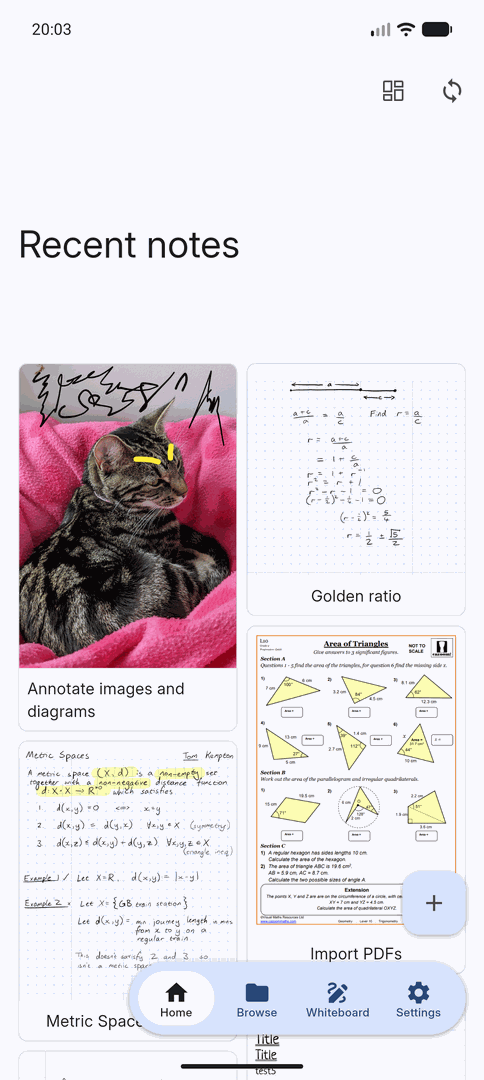
核心信息
| 软件名称 | Saber(saber-notes/saber) |
| 当前版本 | v1.38.0 |
| 更新日期 | 2026-11-21 |
| 开源协议 | GPL-3.0 |
| 软件分类 | Android 开源 APK |
| 关键词 | android、cross-platform、dart、f-droid、flatpak、flutter |
本次更新内容
- 导入PDF后整份文档作为一次操作记录,撤销更省心,页面比例适配更准确,横版文档显示更自然。
- 滚动浏览更流畅,PDF页面上的文字输入也能正常保存,桌面端安装包更精简。
- 新增多语言翻译更新,界面文字更完善。
查看官方英文更新日志(原文)
## External links
[<img src='https://github.com/adil192/saber/blob/main/assets_raw/badges/google-play-badge.svg'
alt='Get it on Google Play'
height=50>][google_play] [<img src="https://github.com/adil192/saber/blob/main/assets_raw/badges/f-droid-badge.svg"
alt="Get it on F-Droid"
height=50>][f-droid] [<img src="https://github.com/adil192/saber/blob/main/assets_raw/badges/app-store-badge.svg"
alt="Download on the App Store"
height=50>][app_store] [<img src="https://github.com/adil192/saber/blob/main/assets_raw/badges/flathub-badge.svg"
alt="Download on Flathub"
height=50>][flathub]
For other downloads, scroll down and find the relevant file under "Assets".
[f-droid]: https://f-droid.org/packages/com.adilhanney.saber/
[flathub]: https://flathub.org/apps/details/com.adilhanney.saber
[google_play]: https://play.google.com/store/apps/details?id=com.adilhanney.saber
[app_store]: https://apps.apple.com/us/app/saber/id1671523739
[releases]: https://github.com/adil192/saber/releases
## Changelog
- A PDF import is grouped into one atomic history item, rather than one per page, letting you undo the import with one click. https://github.com/saber-notes/saber/pull/1896
- Improved sizing of imported PDFs of differing aspect ratios, particularly landscape ones. https://github.com/saber-notes/saber/pull/1896
- Slightly improved scrolling performance. https://github.com/saber-notes/saber/pull/1896
- Fixed pages imported from a PDF not registering changes from the typed text tool. https://github.com/saber-notes/saber/pull/1896
- Removed an unused WebKit dependency from the Linux/Windows builds.
- Translations:
- i18n: Update Korean by @eevexuuu in 5ef91605173b5a2b976d53b6d03c3a8b09c266ce
- i18n: Update Chinese (Traditional Han script) by Jeff Huang in 59197a77a32a8879231e1056135425af3f54b13a
- i18n: Update Korean by @eevexuuu in e63a480f72b785448be1fb42d10c46425a33f377
- **Full Changelog**: https://github.com/saber-notes/saber/compare/v1.37.2...v1.38.0
下载地址
以下为官方原包,本站不二次打包,点击直接下载:
Saber_FOSS_v1.38.0.apk(Android 安装包 | 107.6 MB)
✅ 上方 SHA256 与官方发布值一致,可自行核对。
快速上手
- 运行下载好的安装包,按提示完成安装并启动 Saber。
- 首次启动后进入主界面,可新建笔记或文件夹,支持多层嵌套整理内容。
- 在笔记中用触控笔或手指手写记录,深色模式下可开启反色,让白字显示在黑底上。
- 在设置中配置同步账户与双重密码,把笔记同步到服务器或自建服务器。
- 在首页查看最近笔记,快速打开深层文件夹中的内容继续编辑。
提示:深色模式下开启反色,图片和 PDF 也会一并反色,阅读更护眼。
讨论(0 条)