SCSKiller 是一款免费开源的 Windows 工具,专门对付游戏里因着色器即时编译导致的卡顿。它会在你开玩前,把游戏自带的着色器提前编译进显卡驱动缓存,让游戏过程中不再停下来编译。适合被 DirectX 12 游戏卡顿困扰的 PC 玩家,NVIDIA 和 AMD 显卡都能用。
核心亮点:
- 开玩前预编译着色器,减少游戏中途卡顿
- 支持 NVIDIA 与 AMD 显卡驱动缓存
- 自动识别游戏着色器与管线并提前构建
- 开源免费,界面按商店分组管理游戏库
当前版本 v1.4.9(2026-11-21 发布),开源协议 GPL-3.0,GitHub 4,688 star。


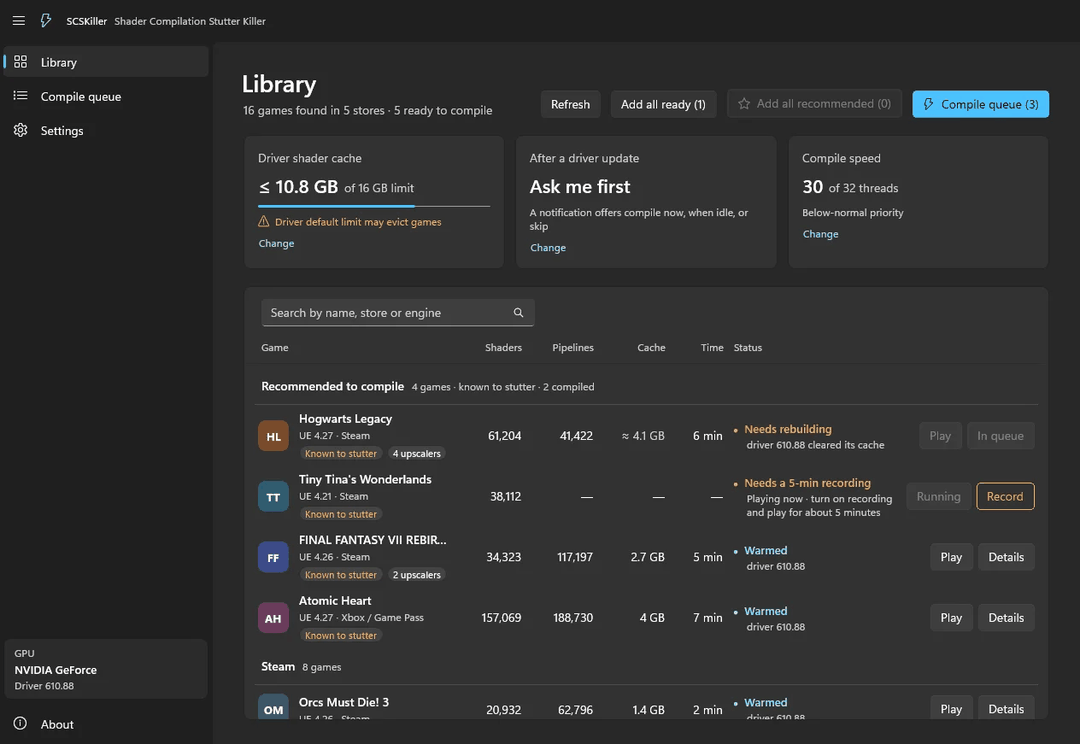
核心信息
| 软件名称 | SCSKiller(BlueHeisenberg/SCSKiller) |
| 当前版本 | v1.4.9 |
| 更新日期 | 2026-11-21 |
| 开源协议 | GPL-3.0 |
| 软件分类 | Windows 效率工具 |
| 关键词 | amd、directx12、nvidia、pc-gaming、shader-compilation、stutter |
本次更新内容
- 新版本首次运行可能被系统安全提示拦截,需手动允许;后续更新不再出现此提示。
- 修复了安装Steam客户端测试版后,部分Steam游戏被误判为反作弊游戏的问题。
- 修复了在线游戏列表较旧时,部分游戏无法正确识别自身文件的问题。
- 使用NVIDIA显卡时,缓存页面现在能正确显示并清理各游戏的DirectX着色器缓存,同时避免影响其他程序。
- 修复了Steam清单文件损坏提示中不准确的建议,不再引导用户移动文件。
查看官方英文更新日志(原文)
> **This build isn't code-signed yet**, so the first run will probably show SmartScreen's "Windows protected your PC".
> Click **More info**, then **Run anyway**. Updates never show it.
>
> To check the download arrived whole, compare its SHA-256 with the one at the end of these notes (PowerShell:
> `Get-FileHash <file>`). These notes aren't signed, so that doesn't prove who built it. The source: https://github.com/BlueHeisenberg/SCSKiller/tree/v1.4.9.
>
> Smart App Control (Windows 11) blocks unsigned apps outright, with no Run anyway.

**Fixed**

- Windows, Linux: Steam games are no longer treated as anti-cheat games when the Steam client beta is installed.
- Windows, Linux: Red Dead Redemption 2 and other games keep their correct game file when the online game list is older
  than the app's own.
- Windows: With NVIDIA, the Cache page shows each game's own DirectX shader cache files and Clear cache deletes them,
  except files other apps with the same exe name use. (Thanks to ecelebi29 for the PR.)
- Windows, Linux: The message about a damaged Steam manifest no longer tells you to move the file.

SHA-256:

```
b6003b423b7ef335b7c2f7649c4b2dc081b604185ef083ae55e442067a3eea6d  SCSKiller-1.4.9-Portable.zip
44f24c90d623fc358953d60fe2e03bff173beea1ca1be2dd6dfef11c726528bb  SCSKiller-Setup.exe
33de6eaf0e3da73c1d9b4aa8065c6c1557e3b9b544e7047fda3175a2d14df024  SCSKiller-x86_64.AppImage
```

[Code signing policy](https://github.com/BlueHeisenberg/SCSKiller/blob/main/CODE_SIGNING_POLICY.md)
下载地址
以下为官方原包,本站不二次打包;多个文件为不同包型,按需选择其中一个下载即可:
SCSKiller-1.4.9-Portable.zip(便携版·解压即用 | 112.4 MB)
SCSKiller-Setup.exe(安装版 | 119.6 MB)
SCSKiller.zip(便携版·解压即用 | 106.8 MB)
✅ 上方 SHA256 与官方发布值一致,可自行核对。
快速上手
- 运行下载好的安装包,按向导完成安装后启动 SCSKiller。
- 首次启动后等待程序扫描并列出已安装游戏,按商店分组显示。
- 在库中找到目标游戏,查看其着色器与管线数量及缓存状态。
- 点击游戏旁的编译按钮,在游戏关闭状态下提前编译着色器。
- 状态显示已预热后,再启动游戏即可减少编译卡顿。
提示:编译时请关闭游戏,避免占用显卡影响进度。
讨论(0 条)