ShizuWall 是一款免 root 的 Android 应用防火墙,不建 VPN、不截获数据包,靠 Shizuku、无线调试或 root 直接调用系统联网控制机制,按应用逐个断网。离线运行、无遥测,还支持快捷开关和广播自动化,适合注重隐私、想精细管控应用联网的 Android 用户。
核心亮点:
- 不建 VPN 隧道,按应用单独拦截联网
- 支持 Shizuku、无线调试与 root 多种后端
- 离线优先,无分析无遥测,保护隐私
- 提供快捷磁贴、小部件与广播自动化控制
当前版本 v4.7.2(2026-11-21 发布),开源协议 GPL-3.0,GitHub 2,575 star。

核心信息
| 软件名称 | ShizuWall(AhmetCanArslan/ShizuWall) |
| 当前版本 | v4.7.2 |
| 更新日期 | 2026-11-21 |
| 开源协议 | GPL-3.0 |
| 软件分类 | Android 开源 APK |
| 关键词 | Android 开源 APK |
本次更新内容
- 新增本地VPN防火墙模式,无需额外授权即可拦截应用,重启后规则自动恢复。
- VPN模式下可单独限制应用在Wi-Fi下联网,移动数据仍可用。
- 内置无线调试配对功能,无需外部组件,安装包更小。
- 无线调试界面重新设计,操作更简洁,并优化了整体性能与动画。
- 修复应用列表搜索后滚动位置丢失的问题。
查看官方英文更新日志(原文)
# Changelog

### Added

- **VPN mode**: a new working mode that blocks apps through a local VPN, no Shizuku, root or ADB needed for firewall rules
  - Blocked apps are routed into a local tunnel that never sends traffic anywhere, apps in other profiles and modes that need the foreground app are unavailable
  - Rules are re-applied after a reboot or when the app restarts
  - Asks for VPN permission only when the firewall is turned on
- **Wi-Fi only blocking** (VPN mode): block an app on Wi-Fi while mobile data stays allowed
- **Built-in ADB client** for wireless debugging, with built-in pairing. The external ADB libraries are removed, so the APK is smaller
- Sort by block mode in hybrid mode
- Predictive back gesture in bottom sheets and the block mode dialog
- Working mode icons in backend settings and on the firewall toggle

### Changed

- LADB is now called **Wireless debugging** may need re-pairing and re-enabling wireless debugging again.
- Redesigned wireless debugging screen: status inside the pairing card, collapsible manual connection, compact logs, share button on ADB commands, advanced mode in the toolbar menu
- The daemon stops when there is no ADB connection, and the error log is shown on an authorization timeout
- Compact settings layout on all screens
- Shorter onboarding tour
- Improved overall app performance and animations.

### Fixed

- Search no longer loses the scroll position in the app list

**Full Changelog**: https://github.com/AhmetCanArslan/ShizuWall/compare/v4.7.1...v4.7.2
下载地址
以下为官方原包,本站不二次打包,点击直接下载:
ShizuWall-4.7.2.apk(Android 安装包 | 5.1 MB)
✅ 上方 SHA256 与官方发布值一致,可自行核对。
快速上手
- 安装完成后首次打开 ShizuWall,按提示选择并启用一个后端:Shizuku、LibADB 或 Root,应用会据此获得控制网络的能力。
- 若选 Shizuku,先在设备上启动 Shizuku 服务并授权 ShizuWall;若选 LibADB,则通过无线调试完成配对,全程无需电脑。
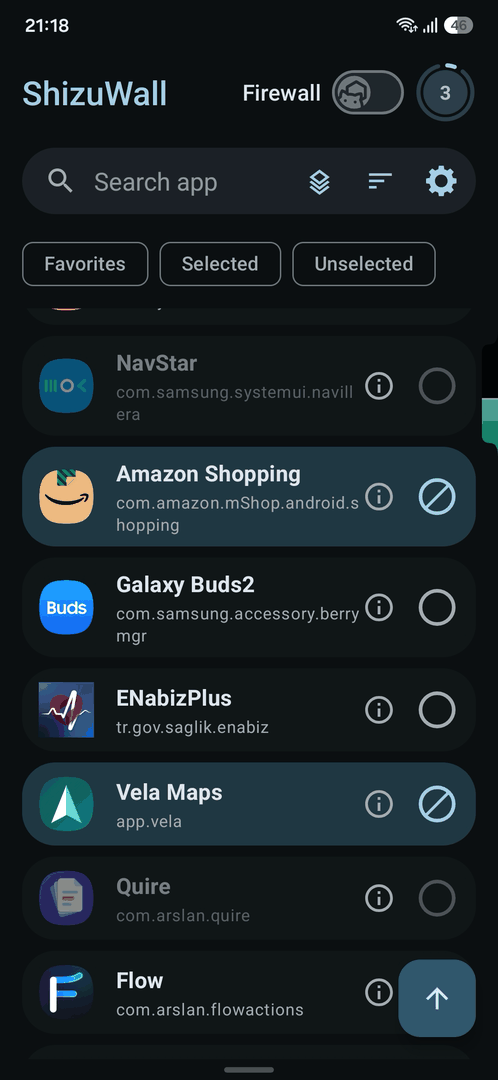
- 进入应用列表,找到要限制联网的应用,将其网络开关关闭即可拦截该应用联网,工作资料与克隆副本也能分别控制。
- 如需整体开关,可在快捷设置磁贴、桌面小组件或悬浮按钮上操作防火墙总开关,无需每次进入应用。
- 重启设备后系统会清除拦截规则,需要重新打开 ShizuWall 应用一次以恢复之前的设置。
提示:用 Tasker 等工具发送广播可实现自动开关防火墙,注意每次重启后规则会失效。
讨论(0 条)