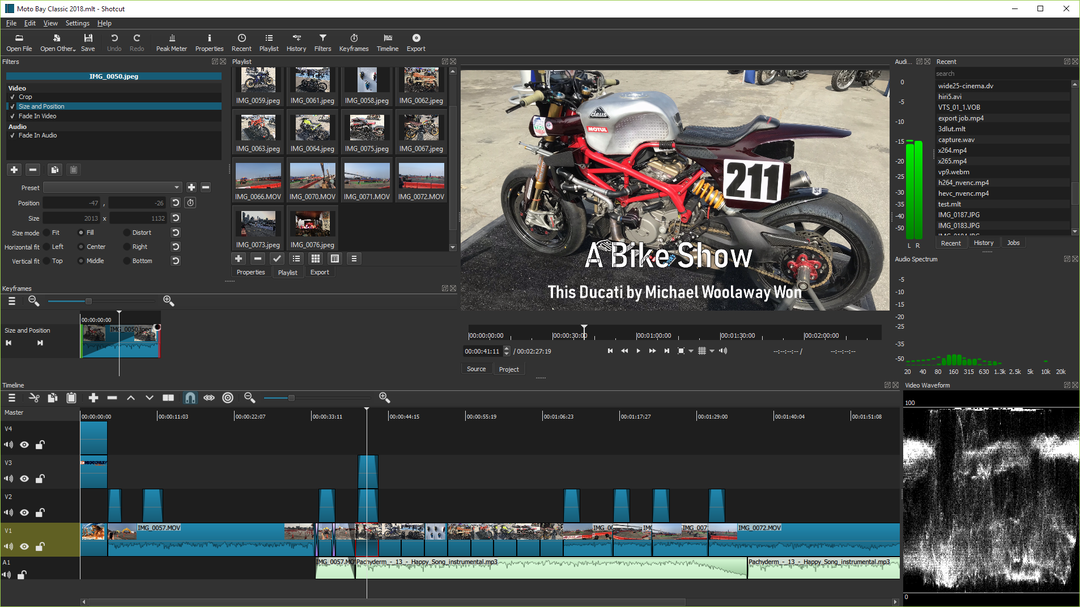
Shotcut 是一款开源跨平台的视频编辑器,基于 MLT 框架和 FFmpeg 打造,支持 Windows、macOS 与 Linux。它无需导入即可直接编辑多种格式素材,界面直观、功能齐全,适合预算有限但需要可靠剪辑工具的内容创作者、教育用户和开源爱好者。
核心亮点:
- 跨平台运行,三大桌面系统都能用
- 基于 MLT 与 FFmpeg,格式兼容性强
- 支持直接编辑多种素材,无需转码导入
- 开源免费,遵循 GPLv3 许可证
当前版本 v26.11.15(2026-11-16 发布),开源协议 GPL-3.0,GitHub 15,704 star。

核心信息
| 软件名称 | Shotcut(mltframework/shotcut) |
| 当前版本 | v26.11.15 |
| 更新日期 | 2026-11-16 |
| 开源协议 | GPL-3.0 |
| 软件分类 | Windows 效率工具 |
| 关键词 | cross-platform、gplv3、mlt、shotcut、video-editor |
本次更新内容
- 修复了新版本中时间线拖拽卡顿、复制粘贴片段和转场出错、音频播放杂音、预览崩溃等多项问题,操作更稳定流畅。
- 改进了转场与音频处理性能,降低内存占用,时间线缩放时的吸附更精准,播放头显示更细。
- 新增时间线音频混音助手、圆角矩形开关、关键帧同步缩放等选项,并支持摄像机取景动画和元素搜索。
- GPS 相关滤镜支持读取行车记录仪等纯文本日志并自动加载同名文件,日期时间参数支持小数。
- Windows 安装升级时可清理旧程序文件,避免冲突;同时支持更多剪辑软件的代理文件命名规则。
查看官方英文更新日志(原文)
## What's Changed

- Fixed a crash when drag-n-drop video suggesting conversion when **Settings > Timeline > Automatically Add Tracks** is on (broke in v26.9).
- Fixed **Timeline** interactions slow when something is using Windows UI Automation (broke in v26.9).
- Fixed copy and paste of multiple clips including dissolve video transitions (broke in v26.9).
- Fixed audio playback might sound scratchy (broke in v26.9).
- Fixed `Ctrl`+mouse-wheel and context menus in the numeric fields of filters on Windows (broke in v26.9).
- Fixed crash when using hardware decoding and preview scaling with GPU processing mode (broke in v26.9).
- Fixed scrubbing audio in the Source player (broke in v26.9).
- Fixed pasting filters to a track (broke in v26.9).
- Fixed moving a clip in **Timeline** with drag-n-drop was slower (broke in v26.9).
- Fixed some VST2 plugins made app hang on start or make the app or export jobs crash on exit (broke in v26.8).
- **Typewriter** filter: fixed changing the text can temporarily break timing in preview (broke in v26.4).
- Fixed launching Glaxnimate installed to `Program Files` on Windows (broke in v26.4).
- Fixed possible crash when drag-moving a clip beyond a transition to end of track.
- Fixed resizing a transition by dragging the clip before it.
- Fixed saving a preset export with `/` in the name.
- Fixed loading B frames from custom export preset with hardware encoding on.
- Fixed the macOS 27 font dialog does not work.
- Fixed crash opening a file dialog in AppImage/Snap on Ubuntu 26.04.1.
- Fixed snapping to the playhead or a marker is inaccurate when **Timeline** is zoomed out.
- **Subtitle Burn In** filter: fixed failing to render beyond an item with blank lines.
- Fixed using **Size, Position & Rotate** filter on an **Adjustment Clip**.
- Reduced the memory usage of audio transitions.
- Improved the performance of dissolve video transitions in 8-bit processing mode.
- Added **Remove Old Program Files** to the Windows installer when doing upgrade.
  This fixes problems caused by old, incompatible DLLs no longer being used.
- Added support for Premiere and Resolve video proxy file conventions:
  `Proxy` or `Proxies` subfolder, case insensitive, same as source name but possibly different extension, optionally with `_Proxy` suffix before extension.
- Reduced playhead thickness.
- Removed **Settings > Player > Audio API > Waveform Audio** on Windows.
  This was a legacy API that was dropped by the SDL library we use for audio output.
  The new defaults are WASAPI for stereo and DirectSound for multi-channel.
- **GPS Graphic** filter: optimized drawing by skipping overlapping lines.
- **GPS Text** filter: added support for decimals X argument for datetime keywords.
- GPS filters: added support for parsing plain text files such as dashcam logs.
- GPS filters: automatically load a companion gps file (with the same name).
- Added support for rectangle parameters to the experimental add-on filt
下载地址
以下为官方原包,本站不二次打包;多个文件为不同包型,按需选择其中一个下载即可:
shotcut-win64-26.11.15.exe(官方安装程序 | 136.2 MB)
shotcut-win64-26.11.15.zip(便携版·解压即用 | 187.0 MB)
✅ 上方 SHA256 与官方发布值一致,可自行核对。
快速上手
- 运行下载好的安装包,按向导完成安装后启动 Shotcut,首次启动会进入主界面。
- 在主界面点击打开文件,选择要编辑的视频素材载入播放列表。
- 把素材从播放列表拖到时间线轨道上,即可开始剪辑与排列片段。
- 在时间线上选中片段进行剪切、删除或调整顺序,完成后通过导出功能保存成片。
提示:导出前先预览确认效果,避免反复渲染耗时。
讨论(0 条)