Sigma File Manager 是一款免费开源的现代文件管理器,支持 Windows 和 Linux。它把分屏、多标签、智能全局搜索和扩展市场整合在一起,界面可自定义,还能替代系统默认资源管理器。适合追求高效、喜欢折腾界面的用户,尤其是经常在多个目录间搬运文件的人。
核心亮点:
- 智能全局搜索,支持拼写纠错和模糊匹配
- 多标签与分屏双栏,目录间拖拽传输文件
- 内置扩展市场,可安装命令、页面和快捷键
- 局域网共享与快速预览,支持压缩包解压
当前版本 v2.3.0(2026-11-25 发布),开源协议 GPL-3.0,GitHub 6,955 star。


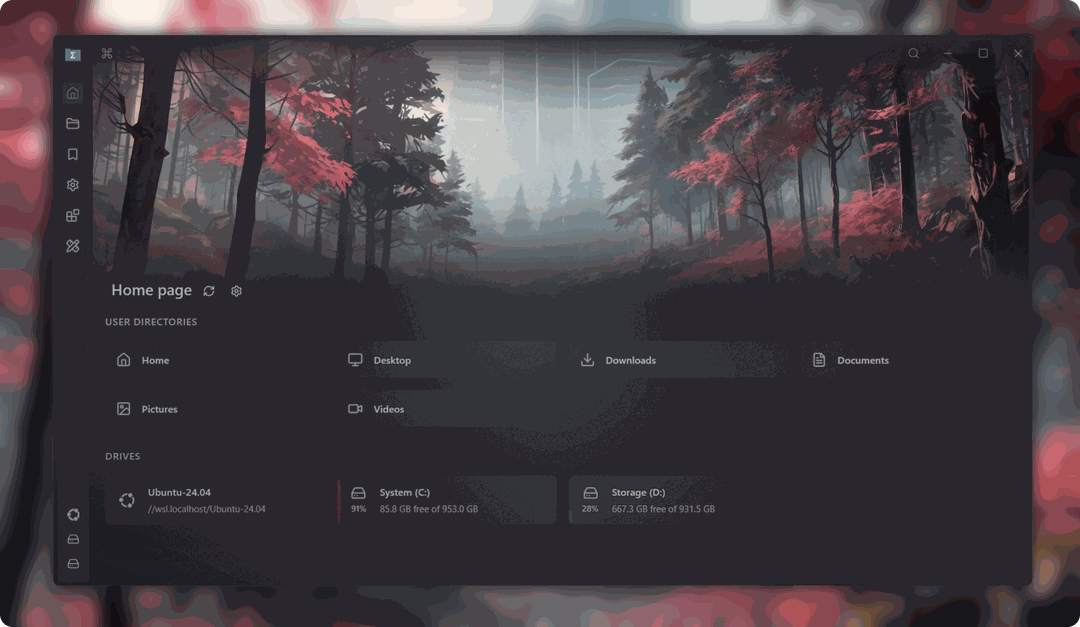
核心信息
| 软件名称 | Sigma-file-manager(aleksey-hoffman/sigma-file-manager) |
| 当前版本 | v2.3.0 |
| 更新日期 | 2026-11-25 |
| 开源协议 | GPL-3.0 |
| 软件分类 | Windows 效率工具 |
| 关键词 | alternative、app、file-manager、filemanager、modern-applications、rust |
本次更新内容
- 新增左侧导航面板,支持文件夹树状浏览与快速访问,提升文件定位效率
- 各文件夹独立保存视图与排序设置,支持按类别或时间分组,个性化体验更佳
- 文件操作支持撤销功能,误删或移动后可一键恢复,降低操作风险
- 优化多标签页管理,支持复制标签页及拆分独立窗口,多任务处理更灵活
- Windows版本提供免安装便携版及数字签名,Linux新增Chromium内核构建版
查看官方英文更新日志(原文)
<img width="1767" height="1026" alt="v2 3 0-poster-side" src="https://github.com/user-attachments/assets/2f0d00e1-1b68-4a84-ad3b-5ad79bec4dcd" />

### Download

See the assets section below to download the installer for your platform.

# Release Notes

**Summary:** Navigation panel with a folder tree, per-folder view options and grouping, undo for file operations, portable and signed Windows builds, an experimental Chromium build for Linux, redesigned tabs, folder cards and dashboard, faster folder sizes, safer file operations, and stricter extension security.

### New Features

#### Navigation Panel

A resizable panel on the left side of the navigator. Open it with the `Navigation panel` button in the window toolbar or with `Alt+Q`.

- **Tree**: browse the folder tree across all drives and locations, in sync with the active pane;
- **Quick access**: see and manage your favorite and tagged items next to the file list;
- **File operations**: tree folders support context menus and drag and drop;
- **Keyboard**: `Ctrl+Left` / `Ctrl+Right` move focus between the panel and the panes; in the tree, the arrow keys move through open folders, `Space` expands or collapses a folder, and `Enter` also opens it in the active pane;

#### Folder Options And Grouping

Each folder now remembers its own layout, sorting, grouping, and hidden items setting. Change them in the new `This folder options` menu next to quick search. In split view, each pane has its own menu.

- **Group by**: group items by `Kind` or `Modified`, or choose `None`, in both list and grid layouts;
- **Mixed sorting**: with `None`, folders are no longer kept above files, so sorting by date or size applies to all items;
- **Defaults**: use `Set current options as default` to make a folder's options the default, or `Reset to default settings` to remove the folder's own options;

#### Undo For File Operations

After you rename, move, or trash items, the notification shows an `Undo` button and the paths of the affected items. Undo for trash is not available on macOS.

#### Multi-Range And Keyboard Selection

- **Multiple ranges**: hold `Ctrl+Shift` and click to add another range to the selection;
- **Keyboard selection**: hold `Shift` and press the arrow keys to extend or shrink the selection;

#### Duplicate And Separate Tabs

- **Duplicate tab**: open a copy of a tab from its context menu or with `Ctrl+Alt+T`;
- **Separate tabs**: right-click a split view tab and choose `Separate tabs` to open each pane in its own tab;

#### Windows Portable And Signed Builds

- **Portable build (experimental)**: run the app without installing it; data is kept in the `sigma-file-manager-data` folder next to the app. Requires the WebView2 runtime, which is included in Windows 11;
- **Portable updates**: the new version is downloaded to the app folder, and you replace the old one yourself; your data folder is kept;
- **Signed builds**: the Windows installer and the port
下载地址
以下为官方原包,本站不二次打包;多个文件为不同包型,按需选择其中一个下载即可:
Sigma-File-Manager-2.3.0-windows-portable.zip(便携版·解压即用 | 20.4 MB)
Sigma-File-Manager-2.3.0-windows-setup.exe(安装版 | 16.4 MB)
✅ 上方 SHA256 与官方发布值一致,可自行核对。
快速上手
- 运行下载好的安装包,按向导完成安装后从开始菜单启动 Sigma File Manager。
- 首次启动后,在设置中可将 Sigma 设为默认文件管理器,替代资源管理器处理日常文件操作。
- 用地址栏输入路径并借助自动补全跳转,或用标签页和分屏视图同时打开多个目录。
- 在搜索框输入关键词进行全局搜索,可容忍拼写错误、大小写和词序问题。
- 选中文件按空格键使用快速视图预览图片、视频、音频、PDF 和文本,无需打开外部程序。
提示:常用操作可借助命令面板和全局快捷键完成,效率更高。
讨论(0 条)