Sophia Script for Windows 是一款基于 PowerShell 的 Windows 深度调优脚本,主打隐私保护与系统精简,可一键关闭遥测、移除预装应用并调整大量系统设置。它提供图形界面,适合追求干净系统、想摆脱臃肿预装软件的高级用户和折腾党。
核心亮点:
- 一键关闭遥测与隐私追踪项
- 批量卸载系统预装冗余应用
- 图形界面操作,降低脚本门槛
- 覆盖系统设置与服务的深度调优
当前版本 v8.1.0(2026-10-31 发布),开源协议 MIT,GitHub 9,976 star。

核心信息
| 软件名称 | Sophia-Script-for-Windows(farag2/Sophia-Script-for-Windows) |
| 当前版本 | v8.1.0 |
| 更新日期 | 2026-10-31 |
| 开源协议 | MIT |
| 软件分类 | Windows 效率工具 |
| 关键词 | 25h2、26h2、debloat、debloater、debloating、gui |
本次更新内容
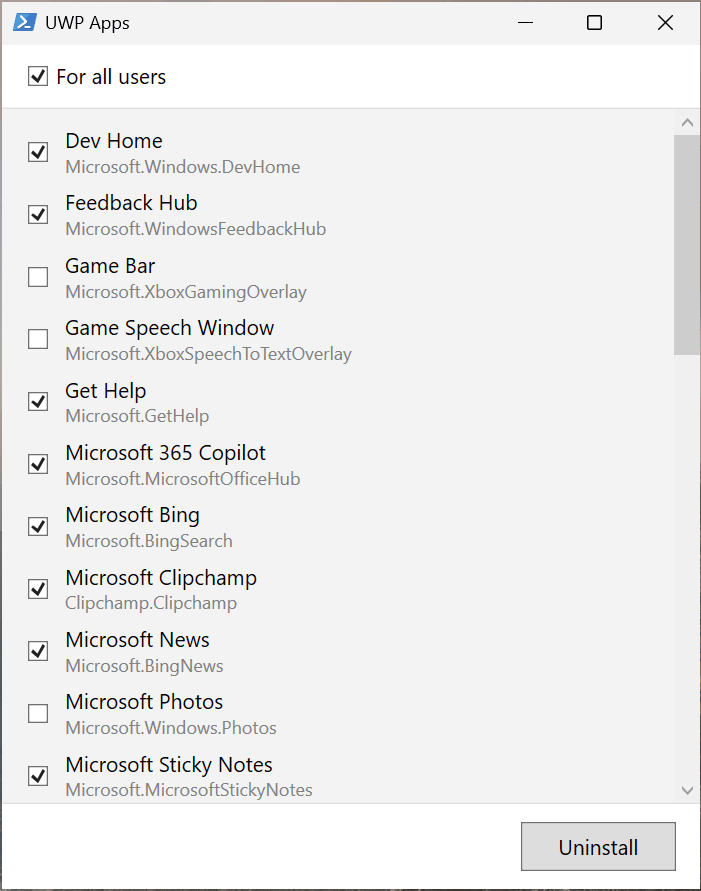
- 新版本为任务计划、系统功能、组件管理、应用卸载和子系统安装等界面换上全新风格,操作更直观顺手。
- Windows 11 新增任务栏位置管理功能,可方便调整任务栏摆放位置。
- 修复注册表策略扫描问题,让创建的策略能在组策略编辑器中正常显示。
- 此前版本的封装工具已停止维护并从仓库移除,相关功能不再可用。
- 移除 Windows 10 的语音助手自启动选项,并更新多语言翻译与说明文档。
查看官方英文更新日志(原文)
<kbd>
<a href="https://t.me/sophianews">
<picture>
<source media="(prefers-color-scheme: dark)" srcset="https://shieldcn.dev/badge/Sophia%20News.svg?logo=telegram&variant=outline&size=sm&mode=dark">
<img src="https://shieldcn.dev/badge/Sophia%20News.svg?logo=telegram&variant=outline&size=sm&mode=light">
</picture>
</a>
</kbd>
<kbd>
<a href="https://t.me/sophia_chat">
<picture>
<source media="(prefers-color-scheme: dark)" srcset="https://shieldcn.dev/badge/Sophia%20Chat.svg?logo=telegram&variant=outline&size=sm&mode=dark">
<img src="https://shieldcn.dev/badge/Sophia%20Chat.svg?logo=telegram&variant=outline&size=sm&mode=light">
</picture>
</a>
</kbd>
<kbd>
<a href="https://discord.gg/sSryhaEv79">
<picture>
<source media="(prefers-color-scheme: dark)" srcset="https://shieldcn.dev/badge/Discord.svg?logo=discord&variant=outline&size=sm&mode=dark">
<img src="https://shieldcn.dev/badge/Discord.svg?logo=discord&variant=outline&size=sm&mode=light">
</picture>
</a>
</kbd>
<br>
<br>
Diff from v8.0.0
[8.0.0...8.1.0](https://github.com/farag2/Sophia-Script-for-Windows/compare/8.0.0...8.1.0)
***
* Code refactoring goes on
* `CortanaAutostart` function removed for Windows 10
* ScheduledTasks, WindowsFeatures, WindowsCapabilities, Uninstall-UWPApps, and Install-WSL now use new UI style
<table>
<tr>
<td align="center">
<img src="./img/UWP.png" width="400" alt="UWP apps removal"><br>
<sub>UWP apps</sub>
</td>
<td align="center">
<img src="./img/Tasks.png" width="400" alt="Scheduled tasks"><br>
<sub>Scheduled tasks</sub>
</td>
</tr>
<tr>
<td align="center">
<img src="./img/WSL.png" width="400" alt="WSL installation"><br>
<sub>WSL</sub>
</td>
</tr>
</table>
* Fix and update `ScanRegistryPolicies` to scan all created registry policies to make them visible in `gpedit.msc`
* Update initial checks
* Added `TaskbarPosition` function for Windows 11 to manage taskbar position
* The Wrapper's story has come to end: https://t.me/SophiaNews/5470
* The Wrapper was removed from the repository and it will stopped working
* @BenchTweakGaming has opened its [sources](https://github.com/BenchTweakGaming/SophiaScriptWrapper)
* Fixed bugs, typos, and minor fixes
* Update localizations
* Update Readmes
### Download
<table>
<tr>
<td align="center" colspan="2">Windows 10</td>
<td align="center" colspan="2">Windows 11</td>
</tr>
<tr>
<td align="left">
<a href="https://github.com/farag2/Sophia-Script-for-Windows/releases/download/8.1.0/Sophia.Script.for.Windows.10.v7.1.0.zip">
<picture>
<source media="(prefers-color-scheme: dark)" srcset="https://shieldcn.dev/badge/PowerShell%205.1.svg?label=Windows%2010%20x64&variant=outline&size=sm&mode=dark">
<img src="https://s
下载地址
以下为官方原包,本站不二次打包;多个文件为不同包型,按需选择其中一个下载即可:
Sophia.Script.for.Windows.10.LTSC.2019.v7.1.0.zip(便携版·解压即用 | 436.5 KB)
Sophia.Script.for.Windows.10.LTSC.2021.v7.1.0.zip(便携版·解压即用 | 453.5 KB)
Sophia.Script.for.Windows.10.PowerShell.7.v7.1.0.zip(便携版·解压即用 | 10.2 MB)
Sophia.Script.for.Windows.10.v7.1.0.zip(便携版·解压即用 | 476.5 KB)
Sophia.Script.for.Windows.11.Arm.PowerShell.7.v8.1.0.zip(便携版·解压即用 | 10.2 MB)
Sophia.Script.for.Windows.11.Arm.v8.1.0.zip(便携版·解压即用 | 477.7 KB)
Sophia.Script.for.Windows.11.LTSC.2024.PowerShell.7.v8.1.0.zip(便携版·解压即用 | 10.1 MB)
Sophia.Script.for.Windows.11.LTSC.2024.v8.1.0.zip(便携版·解压即用 | 458.6 KB)
Sophia.Script.for.Windows.11.PowerShell.7.v8.1.0.zip(便携版·解压即用 | 10.2 MB)
Sophia.Script.for.Windows.11.v8.1.0.zip(便携版·解压即用 | 478.2 KB)
Sophia.Script.for.Windows.11.v8.1.0_WinGet.exe(官方安装程序 | 785.6 KB)
✅ 上方 SHA256 与官方发布值一致,可自行核对。
快速上手
- 解压下载好的压缩包,按你的 Windows 版本选择对应文件夹进入。
- 在文件夹中找到 SophiaScript 脚本文件,右键选择使用 PowerShell 运行。
- 首次运行时若出现执行策略提示,按提示允许脚本运行以继续。
- 在打开的菜单中按需选择要调整的系统项目,逐项确认执行。
- 全部设置完成后关闭窗口,按提示重启电脑使更改生效。
提示:运行前先创建系统还原点,便于随时回滚设置。
讨论(0 条)