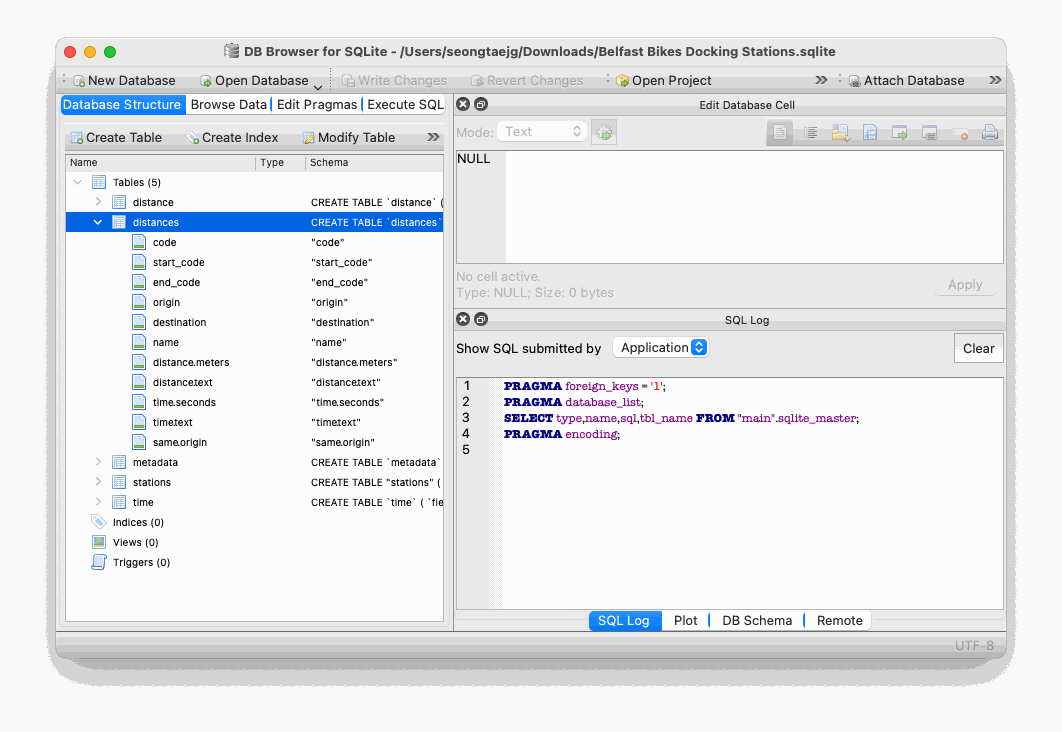
DB Browser for SQLite 是一款开源可视化的 SQLite 数据库管理工具,用类似电子表格的界面替代手写 SQL,建表、查数、改数据都能点鼠标完成。它支持导入导出 CSV 和 SQL 文件、执行查询并查看结果,适合不想记命令的开发者、数据分析新手以及需要快速查看数据库文件的人。
核心亮点:
- 表格化界面建表改表,无需手写 SQL
- 浏览编辑增删记录,支持条件搜索
- CSV 与 SQL 转储文件双向导入导出
- 执行 SQL 查询并查看命令日志
当前版本 v3.13.1(2024-10-16 发布),开源协议 MPL-2.0,GitHub 24,809 star。

核心信息
| 软件名称 | DB Browser(sqlitebrowser/sqlitebrowser) |
| 当前版本 | v3.13.1 |
| 更新日期 | 2024-10-16 |
| 开源协议 | MPL-2.0 |
| 软件分类 | Windows 效率工具 |
| 关键词 | c-plus-plus、cross-platform、database、database-browser、database-gui、sqlite |
本次更新内容
- 新版本为多个对话框添加了帮助文档链接,并优化了帮助菜单图标,方便用户快速获取使用指引。
- Windows安装时默认创建开始菜单快捷方式,同时修复了高分辨率屏幕显示不佳的问题。
- 修复了自动补全失效、复制单元格内容异常、含多字节字符查询选择错误等编辑操作问题。
- 解决了部分旧系统上崩溃、卡死及SQL查询执行不正确等稳定性问题,并更新了多语言翻译。
查看官方英文更新日志(原文)
> [!NOTE]
> Binaries for Windows on ARM were released on April 3, 2026.
> and this work was successfully completed thanks to the support provided by the **Microsoft App Assure Service team**.
> We would like to take this opportunity to express our gratitude. :)

> [!NOTE]
> A problem has been reported where the AppImage cannot be run on some previous OS versions,
> leading to the release of version v2 specifically for the AppImage binary. Further information: #3781, https://github.com/sqlitebrowser/sqlitebrowser/discussions/3775#discussioncomment-10969170

This is a new release with several improvements over the v3.13.0 release from three months ago. :rocket:

As a special mention, SQLean has a new `time` extension! Check out the following link for more information: https://github.com/nalgeon/sqlean/blob/main/docs/time.md

Thanks to everyone for being part of our Community!

Related Discussion: https://github.com/sqlitebrowser/sqlitebrowser/discussions/3775

### Changelog
#### Added
- Add links to the wiki as help for many dialogs (7af1256, b5abc86)

#### Changed
- Change the default to install a shortcut to the Start menu when installing on Windows (623bec6)
- Improve icon image for links in 'Help' menu (#3693, 027c6a8)
- Pragma names and values can now be translated (#3697, bf62f3a, ad00ad4)
- Remove trailing characters when copying a single cell (#3735, 20f481a)
- Update AppImage binary to use the latest SQLCipher library (#3744, 21ba2d0)
- When editing the DB cells, expanded queries with parameters are included in the SQL Log (ac3209f)

#### Fixed
-  ExtendedTableWidget
    - Fix an issue that prevented autocomplete from working in some race conditions (#2567, #3706)
    - Use Tab to close autocomplete popup and move to next item (3aff8c9)
    - Troubleshoot 'Copy as SQL' action on a cell results in string being copied (#1952, 1ebe7bf)

- Global
    - Fix "Argument Missing" error in Korean translation (#3635, #3692, cd518de)
    - Fix an issue that caused apps to crash on some older versions of macOS (#3691)
    - Fix an issue when freezing after stopping a pragma (#3742, 15a9620)
    - Fix an issue with outputting the wrong version on macOS
    - Troubleshooting poor HiDPI support on Windows (#3684)
    - Troubleshoot SQL queries containing VACUUM that run incorrectly (#3723, 51784aa)

- MainWindow
    - Fix an issue when selecting queries containing multi-byte strings (#3731, f89097c)

- TableBrowser
    - Fix a bug where the first row was not adjusted (#3767, ad690e7)

- etc
    - Fix misleading links to Qt license information (8361aa5)
    - Replace 'http' with 'https' in the 'AboutDialog' and 'MainWindow' (9832a52)
    - Translation
        - German (#3749, 8e38bf0)
        - Indonesian (#3756, 6100595)
        - Japanese (#3755, e0f6aea)
        - Korean (7bbfcf9)
        - Simplified Chinese (#3761, 9eb0a5a)
        - Spanish (ac33918)

### Dependent library version informatio
下载地址
以下为官方原包,本站不二次打包;多个文件为不同包型,按需选择其中一个下载即可:
DB.Browser.for.SQLite-v3.13.1-arm64.msi(安装版 | 18.3 MB)
DB.Browser.for.SQLite-v3.13.1-arm64.zip(便携版·解压即用 | 21.8 MB)
DB.Browser.for.SQLite-v3.13.1-win32.msi(安装版 | 17.1 MB)
DB.Browser.for.SQLite-v3.13.1-win32.zip(便携版·解压即用 | 18.5 MB)
DB.Browser.for.SQLite-v3.13.1-win64.msi(安装版 | 18.9 MB)
DB.Browser.for.SQLite-v3.13.1-win64.zip(便携版·解压即用 | 20.7 MB)
SQLiteDatabaseBrowserPortable_3.13.1.paf.exe(便携版·解压即用 | 25.8 MB)
✅ 上方 SHA256 与官方发布值一致,可自行核对。
快速上手
- 运行下载好的安装包,按向导完成安装后从开始菜单启动 DB Browser for SQLite。
- 首次启动后点击工具栏的“新建数据库”,选择保存位置并命名,创建空的 SQLite 数据库文件。
- 在“数据库结构”页用向导新建表,定义字段名与类型,保存后即可在“浏览数据”页查看。
- 切换到“执行 SQL”页输入查询语句并运行,在下方面板查看结果,可导出为文本或 CSV。
- 用“文件”菜单打开已有数据库,在表格界面直接浏览、搜索、添加、编辑或删除记录。
提示:编辑记录后记得点“写入更改”保存,否则修改不会写入数据库文件。
讨论(0 条)