StaxRip 是一款面向 Windows 的专业级开源视频转码前端,它本身不编码,而是调度 x265、ffmpeg、mkvmerge 等命令行工具,并借助 AviSynth+ 与 VapourSynth 脚本完成视频处理。适合愿意花时间学习、追求精细控制的高级用户,新手也能靠内置助手逐步上手。
核心亮点:
- 统一调度 ffmpeg、x265、mkvmerge 等命令行工具
- 集成 AviSynth+ 与 VapourSynth 脚本做视频处理
- 内置助手引导新手完成转码流程
- 项目可扩展事件与设置,支持批量与自动化
当前版本 v2.52.6(2026-09-27 发布),开源协议 MIT,GitHub 3,025 star。

核心信息
| 软件名称 | StaxRip(staxrip/staxrip) |
| 当前版本 | v2.52.6 |
| 更新日期 | 2026-09-27 |
| 开源协议 | MIT |
| 软件分类 | Windows 效率工具 |
| 关键词 | avisynth、ffmpeg、mkvtoolnix、mp4box、nvenc、powershell |
本次更新内容
- 音频处理新增项目选项,可继承标题及默认和强制标记,方便统一管理音轨属性。
- 编码器新增调优参数,并更新了内置工具和滤镜插件,提升兼容性与处理效果。
- 新版本压缩包体积因附加滤镜文件而增大,用户可按需单独下载相关文件。
- 升级时请解压到新位置并迁移设置,避免覆盖安装导致编码任务异常。
查看官方英文更新日志(原文)
> [!TIP]
> #### **If you want to keep StaxRip alive, support its development, get early access to new releases or just say *thanks*, please consider visiting:**
> [](https://www.buymeacoffee.com/Dendraspis) [](https://ko-fi.com/Dendraspis) [](https://www.patreon.com/Dendraspis)
>
> *Special thanks to all supporters, who mode this version available for us:* ❤️
> ***pat-e, Eric, chowderhead, L Freya, Eagledsm, kingpanther, Ray, lawleenaja, ttplayer, HAL9081, Digi and some more!***
-----------------------------
### [Changelog](https://github.com/staxrip/staxrip/blob/master/CHANGELOG.md):
- Audio: Add Project Options to take over title as well as default and forced flags ([#1741](/../../issues/1741))
- x264: Add "--tune touhou" parameter value
- Update tools
- DeeZy v1.3.15
- DoVi_Tool v2.3.4
- eac3to v3.66
- MKVToolNix v102.0
- NVEncC v9.35
- Python v3.14.7
- QSVEncC v8.30
- TrueHDD v0.6.2
- VapourSynth R79
- VCEEncC v9.19
- vvencFFapp v1.14.0 r734-b1cfb2a
- Update Dual plugins
- BestSource R21
- ffms2 r2415
- L-SMASH-Works v1310
-----------------------------
> [!NOTE]
> Supporters, follower and Discord users already know, that I made a **BIG Announcement** regarding the future of StaxRip. If you are interested in what is going on and what will change in the future, you may want to read that announcement - I highly recommend it!
> You can find it on [Discord](https://discord.gg/uz8pVR79Bd) as well as [Patreon](https://www.patreon.com/posts/146531651) and [BuyMeACoffee](https://buymeacoffee.com/dendraspis/big-announcement-4327424).
-----------------------------
> [!NOTE]
> The archive went around 200MB up in size because of the ~400MB of additional filter files for NVEncC. I was not sure if I should take them or exclude them from StaxRip, so every NVEncC user, who needs them, has to download them separately. Please let me know what you think and if we should get rid of those additional files.
-----------------------------
> [!CAUTION]
> `StaxRip-v2.52.6-x64.7z`
> Regular full archive. Do **NOT** extract it into an existing StaxRip folder!
Extract it into a new location and copy over your *Settings* folder or start with fresh/new settings.
In case encoder settings/parameters have changed, I highly recommend updating only when no affected jobs in the Jobs List are present - the encode may be different than
下载地址
以下为官方原包,本站不二次打包,点击直接下载:
StaxRip-v2.52.6-x64.7z(便携版·解压即用 | 895.6 MB)
✅ 上方 SHA256 与官方发布值一致,可自行核对。
快速上手
- 解压下载好的压缩包到任意文件夹,双击其中的 StaxRip 可执行文件启动程序
- 首次启动后按提示完成初始设置,选择所需的编码器与脚本环境
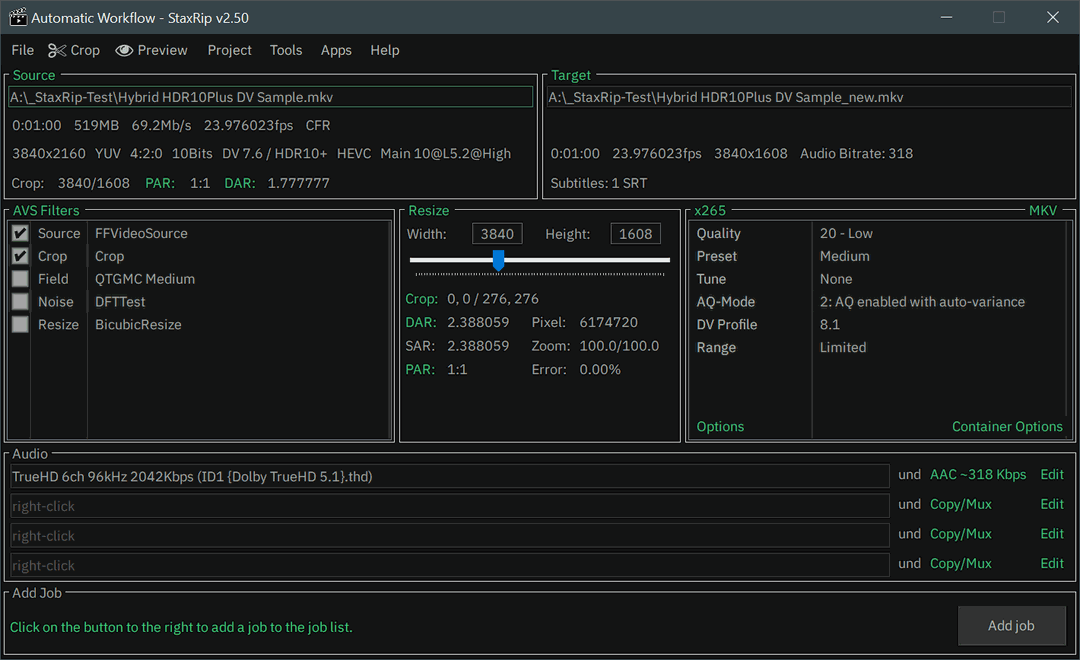
- 在主界面通过 Assistant 功能按向导逐步配置视频与音频处理任务
- 设置好输出参数后启动任务,程序会调用编码工具完成处理
提示:首次使用建议先做小段测试,熟悉流程后再处理完整视频
讨论(0 条)