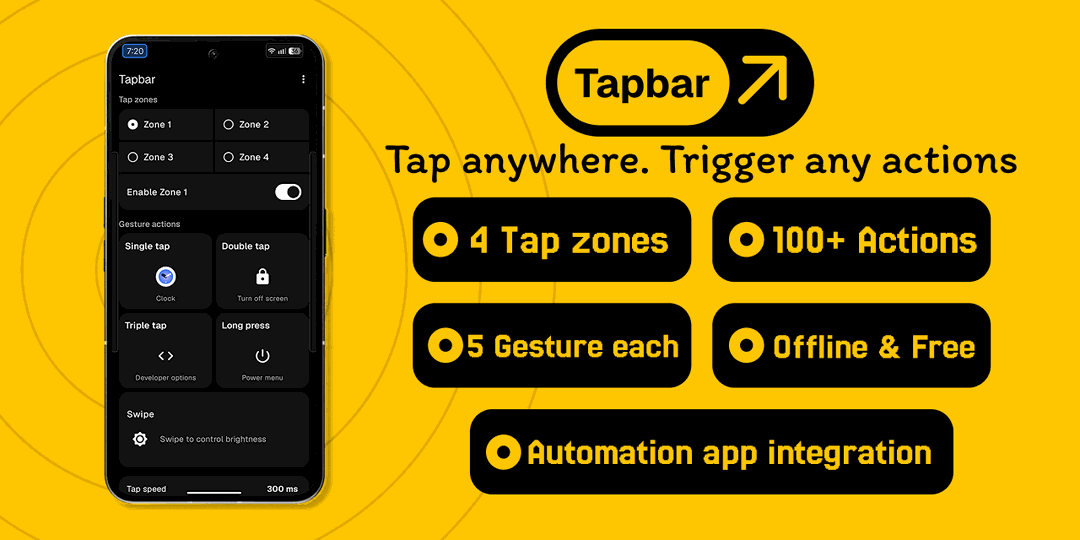
Tapbar 是一款极客向的 Android 状态栏快捷工具,能在屏幕任意位置创建可点击区域。它支持单双击、长按及滑动等多种手势,一键启动应用或触发自动化指令。全程离线运行,无广告无追踪,适合追求高效操作与极致隐私的用户。
核心亮点:
- 屏幕任意位置自定义点击区域,灵活布局
- 支持多种手势映射不同应用或快捷操作
- 完全离线运行,无广告无追踪保护隐私
- 兼容主流自动化应用,触发复杂任务流
当前版本 v1.8(2026-10-18 发布),开源协议 MIT,GitHub 319 star。

核心信息
| 软件名称 | Tapbar(Earendel-lab/Tapbar) |
| 当前版本 | v1.8 |
| 更新日期 | 2026-10-18 |
| 开源协议 | MIT |
| 软件分类 | Android 开源 APK |
| 关键词 | android、app-launcher、clock、customization、fdroid、gesture |
本次更新内容
- 快捷操作库大幅扩充,新增切换应用、页面滚动、剪贴板操作等实用功能,日常操作更便捷。
- 新增自动化通知支持,可与 MacroDroid、Tasker 等自动化应用联动,实现更智能的提醒。
- 引入沉浸式界面风格,并改进引导流程、操作卡片和动画效果,整体视觉与交互更流畅。
- 滑动调节仅在触摸滑块时生效,避免误触;调节亮度时保留自动亮度设置,使用更省心。
- 更新多语言翻译,并强调完全离线运行、无追踪分析,保障隐私安全。
查看官方英文更新日志(原文)
# Tapbar v1.8

## What's Changed

I've been working on this build on the side while still pushing smaller updates to fix bugs. This one's a **huge upgrade**, with new features, more actions, and a bunch of UI improvements.

- Expanded the library to **100+ useful quick actions**
- Added **automation** notifications for apps like MacroDroid, Tasker, and Automate
- Added the new **Immersive UI** style
- Improved onboarding, action cards, and UI animations
- Swipe adjustments now activate only when touching the slider thumb, helping prevent accidental changes.
- Changing brightness now preserves your Auto Brightness setting.
- Updated translations

<details>
<summary>More quick actions</summary>

- Switch to the previous app
- Open the current app's info page
- Scroll to the top or bottom
- Page up and page down
- Copy, cut, paste, and select all
- Clear clipboard
- Refresh page
- Swipe left or right
- Keep the screen awake
- Open the keyboard picker

</details>

### Installation Notes

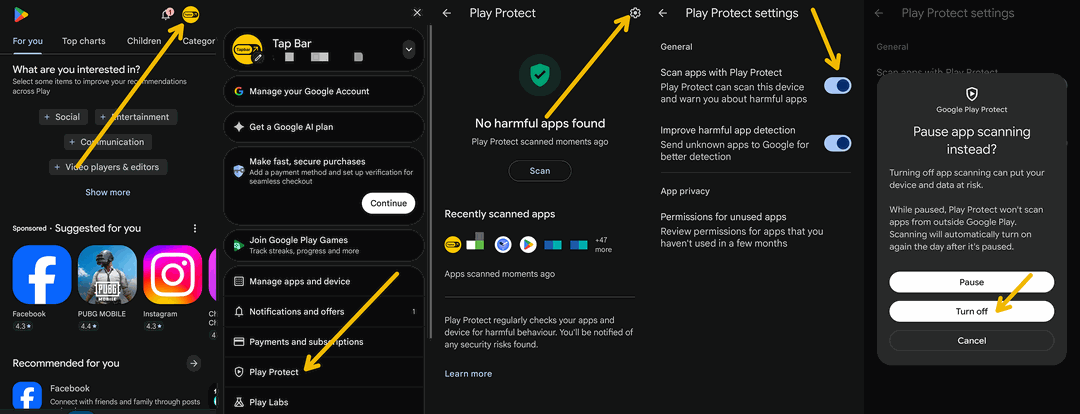
Since Tapbar isn't on the Play Store, you may need to allow installs from unknown sources and adjust Play Protect settings. Full steps are in the [README](https://github.com/Earendel-lab/Tapbar#installation-guide)

<img width="2710" height="1041" alt="image" src="https://github.com/user-attachments/assets/43dcb3c4-b143-4486-ab98-6209d4ae0c64" />

<img width="4294" height="1645" alt="image" src="https://github.com/user-attachments/assets/2c94b129-9f41-40ba-8a9a-76ca2196ad4c" />

> [!TIP]
> **A small bro-to-bro note:** Tapbar works fully **offline**, with no trackers or analytics. Accessibility and Overlay permissions are only used to make Tapbar work. Your data stays on your device.

---
# [VirusTotal Scan](https://www.virustotal.com/gui/file/b1677916be25a0c143ff8c8cde44760c1f61a94104281558f046e6d09191aad7?nocache=1)
下载地址
以下为官方原包,本站不二次打包,点击直接下载:
Tapbar.apk(Android 安装包 | 5.9 MB)
✅ 上方 SHA256 与官方发布值一致,可自行核对。
快速上手
- 运行下载好的 Tapbar.apk 安装包完成应用安装。若 Play Protect 拦截,请前往 Play 商店设置中关闭扫描功能后再重试安装。
- 首次启动应用,根据提示授予悬浮窗和辅助功能权限,这是创建屏幕可点击区域所必需的系统权限。
- 在主界面点击添加按钮,选择屏幕上的任意位置创建自定义点击区域,最多可设置四个独立区域。
- 为每个区域配置单指、双指、长按或滑动等手势,并绑定对应的应用启动或快捷操作,保存后即可生效。
提示:设置完成后重启设备,应用将自动启动并生效,全程无需联网,保护隐私。
讨论(0 条)