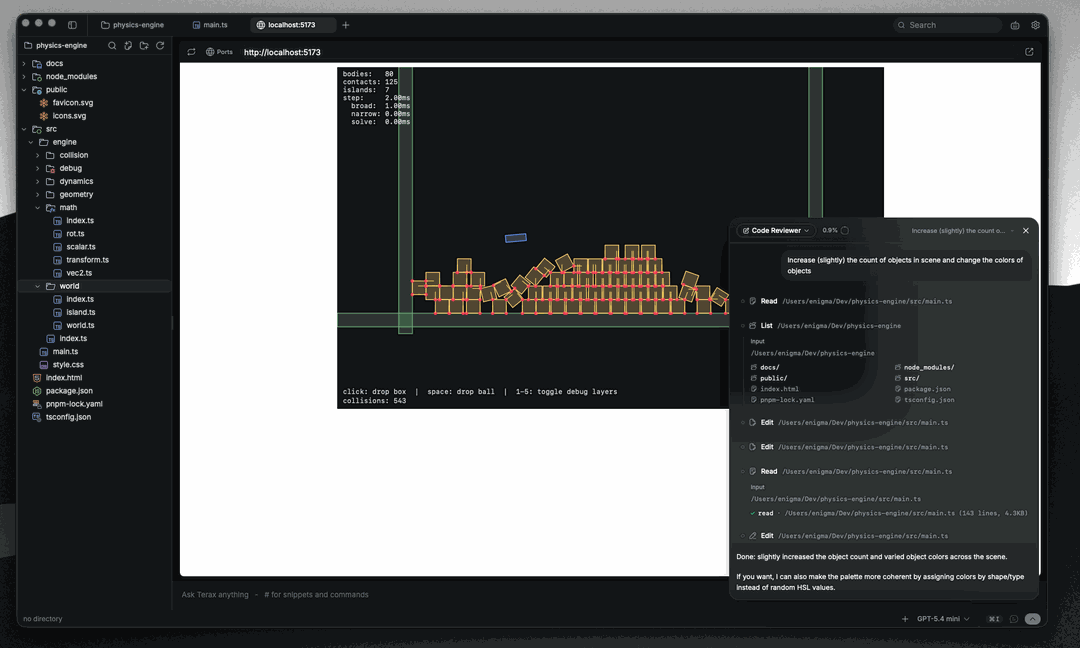
Terax AI 是一款终端优先的轻量级 AI 原生开发环境,基于 Tauri 与 Rust 构建,体积小巧、启动迅速。它把原生终端、代码编辑器、文件浏览、Git 图形化面板和 AI 助手侧栏整合在一起,AI 可接入你自己的密钥或本地模型,全程无遥测、无需注册账号。适合喜欢在终端里干活、又想要 AI 辅助写代码的开发者。
核心亮点:
- 终端优先的 AI 原生开发工作区,轻量启动快
- AI 侧栏支持自带密钥或完全本地模型运行
- 内置代码编辑器、文件树与 Git 图形化面板
- 多标签终端支持分屏、搜索与拖拽文件路径
当前版本 v0.9.0(2026-10-16 发布),开源协议 Apache-2.0,GitHub 9,483 star。


核心信息
| 软件名称 | Terax AI(crynta/terax-ai) |
| 当前版本 | v0.9.0 |
| 更新日期 | 2026-10-16 |
| 开源协议 | Apache-2.0 |
| 软件分类 | Windows 效率工具 |
| 关键词 | agents、ai、code-editor、libghostty、linux、macos |
本次更新内容
- 新版本带来全新终端体验,切换标签和窗口时更省资源、更流畅,界面重绘更干净。
- 文本显示更清晰,特殊符号和绘图字符不再错位,窗口与分屏拖动更顺滑。
- 终端输出、后台任务、文件监听和启动加载都更快,AI 对话保存与取消更可靠,并加强了安全防护。
- 文件管理器支持从系统剪贴板粘贴、多选操作和更快的搜索,文件树按自然顺序排列。
- 新增命令行打开文件、嵌套仓库 Git 支持,编辑器快捷键和通知样式也有改进。
查看官方英文更新日志(原文)
Terax 0.9.0 introduces a new Ghostty-powered + WebGPU terminal and a broad pass on responsiveness and resource use.

- Lower idle CPU use and less memory growth when switching tabs, desktops, and windows.
- Smoother window and split resizing, with fewer redraw artifacts and duplicated prompts.
- Pixel-aligned text and seamless box-drawing, braille, and Powerline glyphs.
- More efficient terminal output, background tasks, file watching, and startup loading.
- More reliable AI conversation storage and cancellation, plus security hardening around terminal transport and network requests.
- Explorer file paste from the OS clipboard, multi-select operations, and faster file search.
- Bundled CLI file opening, nested-repository Git support, editor shortcut improvements, and refined agent notifications and window styling.

Downloads include macOS Apple Silicon and Intel, Windows, and Linux packages. Windows installations without WebView2 need an internet connection to install its runtime.

## What's Changed
* nix: update sources to 0.8.6 by @github-actions[bot] in https://github.com/crynta/terax-ai/pull/1054
* test(git): cover GitError display formatting by @mydd7 in https://github.com/crynta/terax-ai/pull/1064
* test(wsl): cover WSL command output decoding by @mydd7 in https://github.com/crynta/terax-ai/pull/1071
* test(git): cover upstream and path normalization helpers by @mydd7 in https://github.com/crynta/terax-ai/pull/1065
* test(agents): cover agent label formatting by @mydd7 in https://github.com/crynta/terax-ai/pull/1066
* test(ai): cover todo validation and the todo tool by @mydd7 in https://github.com/crynta/terax-ai/pull/1068
* test(shortcuts): cover command palette MRU ranking by @mydd7 in https://github.com/crynta/terax-ai/pull/1072
* build(deps-dev): bump the npm-dev group with 5 updates by @dependabot[bot] in https://github.com/crynta/terax-ai/pull/1041
* build(deps): bump the cargo group in /src-tauri with 10 updates by @dependabot[bot] in https://github.com/crynta/terax-ai/pull/1042
* test(shortcuts): cover command palette availability logic by @mydd7 in https://github.com/crynta/terax-ai/pull/1070
* build(deps): bump the npm-prod-minor-patch group across 1 directory with 10 updates by @dependabot[bot] in https://github.com/crynta/terax-ai/pull/1084
* test(shortcuts): cover shortcut label override resolution by @mydd7 in https://github.com/crynta/terax-ai/pull/1075
* build(deps): bump taiki-e/install-action from 2 to 2.85.4 in the github-actions group by @dependabot[bot] in https://github.com/crynta/terax-ai/pull/1092
* build(deps-dev): bump the npm-dev group with 3 updates by @dependabot[bot] in https://github.com/crynta/terax-ai/pull/1093
* build(deps-dev): bump vite-plugin-inspect from 11.4.1 to 12.0.2 by @dependabot[bot] in https://github.com/crynta/terax-ai/pull/1095
* build(deps): bump the npm-prod-minor-patch group across 1 directory with 2 updates by @dependabot[bot] in https://github.com/crynta/terax
下载地址
以下为官方原包,本站不二次打包;多个文件为不同包型,按需选择其中一个下载即可:
Terax_0.9.0_x64-setup.exe(安装版 | 4.8 MB)
Terax_0.9.0_x64_en-US.msi(安装版 | 6.0 MB)
✅ 上方 SHA256 与官方发布值一致,可自行核对。
快速上手
- 运行下载好的安装包,按向导完成安装并启动 Terax
- 首次启动后进入终端界面,在输入面板直接输入命令并回车执行
- 需要多任务时新建终端标签页,或使用分屏功能横向、纵向拆分面板
- 在文件资源管理器面板中浏览项目文件,拖拽文件到终端可插入路径
- 打开源码管理面板查看改动与 git 提交历史,用 AI 侧边栏辅助编辑代码
提示:Windows 下可为每个标签页选择本地或已安装的 WSL 发行版作为工作环境
讨论(0 条)