Text Grab 是 Windows 上的高效屏幕取词工具,支持从图片、视频甚至不可选文本区域提取文字。核心亮点在于完全本地运行,无需联网,保护隐私。它提供多种捕获模式及文本清理功能,适合需要频繁处理屏幕文字信息的办公用户。
核心亮点:
- 完全本地处理,无需联网,保障数据隐私安全
- 支持从图片视频及不可选区域快速提取文字
- 提供多种捕获模式及文本后处理清理功能
- 启动迅速,支持全局快捷键,融入日常流程
当前版本 v4.16.0(2026-10-27 发布),开源协议 MIT,GitHub 5,096 star。


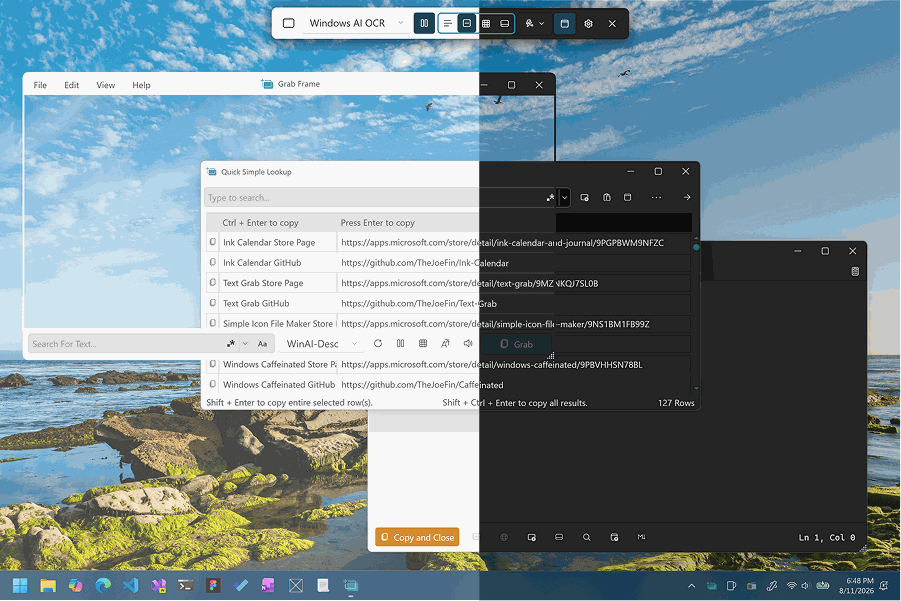
核心信息
| 软件名称 | Text-Grab(TheJoeFin/Text-Grab) |
| 当前版本 | v4.16.0 |
| 更新日期 | 2026-10-27 |
| 开源协议 | MIT |
| 软件分类 | Windows 效率工具 |
| 关键词 | dotnet、local-ai、msix、ocr、window-10、windows |
本次更新内容
- 新增音频转录功能,支持麦克风实时识别及文件拖拽转写,让声音内容也能快速转为文字。
- 增强本地AI能力,优化翻译与摘要效果并提升稳定性,同时支持重置模型以应对异常。
- 升级表格处理体验,支持从PDF抓取及多页处理,并修复了电子表格模式下的换行问题。
- 在抓取框中新增摄像头截图功能,并增加单色托盘图标选项,丰富操作方式与界面风格。
- 修复非拉丁语系OCR的拼写校正问题,提升多语言环境下的文本识别准确率。
查看官方英文更新日志(原文)
## What's Changed

<img width="2526" height="1570" alt="image" src="https://github.com/user-attachments/assets/318f33ac-1bfe-4be0-91ba-b1ce9e46affe" />

* Support Audio by @TheJoeFin in https://github.com/TheJoeFin/Text-Grab/pull/677
  - Live from microphone or system audio
  - Drop an audio file onto the Edit Text Window to transcribe
* Proj structure by @TheJoeFin in https://github.com/TheJoeFin/Text-Grab/pull/681

<img width="1756" height="1154" alt="image" src="https://github.com/user-attachments/assets/ed310588-c939-48e5-80d8-d6f73654df7c" />

* Improved local AI capabilities
  - More robust translation and summarization
  - Better error catching
  - Ability to reset the model
* Better support around Tables
  - Repeated adding of new lines to spreadsheet mode
  - Grab tables from PDFs
  - Multi-page grab on PDFs
* Added Camera Capture to Grab Frame

<img width="440" height="288" alt="image" src="https://github.com/user-attachments/assets/ecccf84f-7f12-4104-b30c-ca24ab01c9ba" />

* Add monochrome tray icon option
* Fix Latin correction for non-Latin OCR languages by @NgoQuocViet2001 in https://github.com/TheJoeFin/Text-Grab/pull/670


## New Contributors
* @NgoQuocViet2001 made their first contribution in https://github.com/TheJoeFin/Text-Grab/pull/670

**Full Changelog**: https://github.com/TheJoeFin/Text-Grab/compare/v4.15.0...v4.16.0
下载地址
以下为官方原包,本站不二次打包;多个文件为不同包型,按需选择其中一个下载即可:
Text-Grab-arm64-Self-Contained.zip(便携版·解压即用 | 98.5 MB)
Text-Grab-arm64.exe(官方安装程序 | 98.7 MB)
Text-Grab-x64-Self-Contained.zip(便携版·解压即用 | 145.9 MB)
Text-Grab.exe(官方安装程序 | 101.2 MB)
✅ 上方 SHA256 与官方发布值一致,可自行核对。
快速上手
- 运行下载好的 Text-Grab.exe 或解压后的程序文件以启动应用。
- 在任务栏或开始菜单中固定图标,以便快速从任务栏启动软件。
- 使用全局快捷键或命令行参数打开特定模式,如全屏抓取模式。
- 在软件界面中选择抓取区域,OCR 识别后点击复制即可使用文本。
提示:所有 OCR 处理均在本地完成,无需联网,保护隐私且无额外费用。
讨论(0 条)