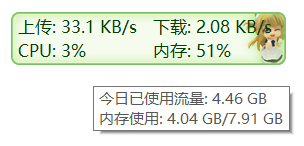
TrafficMonitor 是 Windows 上的网速与硬件监控小工具,能把实时网速、CPU 和内存占用直接嵌进任务栏或做成悬浮窗,还支持换皮肤、看历史流量和装插件。轻量不占资源,适合想随时掌握电脑状态、又不想开一堆监控软件的人。
核心亮点:
- 实时显示网速、CPU 与内存占用,悬浮窗和任务栏都能放
- 多网卡自动或手动选择连接,还能查看网络详细信息
- 支持更换和自定义皮肤,界面风格随你搭配
- 内置历史流量统计与插件系统,可扩展硬件监控
当前版本 V1.86(2026-03-29 发布),开源协议 MIT,GitHub 46,767 star。

核心信息
| 软件名称 | TrafficMonitor(zhongyang219/TrafficMonitor) |
| 当前版本 | V1.86 |
| 更新日期 | 2026-03-29 |
| 开源协议 | MIT |
| 软件分类 | Windows 效率工具 |
| 关键词 | Windows 效率工具 |
本次更新内容
- 任务栏窗口现在能显示在副显示器上,多屏用户查看网速更方便。
- 新增多种语言支持,界面本地化更完善,方便不同地区用户使用。
- 设置对话框支持动态调整大小,滚动条不再复位,操作更顺手。
- 任务栏资源占用图背景色可跟随系统主题,外观更统一。
- 每个皮肤可单独保存字体、文本颜色和显示文本,个性化更灵活。
- 修复更新源不保存、睡眠后网速丢失等问题,并改进崩溃信息显示。
查看官方英文更新日志(原文)
**功能新增**
* 新增任务栏窗口显示在副显示器的功能。#2037 #1974  #1952 #1944 #1875 #1870 #1863 #1734
* 多语言代码重构,多语言字符串在外部ini文件中配置,方便程序本地化。新增德语、意大利语、俄语、波兰语、巴西葡萄牙语、土耳其语、希伯来语等语言的支持。
* 更换皮肤界面皮肤列表控件改为ListBox。
* 选项设置对话框中的控件支持动态调整大小。
* 选项设置对话框调整大小时,垂直滚动条不再复位。
* 任务栏窗口显示项目宽度支持动态调整。
* 新增任务栏资源占用图背景颜色跟随Windows主题颜色的功能。
* 新增每个皮肤的字体、文本颜色、显示文本单独保存的功能。
* 显示文本设置对话框中增加右键菜单,允许为单独的项目恢复默认。
* 崩溃信息窗口新增调用堆栈的显示,新增将崩溃信息写入日志的功能。
* Lite版新增了显卡和硬盘利用率显示。

**问题修正**
* 修正“常规设置”中更新源没有保存的问题 #2020 #1561 #1119
* 修正多显示器DPI不一致时更换皮肤对话框预览图中字体大小不正确的问题。
* 修正当悬浮窗在不同DPI的显示器间移动时DPI可能不正确的问题
* 修正显示了插件项目时任务栏内置项目不能全部去掉,会保留一个上传速度的问题 #1965
* 优化了选项设置中“颜色显示”控件中颜色显示的样式,修正颜色数量大于8个时控件右侧有明显的空白的问题
* 修正主窗口和任务栏窗口设置中,更改“字体大小”文本框中的值后点击“应用”没有生效的问题
* 修正任务栏窗口鼠标提示中的网速单位和设置的不一致的问题
* 修正CPU频率不遵循“数值和单位用空格分隔”选项的问题
* 添加从睡眠状态恢复时重新初始化连接的处理,解决有时从睡眠状态恢复时无法获取到网速的问题。
* 修正皮肤文件中字体名称有Unicode字符时无法获取正确的字体的问题,并修正了皮肤文件解析的一些逻辑问题。
* 其他细节方面的改进。

**New Features**
- Added the feature to display the taskbar window on secondary monitors. #2037 #1974 #1952 #1944 #1875 #1870 #1863 #1734
- Refactored multilingual code; multilingual strings are now configured in external INI files for easier localization. Added support for new languages such as German, Italian, Russian, Polish, Brazilian Portuguese, Turkish, Hebrew.
- Replaced the skin list control in the skin selection interface with a ListBox.
- Controls in the Options Settings dialog now support dynamic resizing.
- The vertical scrollbar in the Options Settings dialog no longer resets when resizing.
- The width of items in the taskbar window now supports dynamic adjustment.
- Added the feature for the taskbar resource usage graph background color to follow the Windows theme color.
- Added the ability to save fonts, text colors, and display text separately for each skin.
- Added a right-click menu in the Display Text Settings dialog to restore defaults for individual items.
- Added the display of call stack in crash information dialog. Add the function of writing the crash information to the log file.
- Added the display of GPU and hard disk utilization for the Lite version.

**Bug Fixes**
- Fixed the issue where the update source in "General Settings" was not saved. #2020 #1561 #1119
- Fixed incorrect font size in the preview image of the skin selection dialog when DPI settings differ across multiple monitors.
- Fixed incorrect DPI when the floating window moves between monitors with different DPI settings.
- Fixed the issue where built-in items in the taskbar could not be fully removed when plugin items were displayed, leaving an upload speed item. #1965
- Optimized the style of color display in the "Color Display" control in the Options Settings dialog. Fixed the issue where noticeable blank space appeared on the right side of the control when more than 8 colors were displayed.
- Fixed the issue where changing the value in the "Font Size" text box in the main window and taskbar window settings did not take effect after clicking "Apply."
下载地址
以下为官方原包,本站不二次打包;多个文件为不同包型,按需选择其中一个下载即可:
TrafficMonitor_V1.86_x64.zip(便携版·解压即用 | 1.4 MB)
TrafficMonitor_V1.86_x64_Lite.zip(便携版·解压即用 | 1.0 MB)
TrafficMonitor_V1.86_x86.zip(便携版·解压即用 | 1.3 MB)
TrafficMonitor_V1.86_x86_Lite.zip(便携版·解压即用 | 995.1 KB)
✅ 上方 SHA256 与官方发布值一致,可自行核对。
快速上手
- 解压下载好的压缩包到任意文件夹,双击运行其中的主程序,屏幕会出现显示网速的悬浮窗
- 在悬浮窗上点击鼠标右键打开菜单,选择“显示任务栏窗口”即可把信息嵌入任务栏显示
- 在任务栏窗口上右键选择“显示设置”,在对话框中勾选需要显示的CPU、内存等项目
- 在主窗口或通知区图标右键选择“其他功能”下的“更换皮肤”,可挑选或自定义皮肤
- 如需温度等硬件监控,可安装硬件监控插件扩展功能
提示:标准版需管理员权限运行,无温度需求可用Lite版免权限
讨论(0 条)