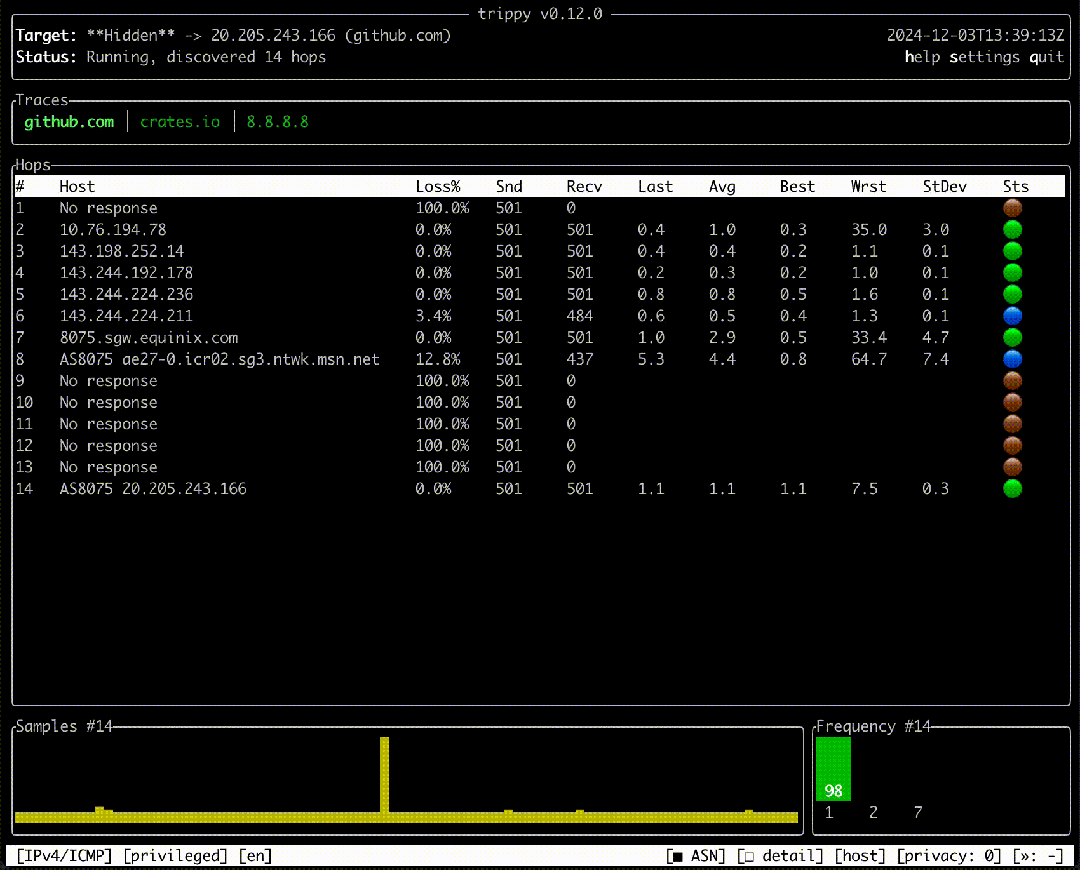
Trippy 是一款把 traceroute 和 ping 合二为一的网络诊断命令行工具,用实时交互界面展示每一跳的延迟与丢包,路由跳变看得明明白白。它跨平台、安装方式丰富,适合运维、网络工程师和爱折腾命令行的 Linux 用户排查连通性问题。
核心亮点:
- 融合 traceroute 与 ping,实时呈现每跳延迟丢包
- 交互式终端界面,路由变化一目了然
- 支持多种协议探测,可自定义追踪策略
- 跨平台可用,主流包管理器一键安装
当前版本 v0.13.0(2025-05-05 发布),开源协议 Apache-2.0,GitHub 8,170 star。

核心信息
| 软件名称 | Trippy(fujiapple852/trippy) |
| 当前版本 | v0.13.0 |
| 更新日期 | 2025-05-05 |
| 开源协议 | Apache-2.0 |
| 软件分类 | Linux 桌面 |
| 关键词 | cli、command-line-interface、command-line-tool、dns、icmp、linux |
本次更新内容
- 新增 DSCP 和 ECN 两列,可显示路径中每跳的服务类型信息,帮助了解网络服务质量。
- 支持自定义时区设置,并可从标准配置目录读取配置文件,提升使用便利性。
- JSON 报告现在包含开始和结束时间戳,便于记录和分析。
- 针对 Windows 用户进行了重要的稳定性改进,并修复了多个问题。
- 引入新的 system 地址族选项,将在下个主要版本中成为默认。
- Trippy 现在有了专属网站和徽标。
查看官方英文更新日志(原文)
## Highlights

The 0.13.0 release of Trippy includes several enhancements related to Type of Service (`ToS`) and adds new `Dscp` and `Ecn` columns.

It also includes improvements to the TUI such as allowing a custom timezone to be set and adding the ability to read the configuration file from the XDG app config directory. The `json` report has been enriched with start and end timestamps.

This release includes a number of bug fixes. For Windows users in particular, this release includes several important stability improvements.

The release also introduces a new `system` address family option, which will become the new default in the next major release.

Finally, Trippy now has a dedicated website and a logo!

### Type of Service (DSCP/ECN) Improvements

Trippy allows setting the Type of Service (`ToS`) for IPv4 via the `--tos` (`-Q`) command-line argument (or via the configuration file). The `ToS` value is the second byte of the `IPv4` header and encodes the Differentiated Services Code Point (`DSCP`) and Explicit Congestion Notification (`ECN`) fields.

Setting the `ToS` on outgoing probe packets can influence the Quality of Service (`QoS`) used by the network devices along the path.

Probe responses received from the hops along the path include the `ToS` values in the Original Datagram (the `IPv4`/`IPv6` header of the probe packet nested inside the `ICMP` error). Examining the `ToS` value from the Original Datagram can provide useful insight into the `QoS` treatment of the probe packets by network devices along the path.

This release of Trippy adds two new columns to display the `DSCP` & `ECN` values, which are derived from the `ToS` value from the Original Datagram for each hop. The new columns are:

- `Dscp` (`K`): The Differentiated Services Code Point (`DSCP`) of the Original Datagram for a hop
- `Ecn` (`M`): The Explicit Congestion Notification (`ECN`) of the Original Datagram for a hop

The `Dscp` and `Ecn` columns are decoded from the `ToS` field of the Original Datagram. If no `ToS` value is present, then the columns will show `na`. Note that these columns show the most recent `ToS` value received from the hop and may therefore change between rounds.

Well-known `DSCP` values are displayed as follows:

- Default Forwarding (`DF`) aka Best Effort aka Class Selector 0 (`CS0`)
- Assured Forwarding (`AFn`)
- Class Selector (`CSn`)
- High Priority Expedited Forwarding (`EF`)
- Voice Admit (`VA`)
- Lower Effort (`LE`)

Unknown `DSCP` values are displayed as a hexadecimal value.

The `ECN` value is displayed as follows:

- Not ECN-Capable Transport (`NotECT`)
- ECN Capable Transport(1) (`ECT1`)
- ECN Capable Transport(0) (`ECT0`)
- Congestion Experienced (`CE`)

These columns are hidden by default but can be enabled as needed. For more details, see the [Column Reference](https://trippy.rs/reference/column).

The following example sets the `ToS` to be `224`, which is a `DSCP` value of `CS7` (0x38
下载地址
以下为官方原包,本站不二次打包;多个文件为不同包型,按需选择其中一个下载即可:
trippy-0.13.0-x86_64-unknown-linux-gnu.tar.gz(官方原包 | 3.4 MB)
trippy-0.13.0-x86_64-unknown-linux-musl.tar.gz(官方原包 | 3.5 MB)
trippy_x86_64-unknown-linux-gnu_0.13.0_amd64.deb(官方原包 | 2.2 MB)
trippy_x86_64-unknown-linux-musl_0.13.0_amd64.deb(官方原包 | 2.3 MB)
✅ 上方 SHA256 与官方发布值一致,可自行核对。
快速上手
- 在终端中运行 trippy 命令启动程序,默认会开始对目标地址进行跟踪探测。
- 按界面提示使用快捷键调整视图,查看每一跳的延迟与丢包等网络信息。
- 需要指定目标时,在命令后加上主机名或地址再运行,例如跟踪某个网站。
- 分析完成后按退出键结束程序,回到终端。
提示:首次运行若提示权限不足,可查阅 README 中关于权限的说明。
讨论(0 条)