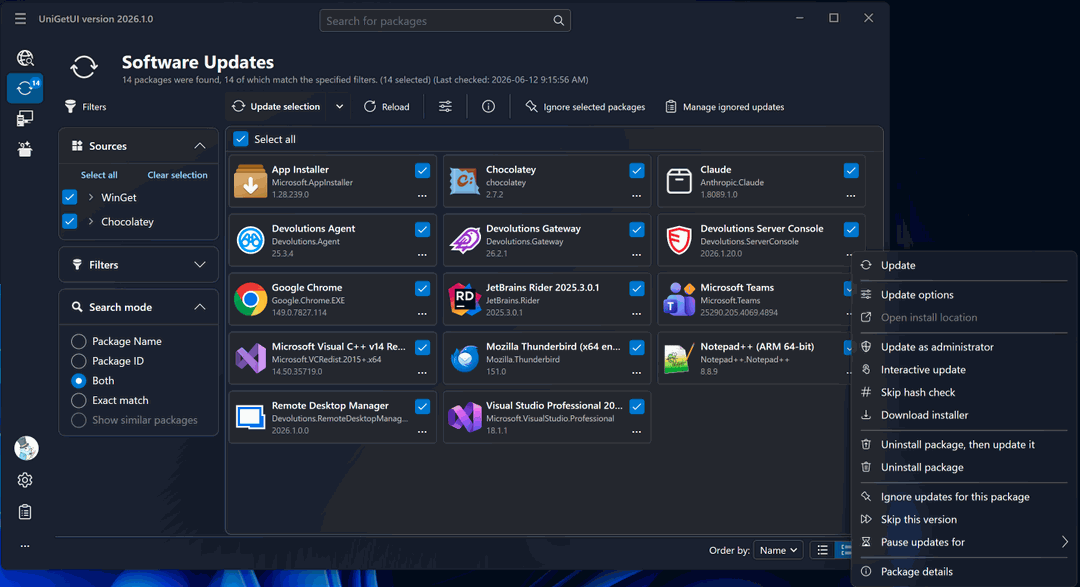
UniGetUI 是一个开源的包管理器统一图形前端,把 WinGet、Scoop、Chocolatey、Homebrew、pip、npm 等命令行工具收进同一个窗口,让你点鼠标就能搜索、安装、更新和卸载软件。它优先支持 Windows,也提供 macOS 和 Linux 版本,适合不想记命令、又同时用多个包管理器的开发者和效率用户。
核心亮点:
- 统一管理多个包管理器,一个界面搞定搜索安装
- 支持批量更新与卸载,省去逐个敲命令的麻烦
- 覆盖 Windows 为主,同时提供 macOS 与 Linux 版本
- 开源免费,项目由 Devolutions 接手维护并持续投入
当前版本 v2026.3.4(2026-11-13 发布),开源协议 MIT,GitHub 27,029 star。


核心信息
| 软件名称 | UniGetUI(marticliment/UniGetUI) |
| 当前版本 | v2026.3.4 |
| 更新日期 | 2026-11-13 |
| 开源协议 | MIT |
| 软件分类 | Windows 效率工具 |
| 关键词 | chocolatey、cli、npm、package、package-manager、pip |
本次更新内容
- 新增可停靠在软件列表旁的详情面板,方便随时查看选中软件的信息。
- 新增管理器健康页面,可查看各包管理器的运行状态并进行修复。
- 新增扩展支持技能插件与苹果开发工具的安装更新,默认关闭需手动开启。
- 软件更新时可先查看说明再选择立即更新、退出时更新或跳过该版本。
- 新增跳过主版本更新、更新前先卸载重装等选项,并支持完成后自动关机。
- 修复重启后更新状态卡住及部分更新提示异常等问题,提升稳定性。
查看官方英文更新日志(原文)
# Devolutions UniGetUI 2026.3.4

This release adds a docked package details panel, a Manager Health page, and two new extensions: Agent Skills, and Xcode on macOS. It also adds new options for updates, notifications and shutting down, and fixes many update, display and performance bugs.

### New Features
* Added a package details panel that can stay open beside the package list on the Installed, Discover and Updates pages. It follows the selected package. Open it from the footer, with Ctrl+Shift+D (Cmd+Shift+I on macOS), or from the right-click menu.
* Added a Manager Health page that shows when each package manager last worked or failed, with repair actions. Each package manager also has a setup guide, linked from its status card when the tool isn't found.
* Added an Agent Skills extension for finding, installing and updating skills and plugins for Claude Code, Codex, GitHub Copilot and Cursor. It is off by default, under Settings > Extensions.
* Added an Xcode extension on macOS 13 and later. It downloads, installs, updates and switches between several Xcode versions, and manages Simulator runtimes, after you sign in with your Apple ID. It is off by default, under Settings > Extensions.
* Git Repositories now shows the size of each clone and worktree, and handles refresh failures more clearly.
* When a UniGetUI update is ready, you can now read its release notes before installing it, then update now, update when you quit, or skip that version. Open it from the update notification or from **More > Check for UniGetUI updates**. Quitting UniGetUI no longer installs a waiting update unless you choose to.
* Added an option to install UniGetUI updates automatically while it runs in the background with nothing else in progress (Windows, off by default).
* New per-package installation options:
  * **Skip major updates**, to keep getting minor and patch releases without moving to the next major version.
  * **Uninstall, then reinstall when updated**, for packages that only update cleanly from scratch.
* Added **Shut down when finished** to the operations panel menu (Windows). It shuts the computer down after the current operations, with a 60-second countdown you can cancel.
* Added an option to quit UniGetUI when automatic updates find nothing to install.
* Added an option to keep update notifications on screen until you dismiss them (Windows).
* Package lists can now scroll horizontally instead of squeezing columns. Turn off **Fit columns to the window** in the column menu.

### Improvements
* Downloaded installers are now checked against their published hash, and the installer's signer is shown.
* .NET Tool now uses the feeds in your NuGet configuration, including private feeds, and detects updates on Artifactory feeds.
* Improvements to WinGet searches.
* WinGet now lists updates that it can only apply by reinstalling, for example when a new version switches installer type.
* At startup, update checks now wait for each packag
下载地址
以下为官方原包,本站不二次打包;多个文件为不同包型,按需选择其中一个下载即可:
UniGetUI.Installer.arm64.exe(安装版 | 34.8 MB)
UniGetUI.Installer.exe(安装版 | 36.7 MB)
UniGetUI.Installer.x64.exe(安装版 | 36.7 MB)
UniGetUI.x64.zip(便携版·解压即用 | 55.1 MB)
✅ 上方 SHA256 与官方发布值一致,可自行核对。
快速上手
- 运行下载好的安装包,按向导完成安装后启动 UniGetUI。
- 首次启动后,在界面中查看已检测到的包管理器,确认可用的软件来源。
- 在搜索框输入软件名称,从结果中选择条目并点击安装。
- 切换到已安装列表,可对软件执行更新或卸载操作。
提示:安装前请核对软件来源与发布者,谨慎选择第三方包。
讨论(0 条)