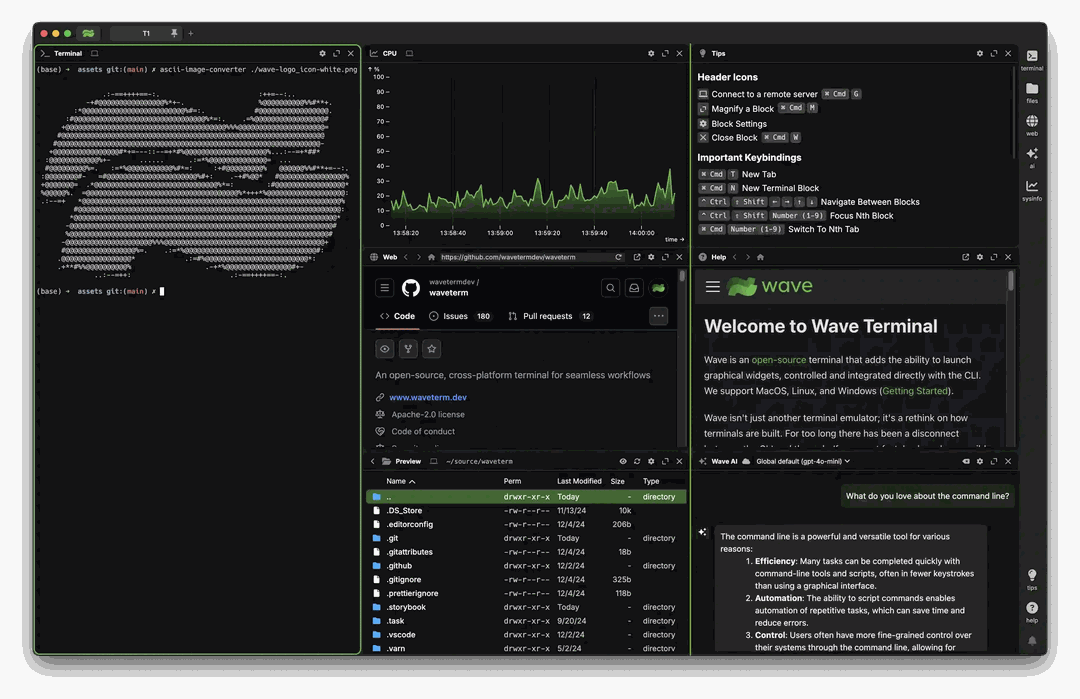
Wave Terminal 是一款开源且内置 AI 助手的终端工具,跨 macOS、Linux 和 Windows 平台。它能读取终端输出做调试分析、读写文件,还支持断线自动重连的持久 SSH 会话,以及图形化远程文件编辑与预览。适合经常远程开发、想少开几个窗口的开发者使用。
核心亮点:
- AI 助手读取终端输出,辅助调试与分析
- 持久 SSH 会话断线自动重连不丢状态
- 拖拽式多块界面整合终端、编辑器与浏览器
- 内置编辑器与富文件预览,远程操作更顺手
当前版本 v0.14.5(2026-04-16 发布),开源协议 Apache-2.0,GitHub 22,706 star。


核心信息
| 软件名称 | Waveterm(wavetermdev/waveterm) |
| 当前版本 | v0.14.5 |
| 更新日期 | 2026-04-16 |
| 开源协议 | Apache-2.0 |
| 软件分类 | Windows 效率工具 |
| 关键词 | command-line、developer-tools、linux、macos、productivity、terminal |
本次更新内容
- 新增进程查看器组件,可查看本地和远程进程的处理器与内存占用,支持排序和发送信号。
- 全局快捷键可一键呼出或隐藏窗口,类似游戏里的快捷面板,随时唤出终端。
- 支持从文件管理器拖拽文件到终端,自动填入带引号的路径,省去手动输入。
- 新增可选的区块分屏按钮,并可从菜单切换组件侧栏,标签重命名和网页前进后退也更顺手。
- 修复设置中无法创建或编辑尚不存在的配置文件的问题,终端复制不再带多余空格。
查看官方英文更新日志(原文)
Wave v0.14.5 introduces a new Process Viewer widget, Quake Mode for global hotkey, and several quality-of-life improvements.

- **Process Viewer** - New widget that displays running processes on local and remote machines, with CPU and memory usage, sortable columns, and the ability to send signals to processes
- **Quake Mode** - The global hotkey (`app:globalhotkey`) now toggles a Wave window visible and invisible
- **[bugfix] Settings Widget** - Fixed a bug where config files that didn't exist yet couldn't be created or edited from the Settings widget UI
- **Drag & Drop Files into Terminal** - Drag files from Finder (macOS) or your file manager into a terminal block to paste their quoted path ([#746](https://github.com/wavetermdev/waveterm/issues/746))
- New opt-in `app:showsplitbuttons` setting adds horizontal/vertical split buttons to block headers
- Toggle the widgets sidebar from the View menu; visibility persists per workspace
- F2 to rename the active tab
- Mouse button 3/4 (back/forward) now navigate in web widgets
- Terminal sessions now set `COLORTERM=truecolor` for better color support in CLI tools
- [bugfix] Trim trailing whitespace from terminal clipboard copies
- Package updates and dependency upgrades

## PRs
* First Cut at a new ProcessViewer Widget by @sawka in https://github.com/wavetermdev/waveterm/pull/3137
* updates to make processviewer more robust by @sawka in https://github.com/wavetermdev/waveterm/pull/3144
* feat: drag and drop file paths into terminal by @JustHereToHelp in https://github.com/wavetermdev/waveterm/pull/2857
* new keybindng F2 to edit the active tab name, also fix refocus after name editing by @sawka in https://github.com/wavetermdev/waveterm/pull/3158
* fix: Mouse Back/Forward support in webviews + few bugfixes by @mswiszcz in https://github.com/wavetermdev/waveterm/pull/3141
* feat: add widgets sidebar toggle button to view menu by @mswiszcz in https://github.com/wavetermdev/waveterm/pull/3140
* docs: add Traditional Chinese (zh-TW) README translation by @JaiJun in https://github.com/wavetermdev/waveterm/pull/3157
* Bump brace-expansion from 1.1.12 to 1.1.13 by @dependabot[bot] in https://github.com/wavetermdev/waveterm/pull/3139
* Bump google.golang.org/api from 0.271.0 to 0.273.0 by @dependabot[bot] in https://github.com/wavetermdev/waveterm/pull/3132
* Bump electron from 41.0.2 to 41.1.0 by @dependabot[bot] in https://github.com/wavetermdev/waveterm/pull/3133
* Turns app:globalhotkey into a dedicated quake mode by @Midnight145 in https://github.com/wavetermdev/waveterm/pull/3151
* feat: add opt-in split buttons to block headers by @lucyfarnik in https://github.com/wavetermdev/waveterm/pull/3159
* Bump actions/deploy-pages from 4 to 5 in /.github/workflows by @dependabot[bot] in https://github.com/wavetermdev/waveterm/pull/3131
* Bump github.com/mattn/go-sqlite3 from 1.14.37 to 1.14.40 by @dependabot[bot] in https://github.com/wavetermdev/waveterm/pull/3176
* Bump github.co
下载地址
以下为官方原包,本站不二次打包;多个文件为不同包型,按需选择其中一个下载即可:
Wave-win32-x64-0.14.5.exe(官方安装程序 | 156.2 MB)
Wave-win32-x64-0.14.5.msi(安装版 | 171.7 MB)
Wave-win32-x64-0.14.5.zip(便携版·解压即用 | 208.0 MB)
✅ 上方 SHA256 与官方发布值一致,可自行核对。
快速上手
- 运行下载好的安装包,按向导完成安装并启动 Wave Terminal。
- 首次启动后,在界面中拖放终端块、编辑器、浏览器等组件,自由排布工作区。
- 通过一键远程连接建立 SSH 会话,网络中断或重启后会自动重连。
- 用内置编辑器打开远程文件,或直接预览 markdown、图片、视频、PDF 等文件。
- 在 AI 聊天组件中填入自己的 API 密钥,或接入本地模型,开始使用终端助手。
提示:API 密钥保存在系统安全存储中,可在不同 SSH 会话间复用。
讨论(0 条)