Win11Debloat 是一款免安装的 PowerShell 脚本,帮你一键清理 Win11 预装应用、关闭遥测和烦人的界面元素,不用再逐个翻设置手动折腾。它提供交互菜单,也支持命令行参数,适合想让系统更干净利落的普通用户和爱折腾的管理员。
核心亮点:
- 一键移除预装应用,告别臃肿系统
- 关闭遥测与广告推荐,减少骚扰
- 交互菜单操作,新手也能轻松上手
- 支持命令行参数与设置导入导出
当前版本 v2026.10.30(2026-10-31 发布),开源协议 MIT,GitHub 63,486 star。

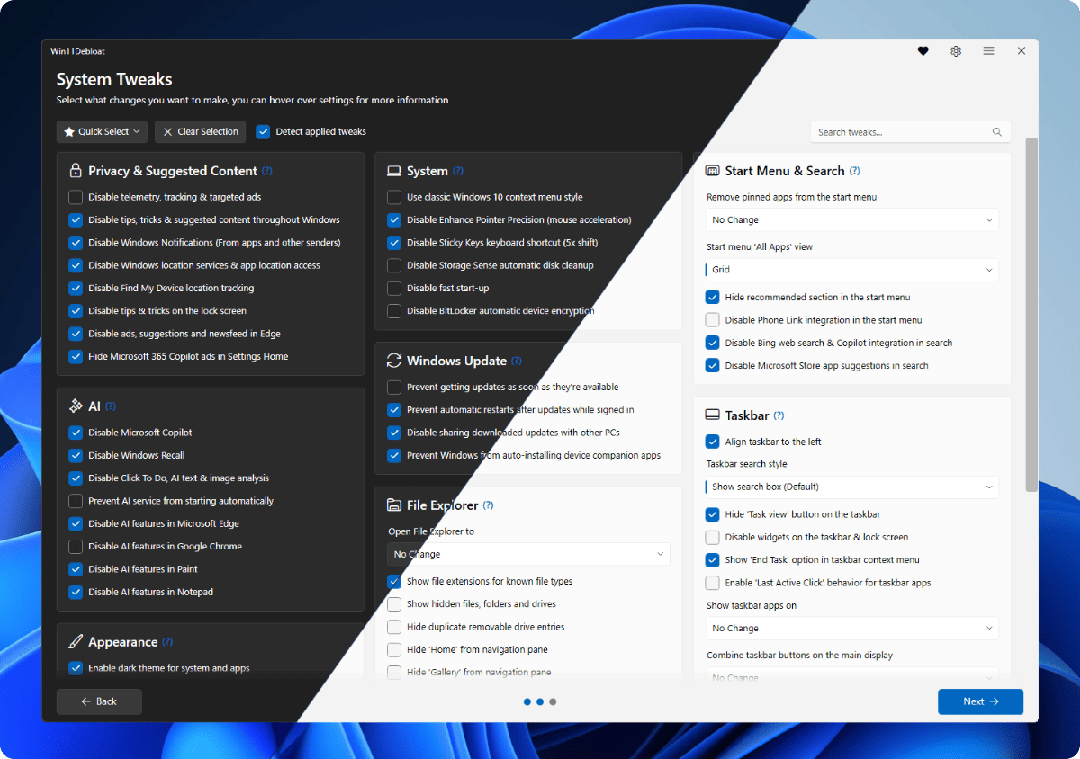
核心信息
| 软件名称 | Win11Debloat(Raphire/Win11Debloat) |
| 当前版本 | v2026.10.30 |
| 更新日期 | 2026-10-31 |
| 开源协议 | MIT |
| 软件分类 | Windows 效率工具 |
| 关键词 | automated、bloatware、bloatware-removal、cleanup、cli、debloat |
本次更新内容
- 新增多语言界面支持,用户可用熟悉的语言操作软件,设置中还能切换主题和语言。
- 用户设置和日志改为保存在个人数据目录,不再写入脚本所在位置,使用更规范。
- 新增关闭浏览器智能功能、禁用驱动自动更新等选项,并扩大可移除应用的覆盖范围。
- 优化界面布局与程序性能,提升运行稳定性和使用体验。
查看官方英文更新日志(原文)
> [!NOTE]
> Win11Debloat now stores user data, including your last used settings, preferences, and logs, in `%LOCALAPPDATA%\Win11Debloat` instead of the script directory. The script will still fall back to the script directory when it is run in system context.

This release introduces one of the most requested features for Win11Debloat: localization support! Made possible by contributions from the community, the GUI now supports 13 languages. Special thanks to @SashankBhamidi for laying the foundation for this!

Beyond localization, this update brings several new features, expanded app removal support, and numerous improvements to the user interface, security, reliability, and performance.

## New Features & Enhancements

* Localization support
  * Add localization framework for the GUI (en-US baseline) by @SashankBhamidi in https://github.com/Raphire/Win11Debloat/pull/764
  * Add localization for app names and descriptions by @SashankBhamidi in https://github.com/Raphire/Win11Debloat/pull/769
  * Add Brazilian Portuguese (pt-BR) translation by @2ButAqUxVy in https://github.com/Raphire/Win11Debloat/pull/768
  * Add Dutch (nl-NL) translations by @Raphire in https://github.com/Raphire/Win11Debloat/pull/778
  * Add pt-BR app names and descriptions by @YWZsaXRv in https://github.com/Raphire/Win11Debloat/pull/781
  * Add Italian (it-IT) translations by @habby1337 in https://github.com/Raphire/Win11Debloat/pull/786
  * Add Japanese (ja-JP) translations by @willybilly981 in https://github.com/Raphire/Win11Debloat/pull/791
  * Add Simplified Chinese (zh-CN) GUI translations by @quanfanpro-code in https://github.com/Raphire/Win11Debloat/pull/799
  * Add Russian (ru-RU) GUI translation by @Raphire in https://github.com/Raphire/Win11Debloat/pull/857
  * Add Traditional Chinese (Taiwan) (zh-TW) GUI translation by @wang13zhe in https://github.com/Raphire/Win11Debloat/pull/838
  * Add Korean (ko-KR) GUI translation by @wang13zhe in https://github.com/Raphire/Win11Debloat/pull/842
  * Add German (de-DE) GUI translation by @wang13zhe in https://github.com/Raphire/Win11Debloat/pull/839
  * Add French (fr-FR) GUI translation by @wang13zhe in https://github.com/Raphire/Win11Debloat/pull/841
  * Add Spanish (es-ES) GUI translation by @wang13zhe in https://github.com/Raphire/Win11Debloat/pull/840
  * feat: add Turkish (tr-TR) UI translations by @kararliadam in https://github.com/Raphire/Win11Debloat/pull/845
* Add an option to disable Google Chrome AI features by @yasar11732 in https://github.com/Raphire/Win11Debloat/pull/763
* Add settings UI for theme and language by @Raphire in https://github.com/Raphire/Win11Debloat/pull/780
* chore: update Edge AI feature to also disable Copilot Chat button by @Raphire in https://github.com/Raphire/Win11Debloat/pull/811
* feat: update FriendlyNames and descriptions for various apps by @Raphire in https://github.com/Raphire/Win11Debloat/pull/861
* feat: Add support for removing the Windows App by @Rap
下载地址
以下为官方原包,本站不二次打包,点击直接下载:
Win11Debloat.zip(便携版·解压即用 | 741.5 KB)
✅ 上方 SHA256 与官方发布值一致,可自行核对。
快速上手
- 解压下载好的 Win11Debloat.zip 到任意文件夹,进入解压出的 Win11Debloat 文件夹
- 双击文件夹中的 Run.bat 文件启动脚本,若控制台窗口一闪而过,改用 PowerShell 方式运行
- 在弹出的 Windows UAC 提示中点击允许,以管理员身份运行脚本
- 仔细阅读屏幕上的菜单说明,按提示选择要移除的应用或要关闭的功能项
提示:操作前建议先创建系统还原点,便于随时恢复。
讨论(0 条)