Wox 是一款开源跨平台快捷启动器,用键盘就能打开应用、搜索文件、执行操作,全程不离开输入框。它采用原生 GPU 渲染而非网页壳,常驻后台也很轻量,还支持用脚本扩展插件。适合追求效率、喜欢 Alfred 或 Raycast 那种键盘流体验的 Windows、macOS 和 Linux 用户。
核心亮点:
- 原生 GPU 渲染,跨平台运行流畅不卡顿
- 键盘优先操作,搜索启动一步到位
- 插件体系开放,支持脚本自由扩展
- 内置插件商店与主题商店,按需定制
当前版本 v2.5.0(2026-11-09 发布),开源协议 GPL-3.0,GitHub 27,630 star。


核心信息
| 软件名称 | Wox(Wox-launcher/Wox) |
| 当前版本 | v2.5.0 |
| 更新日期 | 2026-11-09 |
| 开源协议 | GPL-3.0 |
| 软件分类 | Windows 效率工具 |
| 关键词 | alfred、app-launcher、launcher、launchpad、launchy、productivity |
本次更新内容
- 插件现在可以打开独立窗口,让用户直接在搜索结果里与预览内容交互,操作更直观。
- 计时器和听写改为按需安装的独立插件,升级后原有设置会自动保留。
- 新增常用文本片段功能,可保存、搜索并一键插入日期或剪贴板内容。
- 截图工具支持标注与调整选区比例,AI 聊天可连接本地模型并显示等待状态。
- 插件商店可查看下载与收藏数据并排序,安装更新进度在工具栏直接显示。
查看官方英文更新日志(原文)
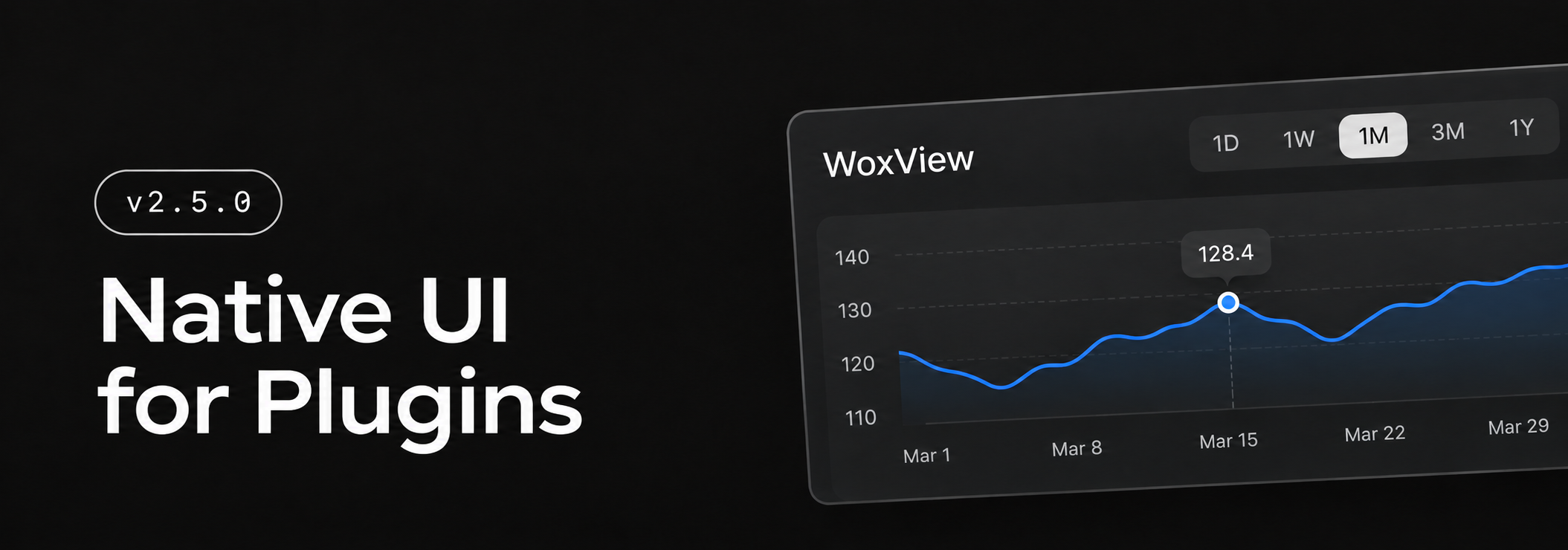
Plugins can now open native windows and let you interact directly with search previews. Timer and Dictation are now standalone plugins you can install from the Wox Store as needed. We explain the move in [Keeping Wox Simple](https://www.woxlauncher.com/blog/a-smaller-core-with-plugins.html).
- Add
- [`WoxView`] Fill out forms, change options, and explore live charts in plugins that use WoxView, either in a separate window or right from a search result.
- [`Snippets`] Save and search text you use often. Copy a snippet from Wox or set it to expand when you type a keyword. Snippets can insert values such as today's date or the current clipboard text. [#4702](https://github.com/Wox-launcher/Wox/issues/4702)
- Improve
- [`Timer` and `Dictation`] Install either plugin from the Wox Store when you need it. Wox carries over your existing plugin settings when you upgrade.
- [`Screenshot`] Highlight parts of a screenshot and edit the strokes later. Choose a preset aspect ratio and keep it locked as you resize the capture area. [#4704](https://github.com/Wox-launcher/Wox/issues/4704)
- [`AI Chat`] Connect to local models through LM Studio and see an indicator while waiting for a reply. [#4692](https://github.com/Wox-launcher/Wox/issues/4692)
- [`Quick Jump`] Type to search in Directory Opus, with the search box appearing next to the active pane. [#4688](https://github.com/Wox-launcher/Wox/pull/4688) [@momadacoding](https://github.com/momadacoding)
- [`Converter`] Convert Unix timestamps to your local date and time with `to datetime` or `to dt`. [#4685](https://github.com/Wox-launcher/Wox/issues/4685)
- [`Hotkey`] Use Insert or Delete as a shortcut on its own, and trigger shortcuts by holding supported keys on Windows, macOS, and Hyprland.
- [`Query`] Search within filter options and save default selections for each plugin command.
- [`Plugin`] See installation and update progress in the toolbar, and take action directly from plugin notifications.
- [`Plugin Store`] See download and star counts, and sort by downloads, stars, name, or recent updates.
- Fix
- [`Clipboard`] Read the latest clipboard contents on Wayland and preserve text without appending a newline.
- [`Notes`] Preserve blank lines when switching between Markdown and preview, and keep headings from being clipped.
- [`Settings`] Keep the active field focused and preserve its selection when plugin settings refresh after saving.
- [`Quick Jump`] Keep File Explorer context menu shortcuts working when type-to-search is enabled. [#4698](https://github.com/Wox-launcher/Wox/pull/4698) [@yiumanlenong](https://github.com/yiumanlenong)
- Store
- Plugin
- [Timer](https://github.com/Wox-launcher/Wox.Plugin.Timer) Create and manage countdown timers [@Wox-launcher](https://github.com/Wox
下载地址
以下为官方原包,本站不二次打包,点击直接下载:
wox-windows-amd64.exe(官方安装程序 | 62.8 MB)
✅ 上方 SHA256 与官方发布值一致,可自行核对。
快速上手
- 运行下载好的 wox-windows-amd64.exe,按提示完成安装并等待程序启动
- 首次启动后,在输入框中直接键入应用名或文件名,用键盘选中结果并回车打开
- 在输入框内继续输入动作关键词,对选中结果执行打开、定位等操作,无需离开输入
- 需要更多能力时,在插件商店中浏览并安装插件,用 Node.js、Python 或脚本扩展功能
- 空闲时让 Wox 常驻后台,随时用键盘唤起输入框开始下一次查询
提示:日常查询尽量用键盘完成,减少鼠标切换,效率更高。
讨论(0 条)