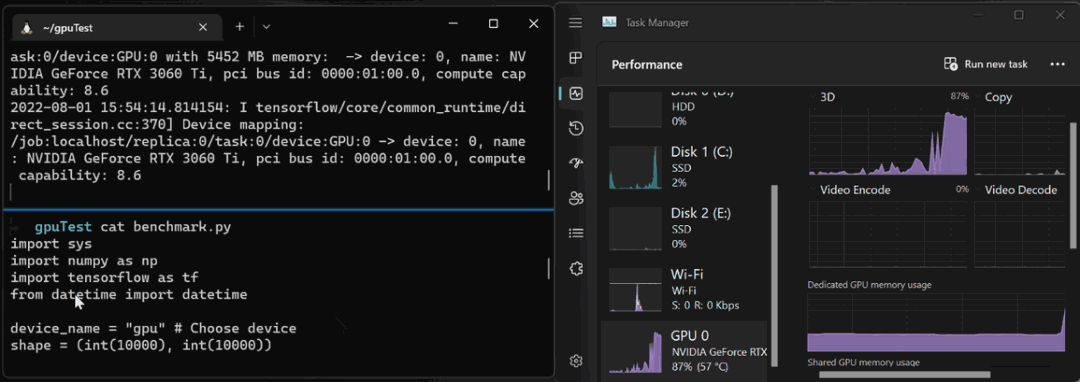
WSL 是微软官方推出的 Windows 子系统,让你直接在 Windows 里跑完整的 Linux 命令行工具和应用,不用装虚拟机也不用双系统切换。它启动快、资源占用低,还能跑图形界面程序,适合开发者、运维和需要 Linux 环境的学生党日常使用。
核心亮点:
- 在 Windows 内直接运行 Linux 命令行工具,无需虚拟机或双系统
- 一条命令即可完成安装,上手门槛低
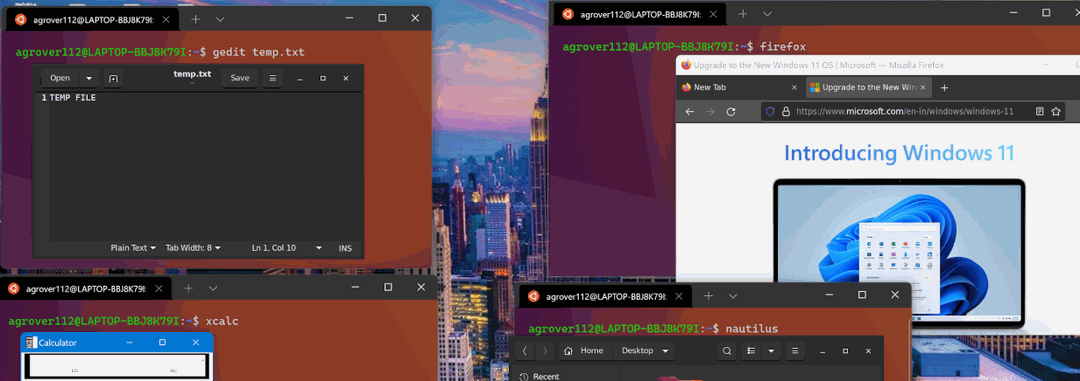
- 支持 Linux 图形界面应用,开发调试更顺手
- 微软官方维护,文档完善且持续更新
当前版本 v3.0.3(2026-10-09 发布),开源协议 MIT,GitHub 34,306 star。

核心信息
| 软件名称 | WSL(microsoft/WSL) |
| 当前版本 | v3.0.3 |
| 更新日期 | 2026-10-09 |
| 开源协议 | MIT |
| 软件分类 | Windows 效率工具 |
| 关键词 | Windows 效率工具 |
本次更新内容
- 新版本修复了创建新发行版时误报配置警告的问题,并解决了后台服务偶发的竞态问题,提升使用稳定性。
- 容器镜像构建现在支持从标准输入读取构建上下文,同时改进了容器事件过滤与命令参数校验。
- 内核组件随新版本更新,并让相关挂载点可写,改善兼容性与运行表现。
- 优化了目录遍历方式与本地文件访问路径,减少卡顿并提升文件操作效率。
查看官方英文更新日志(原文)
## What's Changed
* Update issue template for WSLC by @dkbennett in https://github.com/microsoft/WSL/pull/41778
* Run the nightly tests on Windows Server 2025 by @OneBlue in https://github.com/microsoft/WSL/pull/41760
* Localization change from build: 159470205 by @OneBlue in https://github.com/microsoft/WSL/pull/41800
* Fix various issues preventing the ModernOOBE test from running multiple times on the same test_distro by @OneBlue in https://github.com/microsoft/WSL/pull/41781
* Remove unused delay-load options by @benhillis in https://github.com/microsoft/WSL/pull/41804
* Disable pushing to the store by default by @OneBlue in https://github.com/microsoft/WSL/pull/41782
* Scope down the ephemeral port range in various consommé tests by @OneBlue in https://github.com/microsoft/WSL/pull/41805
* Fix race condition in LifetimeManager by @OneBlue in https://github.com/microsoft/WSL/pull/41807
* Use DistroFileChange instead of going through wsl.localhost by @OneBlue in https://github.com/microsoft/WSL/pull/41810
* Explicitely setup impersonation when instanciating IWslSupport by @OneBlue in https://github.com/microsoft/WSL/pull/41815
* Wait for bound ports to be released by the port relay in the tests by @OneBlue in https://github.com/microsoft/WSL/pull/41817
* Support reading the wslc image build context from stdin by @ggarzia-MSFT in https://github.com/microsoft/WSL/pull/41765
* Update Microsoft.WSL.Kernel to 6.18.54.1 by @chessturo in https://github.com/microsoft/WSL/pull/41822
* Add logic to reject commands with extra arguments by @OneBlue in https://github.com/microsoft/WSL/pull/41821
* Improve wslc event filters by @beena352 in https://github.com/microsoft/WSL/pull/41809
* Make the binfmt mount writable by @OneBlue in https://github.com/microsoft/WSL/pull/41808
* Match container and network filters across event types by @beena352 in https://github.com/microsoft/WSL/pull/41818
* Fix incorrect wsl.conf warnings being displayed when creating a new distribution by @OneBlue in https://github.com/microsoft/WSL/pull/41820
* Convert EnsureCaseSensitiveDirectoryRecursive to iterative traversal by @benhillis in https://github.com/microsoft/WSL/pull/40347


**Full Changelog**: https://github.com/microsoft/WSL/compare/3.0.2...3.0.3
下载地址
该项目由官方站点分发,本站提供版本追踪与中文教程:
✅ 官方原包直发,版本同步更新。
快速上手
- 在 Windows 命令行中运行 wsl –install 命令,按提示完成安装并重启电脑。
- 首次启动后按提示设置 Linux 用户名和密码,创建默认发行版账户。
- 在命令行输入 wsl 进入 Linux 环境,直接使用已安装的 Linux 命令行工具。
- 需要图形界面程序时,在 Linux 环境中运行图形应用,由 WSLg 支持显示。
提示:安装前确认系统已启用虚拟化,可减少安装失败。
讨论(0 条)