XDM 是一款老牌下载加速器,通过多连接分段把大文件下载提速,支持断点续传、BT 种子与磁力链接,还能从流媒体网站抓取视频。配合浏览器扩展,网页里的下载和检测到的视频可一键交给它处理,适合经常下载大文件、批量资源或在线视频的 Windows 用户。
核心亮点:
- 多连接分段加速,大文件下载更快
- 断点续传,中断任务可接着继续
- 支持 BT 种子与磁力链接下载
- 浏览器扩展一键接管下载与视频抓取
当前版本 v9.0.11(2026-11-15 发布),开源协议 GPL-3.0,GitHub 8,736 star。


核心信息
| 软件名称 | xdm(subhra74/xdm) |
| 当前版本 | v9.0.11 |
| 更新日期 | 2026-11-15 |
| 开源协议 | GPL-3.0 |
| 软件分类 | Windows 效率工具 |
| 关键词 | batch、batchdownloading、browser-extension、chrome、download-accelerator、download-manager |
本次更新内容
- 视频下载新增“尽量保存为MP4”选项,默认开启,关闭后可保留原始流格式与音轨。
- 浏览器扩展改进单次播放列表链接的解析,让更多清晰度可选;纯音频流保存为正确的音频文件格式。
- 内置合并器大量修复,解决视频开头花屏、时间错乱、部分编码播放异常及音轨缺失等问题。
- 修复外部合并工具在路径含空格或特殊字符时失败的问题,并改进更新检查的进度与结果提示。
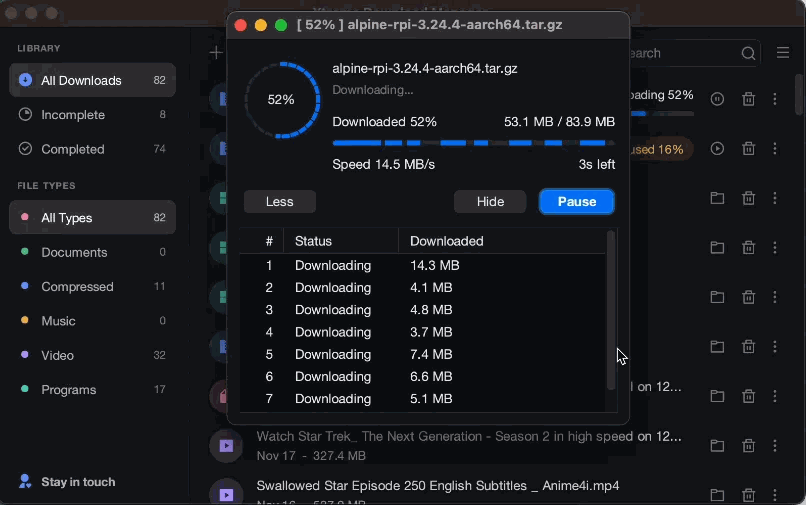
- 下载进度窗口改为每条连接固定显示一行,方便持续查看整体下载情况。
查看官方英文更新日志(原文)
## Downloads

| Installer | Notes |
|---|---|
| [xdm-app-9.0.11-arm64.dmg](https://github.com/subhra74/xdm/releases/download/9.0.11/xdm-app-9.0.11-arm64.dmg) | For Apple Silicon (M1 or later) mac |
| [xdm-app-9.0.11-x64.dmg](https://github.com/subhra74/xdm/releases/download/9.0.11/xdm-app-9.0.11-x64.dmg) | For Intel mac |
| [xdm-9.0.11-arm64.msi](https://github.com/subhra74/xdm/releases/download/9.0.11/xdm-9.0.11-arm64.msi) | For Windows ARM (Windows 10/11) |
| [xdm-9.0.11-x64.msi](https://github.com/subhra74/xdm/releases/download/9.0.11/xdm-9.0.11-x64.msi) | For Windows x64 (Windows 10/11) |
| [xdmsetup-9.0.11.msi](https://github.com/subhra74/xdm/releases/download/9.0.11/xdmsetup-9.0.11.msi) | Same as the x64 MSI; for XDM 8 (Microsoft Store) update notices |
| [xdm-app_9.0.11_amd64.deb](https://github.com/subhra74/xdm/releases/download/9.0.11/xdm-app_9.0.11_amd64.deb) | For Debian / Ubuntu / Linux Mint x64 |
| [xdm-app_9.0.11_arm64.deb](https://github.com/subhra74/xdm/releases/download/9.0.11/xdm-app_9.0.11_arm64.deb) | For Debian / Ubuntu / Linux Mint ARM |
| [xdm-app-9.0.11-1.aarch64.rpm](https://github.com/subhra74/xdm/releases/download/9.0.11/xdm-app-9.0.11-1.aarch64.rpm) | For Fedora / RHEL / openSUSE ARM |
| [xdm-app-9.0.11-1.x86_64.rpm](https://github.com/subhra74/xdm/releases/download/9.0.11/xdm-app-9.0.11-1.x86_64.rpm) | For Fedora / RHEL / openSUSE x64 |
| [xdm-app-9.0.11-1-aarch64.pkg.tar.zst](https://github.com/subhra74/xdm/releases/download/9.0.11/xdm-app-9.0.11-1-aarch64.pkg.tar.zst) | For Arch Linux / Manjaro ARM |
| [xdm-app-9.0.11-1-x86_64.pkg.tar.zst](https://github.com/subhra74/xdm/releases/download/9.0.11/xdm-app-9.0.11-1-x86_64.pkg.tar.zst) | For Arch Linux / Manjaro x64 |
| [xdm-app-9.0.11-linux-arm64.tar.gz](https://github.com/subhra74/xdm/releases/download/9.0.11/xdm-app-9.0.11-linux-arm64.tar.gz) | For any Linux ARM (portable, no install) |
| [xdm-app-9.0.11-linux-x64.tar.gz](https://github.com/subhra74/xdm/releases/download/9.0.11/xdm-app-9.0.11-linux-x64.tar.gz) | For any Linux x64 (portable, no install) |

[Code signing policy](https://github.com/subhra74/xdm/blob/master/CODE_SIGNING_POLICY.md)

## What's Changed

### Video downloads (HLS / DASH)
- New **"Save as MP4 where possible"** option in the video download dialog (on by default, remembered). Turn it off to keep an HLS stream as `.ts`, joined with its audio track as-is.
- Better quality picks for HLS videos on sites whose playlist links work only once: the browser extension now passes the playlist it already loaded, so all resolutions show up.
- Opus-only audio is now saved as a real `.opus` file instead of `.webm`.
- Many fixes in the built-in muxer, checked against ffmpeg's output: videos no longer start with broken frames, correct timing for streams with missing or reordered timestamps (fixes frames shown one picture late and decode errors on some Apple-packaged streams), HEVC saved as `hvc1`, better playback in Windows/macOS system players, correct colour an
下载地址
以下为官方原包,本站不二次打包;多个文件为不同包型,按需选择其中一个下载即可:
xdm-9.0.11-arm64.msi(安装版 | 60.9 MB)
xdm-9.0.11-x64.msi(安装版 | 63.2 MB)
xdmsetup-9.0.11.msi(安装版 | 63.2 MB)
✅ 上方 SHA256 与官方发布值一致,可自行核对。
快速上手
- 运行下载好的安装包,按向导提示完成安装,安装结束后启动 XDM 主程序。
- 首次启动后,在设置中启用浏览器集成,按提示为浏览器安装配套扩展。
- 在浏览器中点击下载链接或检测到的视频,XDM 会接管并开始下载。
- 在 XDM 主界面查看下载任务,可暂停、继续或恢复中断的下载。
- 把磁力链接或种子文件交给 XDM,即可添加并开始 torrent 下载。
提示:浏览器扩展装好后,网页视频和下载链接会自动交给 XDM 处理。
讨论(0 条)