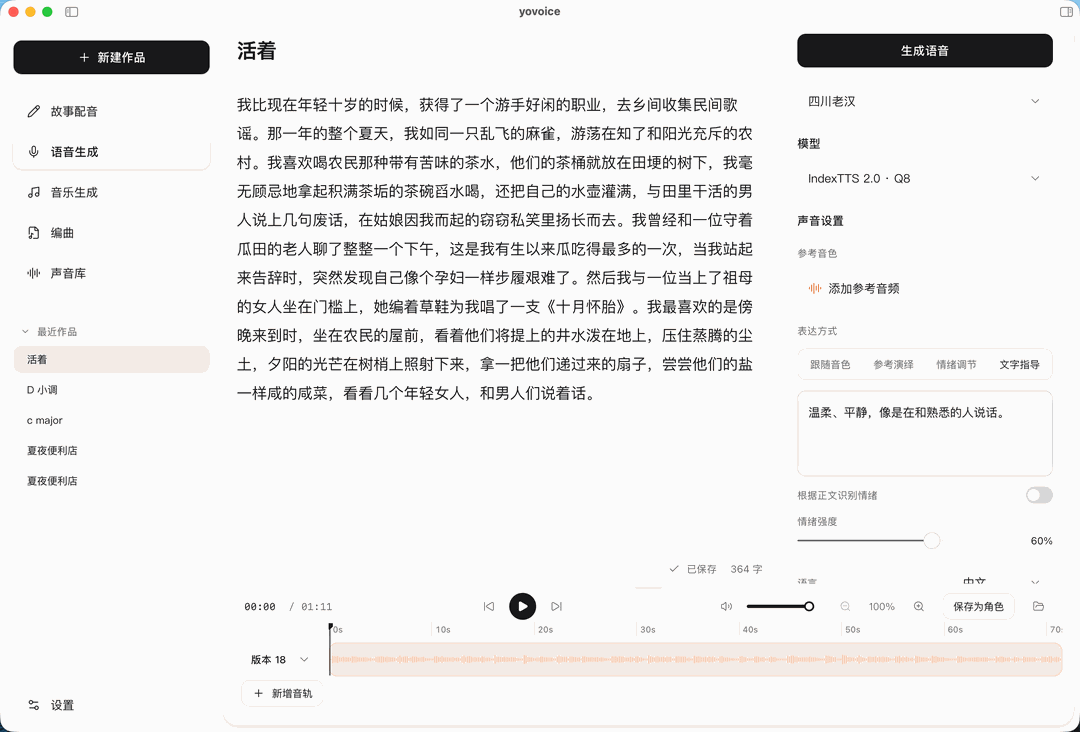
Yovoice 是一款本地优先的开源 AI 语音工作室,把文字转语音、零样本声音克隆、AI 歌曲创作和多轨乐谱编辑整合进桌面应用。全部模型在本地运行,隐私可控,适合内容创作者、音乐爱好者和需要配音或原创音乐的普通用户。
核心亮点:
- 文字转自然语音,支持情感与语气控制
- 零样本克隆音色,无需大量样本训练
- 从人声到编曲生成完整歌曲
- 多轨乐谱编辑与本地模型离线运行
当前版本 v0.9.0(2026-11-22 发布),开源协议 Apache-2.0,GitHub 2,287 star。


核心信息
| 软件名称 | Yovoice(leemysw/yovoice) |
| 当前版本 | v0.9.0 |
| 更新日期 | 2026-11-22 |
| 开源协议 | Apache-2.0 |
| 软件分类 | Windows 效率工具 |
| 关键词 | ai-music、audio、desktop-app、local-ai、macos、mcp |
本次更新内容
- 修复语音生成后旧音频被自动删除的问题,历史记录和故事配音版本会一直保留到用户手动删除。
- 新增语音模型,支持默认音色与音色克隆,可自动识别多种语言并输出高音质音频。
- 语音合成新增情感、方言、语速、音高、音量等控制方式,正文还可插入笑声等标签。
- 参考音频支持拖入文件或从历史选取,可试听、截取并编辑原文,删除原记录后仍可使用。
- 故事配音逐句统一响度,导入小说可识别角色台词并自动分角色,分享歌曲时歌词未对齐也能分享。
- 修复录音后麦克风未关闭、快速输入丢字、界面文字截断及部分平台卡死等问题。
查看官方英文更新日志(原文)
## [0.9.0] - 2026-11-22

### English

- Fix data loss: generating speech no longer deletes older takes after ten versions. API history and completed story takes are also kept until you delete them.
- New speech model Audio8 TTS Realistic 0.6B (Q8 / BF16): default voice and voice cloning in 11 languages with automatic detection, 44.1 kHz output; cloning needs the reference transcript.
- Ming 3.0 TTS adds control modes: built-in voices from a list (some with emotion variants), emotion, dialect (Cantonese, Sichuan-Chongqing), speed / pitch / volume and free-form instructions, plus tags such as [Laughter] in the text. Qwen3 CustomVoice labels its optional instructions as style guidance.
- Reference audio: drag in a file or pick generated speech from history, audition it, select an excerpt and edit its transcript. Saved references keep their source and still work after the original generation is deleted. The picker says when the library is empty or a search finds nothing.
- Generation history shows model tags and a read-only view of the saved text, time, seed and parameters, with JSON export.
- Story narration evens out each line's loudness as it is generated. Importing a book recognizes “Name: line” scripts and casts each name as a role, and Import book is also in the New project menu.
- Sharing a song to the community can skip lyrics, so unaligned lyrics no longer hold up sharing.
- Scores: exporting large scores to MIDI is faster, stem export refuses to overwrite existing files, and cancelling rendering stops promptly without saving a WAV.
- CLI model downloads use the saved download source; a failed download no longer changes it.
- macOS: switching the interface language relabels the whole menu bar right away. Windows: when GitHub rate-limits update checks, the app says so and when to try again.
- Fixes: Linux freezing on WebKitGTK 2.50 when opening the Model menu or leaving Settings, and the first-run tour spotlight on Linux; the microphone staying on after quickly cancelling a recording or leaving the page; dropped characters when typing fast in a draft; enabling the Local API right after changing its port; clipped labels in Expression options, the Speech sidebar and Settings › Assets tables; errors when switching pages quickly.

### 简体中文

- 修复音频丢失:语音生成不再在十个版本后删除较早的版本;接口历史和已完成的故事逐句版本也一直保留,直到你自己删除。
- 新增语音模型 Audio8 TTS Realistic 0.6B(Q8 / BF16):默认音色与音色克隆,自动识别 11 种语言,44.1 kHz 输出;克隆需填写参考原文。
- Ming 3.0 TTS 新增控制方式:从列表选内置音色(部分可选情感)、情感、方言(粤语、川渝话)、语速 / 音高 / 音量和自由指令,正文可插入 [Laughter] 等标签。Qwen3 CustomVoice 的可选指令改称“风格指导”。
- 参考音频:可以拖入文件,或从生成历史里选语音,试听、截取节选并编辑原文;保存的样本保留来源,删除原生成记录后仍可使用。参考音频库为空或搜索没有结果时会提示。
- 生成历史显示模型标签,可查看保存的文字、时间、随机种子与参数,并导出 JSON。
- 故事配音逐句生成时统一响度;导入小说能识别“角色:台词”格式的剧本并按名字分角色,“新建作品”菜单里也能直接导入小说。
- 分享歌曲到社区时可以不带歌词,歌词没对齐也能直接分享。
- 编曲:大谱子导出 MIDI 更快,分轨导出不再覆盖已有文件,取消渲染后及时停止、不保存 WAV。
- 命令行下载模型沿用已保存的下载来源,下载失败不再改动它。
- macOS 切换界面语言后整个菜单栏立即换成新语言;Windows 上 GitHub 限制更新检查时,会说明原因和可重试的时间。
- 修复:Linux 在 WebKitGTK 2.50 上打开模型菜单或离开设置时卡死,以及首次引导的聚光遮罩错位;快速取消录音或离开页面后麦克风仍开着;快速
下载地址
以下为官方原包,本站不二次打包;多个文件为不同包型,按需选择其中一个下载即可:
yovoice-v0.9.0-cli-windows-x64.zip(便携版·解压即用 | 14.7 MB)
yovoice-v0.9.0-windows-x64-cuda12.4-setup.exe(安装版 | 609.2 MB)
yovoice-v0.9.0-windows-x64-cuda13.3-setup.exe(安装版 | 784.2 MB)
yovoice-v0.9.0-windows-x64-setup.exe(安装版 | 77.2 MB)
yovoice-v0.9.0-windows-x64-update.exe(官方安装程序 | 66.6 MB)
✅ 上方 SHA256 与官方发布值一致,可自行核对。
快速上手
- 运行下载好的安装包,按向导提示完成安装并启动 Yovoice 桌面应用。
- 首次启动后进入工作台,选择文本转语音入口,输入或粘贴要朗读的文字内容。
- 在声音设置中选择内置音色,或使用零样本声音克隆导入参考音频生成专属音色。
- 调整情感与表现力参数后点击生成,试听结果并导出音频文件。
- 如需创作歌曲,切换到音乐生成或乐谱编辑,把想法编排成完整作品。
提示:首次生成前先试听短句,确认音色与情感参数合适再批量处理。
讨论(0 条)