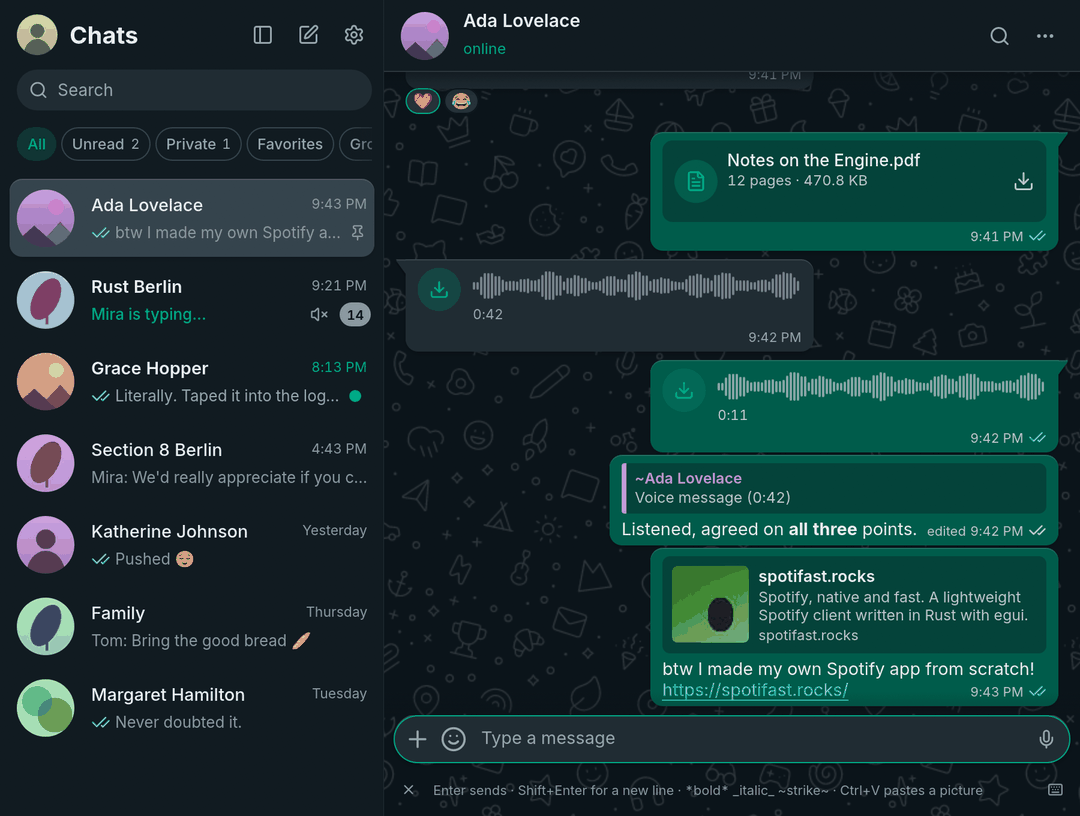
ZapFast 是一款用 Rust 编写的原生 WhatsApp 桌面客户端,不依赖浏览器引擎,启动迅速、内存占用低。它支持消息收发、媒体播放、多账号切换和本地加密存档,界面提供多语言与主题定制。适合追求轻快流畅聊天体验、注重隐私的桌面用户。
核心亮点:
- 原生 Rust 实现,无浏览器引擎,启动快占用低
- 支持富文本、回复、表情回应、投票与语音消息
- 聊天记录本地加密存档,可导出为文本或压缩包
- 多账号同窗切换,托盘常驻并推送通知
当前版本 v0.21.3(2026-11-17 发布),开源协议 MIT,GitHub 4,654 star。

核心信息
| 软件名称 | Zapfast(crmne/zapfast) |
| 当前版本 | v0.21.3 |
| 更新日期 | 2026-11-17 |
| 开源协议 | MIT |
| 软件分类 | Windows 效率工具 |
| 关键词 | chat、desktop-app、egui、linux、macos、messaging |
本次更新内容
- 修复部分联系人消息一直卡在等待状态的问题,现在能正常收发。
- 解决 Windows 上窗口偶尔闪烁的问题,打字更稳定。
- 首次同步大幅减少磁盘写入,速度更快,退出也不会卡死。
- 修复 macOS 重音符号选择时多打一个字母的问题。
- 最新表情符号可正常显示,不再出现空白方框。
- 重复点击接听不再导致通话中断,历史未接来电也不会影响后续通话。
查看官方英文更新日志(原文)
ZapFast 0.21.3 is a batch of fixes: messages that stayed on "Waiting for this message", the window flickering on Windows, a first sync that wrote gigabytes to disk, the macOS accent picker typing two letters, the newest emoji, and calls that dropped when Accept was clicked twice. **Download ZapFast:** [Mac](https://github.com/crmne/zapfast/releases/download/v0.21.3/zapfast-v0.21.3-macos-universal.dmg) · [Windows](https://github.com/crmne/zapfast/releases/download/v0.21.3/zapfast-v0.21.3-x86_64-pc-windows-msvc.msi) · [Windows ARM](https://github.com/crmne/zapfast/releases/download/v0.21.3/zapfast-v0.21.3-aarch64-pc-windows-msvc.msi) · [Linux](https://github.com/crmne/zapfast/releases/download/v0.21.3/zapfast-v0.21.3-x86_64-unknown-linux-gnu.tar.gz) · [Linux ARM](https://github.com/crmne/zapfast/releases/download/v0.21.3/zapfast-v0.21.3-aarch64-unknown-linux-gnu.tar.gz) · [AppImage](https://github.com/crmne/zapfast/releases/download/v0.21.3/zapfast-0.21.3-x86_64.AppImage) · [AppImage ARM](https://github.com/crmne/zapfast/releases/download/v0.21.3/zapfast-0.21.3-aarch64.AppImage) · [Flatpak](https://github.com/crmne/zapfast/releases/download/v0.21.3/zapfast-v0.21.3-x86_64.flatpak) · [Debian/Ubuntu](https://github.com/crmne/zapfast/releases/download/v0.21.3/zapfast_0.21.3_amd64.deb) · [Fedora/openSUSE](https://github.com/crmne/zapfast/releases/download/v0.21.3/zapfast-0.21.3-1.x86_64.rpm) On a Mac, `brew install --cask crmne/tap/zapfast`. On Arch, `yay -S zapfast-bin`. On Fedora, `sudo dnf copr enable paolino/zapfast` and then `sudo dnf install zapfast`, which keeps ZapFast updated with the rest of your system. ## Fixed - **Messages no longer stay on "Waiting for this message".** Messages from some contacts' linked devices could never be read, on ZapFast or on the phone, since 0.21.2. ZapFast now uses whatsapp-rust's fixes for checking those devices' identities, and asks again instead of giving up. By @crmne; thanks @XylotoGhost, who reported it. (#1052) - **The window no longer flickers on Windows with NVIDIA graphics.** A frame of plain background colour flashed now and then, while typing or not. Fixed upstream in egui by @sknowledge1, who found the cause, and carried in ZapFast until egui releases it; thanks @neorai for the report and @arachnoise, @Mesazane and @sknowledge1 for narrowing it down. (#945) - **The first sync after linking writes far less to disk.** ZapFast saved each message of your history, and each change the phone sent, on its own, which could write tens of gigabytes. It now saves them in batches, about six times less in our tests, and twice as fast. Quitting while a sync is busy no longer leaves ZapFast stuck without a window. By @crmne; thanks @jay-tau for the detailed report. (#839) - **The macOS accent picker types only the accent you choose.** Holding `c` and choosing `ç` typed `cç`. By @crmne; thanks @madison08, who reported it. (#1046) - **The newest emoji show instead of empty boxes,** such as , in the picker and in c
下载地址
以下为官方原包,本站不二次打包;多个文件为不同包型,按需选择其中一个下载即可:
zapfast-v0.21.3-aarch64-pc-windows-msvc.msi(安装版 | 26.8 MB)
zapfast-v0.21.3-aarch64-pc-windows-msvc.zip(便携版·解压即用 | 29.2 MB)
zapfast-v0.21.3-x86_64-pc-windows-msvc.msi(安装版 | 28.7 MB)
zapfast-v0.21.3-x86_64-pc-windows-msvc.zip(便携版·解压即用 | 30.8 MB)
✅ 上方 SHA256 与官方发布值一致,可自行核对。
快速上手
- 运行下载好的安装包,按向导完成安装后启动 ZapFast,主窗口会显示用于配对的二维码。
- 在手机 WhatsApp 中依次打开设置、已关联的设备、关联设备,用手机扫描窗口中的二维码。
- 若不便扫码,可点击窗口里的用手机号关联,在手机上输入窗口显示的字符码完成关联。
- 关联成功后即可在桌面收发消息、查看历史记录,并在托盘保持在线接收通知。
提示:可在设置中切换简体中文界面,并开启应用锁保护聊天隐私。
讨论(0 条)