Zen是一款开源的全系统级广告拦截工具,支持多平台。它通过系统代理拦截所有应用的HTTP请求,不仅屏蔽网页广告,还能清除桌面软件及系统组件中的追踪脚本和恶意内容。相比浏览器插件,它能提供更深层的隐私保护,让你上网更清净安全,适合注重数据隐私和纯净体验的用户。
核心亮点:
- 全系统级拦截,覆盖桌面应用与系统组件
- 深度隐私保护,有效屏蔽行为追踪脚本
- 支持自定义过滤规则,灵活添加Hosts文件
- 本地生成证书,保障HTTPS请求安全拦截
当前版本 v0.30.0(2026-11-25 发布),开源协议 MIT,GitHub 4,395 star。


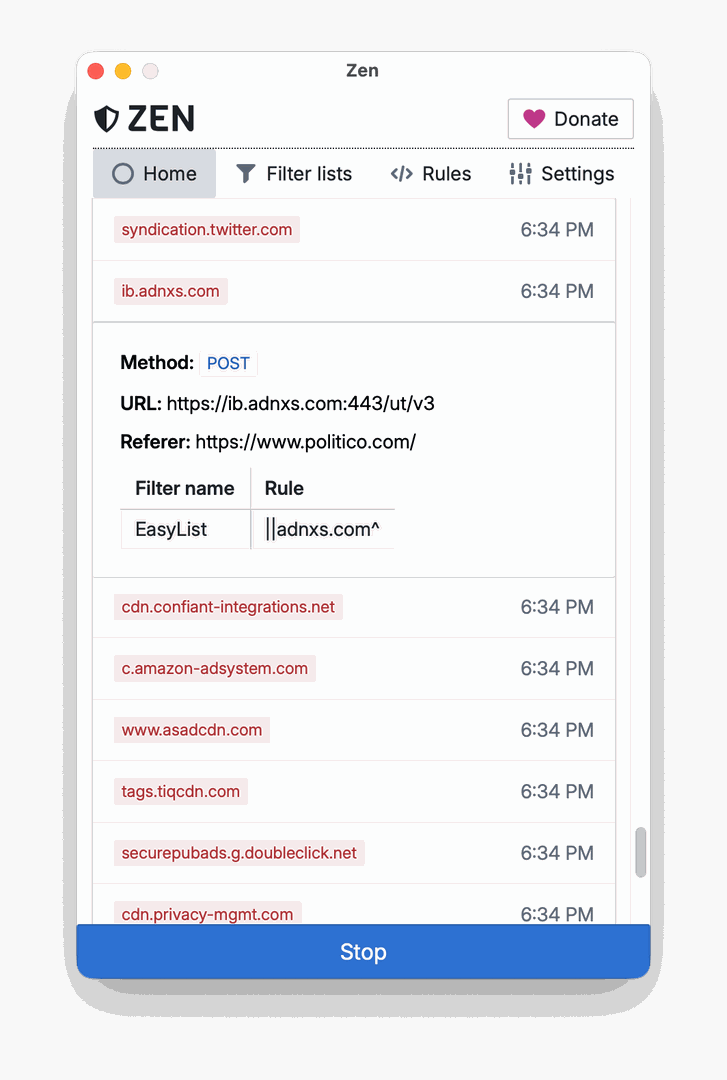
核心信息
| 软件名称 | Zen-desktop(irbis-sh/zen-desktop) |
| 当前版本 | v0.30.0 |
| 更新日期 | 2026-11-25 |
| 开源协议 | MIT |
| 软件分类 | Windows 效率工具 |
| 关键词 | ad-block、ad-blocker、ad-blocking、adblock、adblocker、adblocking |
本次更新内容
- 新增加密DNS功能,支持主流服务商,有效对抗域名伪装追踪,提升隐私保护能力
- 过滤规则兼容性大幅增强,修复多项脚本错误,显著提升广告拦截的准确率与覆盖面
- 请求检测速度提升约三倍,同时修复网页聊天断连及重定向失效问题,浏览更流畅
- Linux端文件管理更规范,配置文件格式优化易读,整体使用体验更加整洁便捷
查看官方英文更新日志(原文)
## What's New

* **Encrypted DNS**
  Zen can now encrypt its DNS queries with DNS over HTTPS. Choose Quad9, Cloudflare, Google, OpenDNS or your own server under Settings > DNS.
  The setting is experimental and off by default, so please try it out and tell us how it went. See [our blog post](https://irbis.sh/blog/introducing-support-for-doh/) for more details.
* **Protection against CNAME cloaking**
  Some sites use DNS (CNAME) records to make a third-party tracking server look like part of the site, so filter rules for that server's domain don't match. With encrypted DNS on, Zen checks these records and blocks matching requests.
* **More filter rules work**
  * Added the `set-cookie`, `set-cookie-reload`, `trusted-set-cookie` and `trusted-set-cookie-reload` scriptlets. Cookie notice lists use them to dismiss banners by saving an answer in advance.
  * Fixed the `set-constant` scriptlet, which set numbers as text and set the wrong value for promises. Its alias, `set`, now works too.
  * `$jsonprune` rules that write `$` as `\$` now load. This adds rules that remove ads from data sent by Prime Video, Pluto TV and MSN. Thanks to @LucasM4r!
  * The `$domain`, `$third-party` and `$method` modifiers now also work in rules that change responses. Thanks to @prascli!
* **Faster filtering**
  Zen now checks requests against the filter lists about three times faster.
* **Connection fixes**
  Zen could lose the first message on a WebSocket connection, which live chats and similar features use. On plain HTTP sites, blocked requests returned a page of raw text, and redirects made by Zen didn't work. All three are fixed.
* **Tidier folders on Linux**
  Zen's files were unnecessarily spread over multiple folders. They now stay in one `zen` folder. Zen deletes the old folders when it updates. Thanks to @samzorn for reporting this, and @ohdonny and @BUTTER-BEAR for the details!
* **Readable config file**
  `config.json` is now indented, so it's easier to read and edit by hand. Thanks to @viesloxy!
* Other minor bugfixes and improvements.

## New Contributors
* @prascli made their first contribution in https://github.com/irbis-sh/zen-desktop/pull/881
* @viesloxy made their first contribution in https://github.com/irbis-sh/zen-desktop/pull/906

Thank you for using Zen!

**Full Changelog**: https://github.com/irbis-sh/zen-desktop/compare/v0.29.0...v0.30.0
下载地址
以下为官方原包,本站不二次打包;多个文件为不同包型,按需选择其中一个下载即可:
Zen-amd64-installer.exe(安装版 | 12.7 MB)
Zen-arm64-installer.exe(安装版 | 12.0 MB)
Zen_windows_amd64.zip(便携版·解压即用 | 11.1 MB)
Zen_windows_amd64_noselfupdate.zip(便携版·解压即用 | 11.1 MB)
Zen_windows_arm64.zip(便携版·解压即用 | 10.4 MB)
Zen_windows_arm64_noselfupdate.zip(便携版·解压即用 | 10.4 MB)
✅ 上方 SHA256 与官方发布值一致,可自行核对。
快速上手
- 运行下载好的安装包完成安装,随后首次启动软件。
- 根据界面提示安装本地生成的根证书,以允许拦截并修改 HTTPS 请求。
- 确认安装完成后,软件将在系统级别自动运行,开始拦截广告和跟踪脚本。
提示:Zen 会在系统级拦截流量,建议留意托盘图标状态,确保代理功能已正常开启。
讨论(0 条)