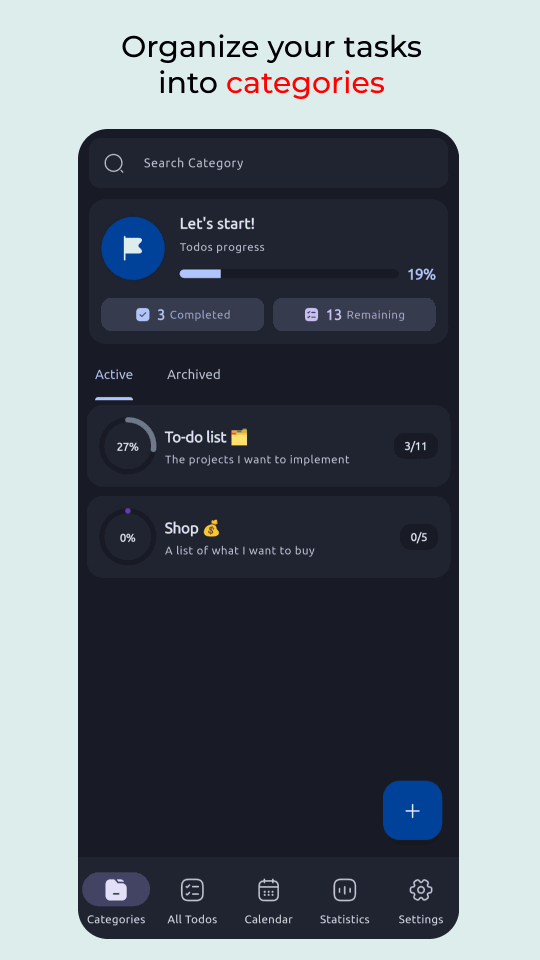
Zest 是一款基于 Flutter 打造的轻量级 Android 任务管理应用。它支持 Material You 动态主题与 AMOLED 深色模式,界面美观且流畅。核心亮点包括层级子任务、365天热力图统计及智能提醒。适合追求高效组织、注重隐私保护及数据可视化的用户。
核心亮点:
- 支持层级子任务与颜色分类,灵活管理待办事项
- 提供365天热力图与可视化统计,直观掌握生产力
- 支持 Material You 动态换肤及纯黑 AMOLED 主题
- 具备智能提醒与手动自动备份,保障数据安全
当前版本 v1.6.0(2026-02-12 发布),开源协议 MIT,GitHub 485 star。


核心信息
| 软件名称 | Zest(darkmoonight/Zest) |
| 当前版本 | v1.6.0 |
| 更新日期 | 2026-02-12 |
| 开源协议 | MIT |
| 软件分类 | Android 开源 APK |
| 关键词 | android、app、application、dart、flutter、flutter-app |
本次更新内容
- 全新采用 Material Design 3 设计语言,界面视觉焕然一新。
- 优化子任务逻辑,支持独立标记完成及点击主任务查看详情。
- 任务描述支持多行输入,创建任务时可快速添加子任务。
- 新增自动备份选项,完善统计功能,提升数据安全性。
- 修复日历视图崩溃、语言设置及重复任务等已知问题。
查看官方英文更新日志(原文)
## What's Changed
* New Material Design 3 by @Leonavichus in https://github.com/darkmoonight/Zest/pull/114
* fix(lang-settings): resolve issue in language dialog by @r4khul in https://github.com/darkmoonight/Zest/pull/125
* fix: resolve duplicate todo problem due to a race condition which occurred while using both a watcher stream and manual updates  by @r4khul in https://github.com/darkmoonight/Zest/pull/127
* feat: add badges of github downloads and playstore downloads to the readme  by @r4khul in https://github.com/darkmoonight/Zest/pull/128
* fix: setState Assertion Error in Calendar View by @r4khul in https://github.com/darkmoonight/Zest/pull/129
* Statistic by @Leonavichus in https://github.com/darkmoonight/Zest/pull/131
* Dim text of the [0/0] subtasks box #117
* Don't mark subtasks as done once the task has been completed #116
* "All todos" list includes tasks from archived categories #115
* Multiline text in task description #118
* Todo sorting feels a bit off #120
* Subtasks button inside the todo creation dialog #119
* Display subtasks when clicking on a task #130
* [Feature Request] Option to enable auto-backups #49
* Task not completed / no longer required (strike through) #103
* Filter out already applied tags from the dropdown list #121
* Bottom toolbar visual tweaks #123
* Shortcut for completing task and all of its subtasks #124

## New Contributors
* @r4khul made their first contribution in https://github.com/darkmoonight/Zest/pull/125

**Full Changelog**: https://github.com/darkmoonight/Zest/compare/v1.5.12...v1.6.0

## New Contributors
* @r4khul made their first contribution in https://github.com/darkmoonight/Zest/pull/125

**Full Changelog**: https://github.com/darkmoonight/Zest/compare/v1.5.12...v1.6.0
下载地址
以下为官方原包,本站不二次打包;多个文件为不同包型,按需选择其中一个下载即可:
zest-arm64-v8a-release.apk(Android 安装包 | 13.6 MB)
zest-armeabi-v7a-release.apk(Android 安装包 | 13.4 MB)
zest-release.apk(Android 安装包 | 33.4 MB)
zest-x86_64-release.apk(Android 安装包 | 13.8 MB)
✅ 上方 SHA256 与官方发布值一致,可自行核对。
快速上手
- 在 Windows 上安装并启动 Android 模拟器,将下载好的 APK 文件拖入模拟器窗口完成安装
- 打开应用,在设置中根据需要选择语言、主题模式及自定义分类颜色
- 在主界面创建分类或待办事项,利用拖拽排序、标签和优先级功能管理任务
- 通过主界面入口查看日历视图或统计图表,了解任务完成进度与生产力数据
提示:建议在模拟器中开启高性能模式,以获得更流畅的动画效果和响应速度。
讨论(0 条)