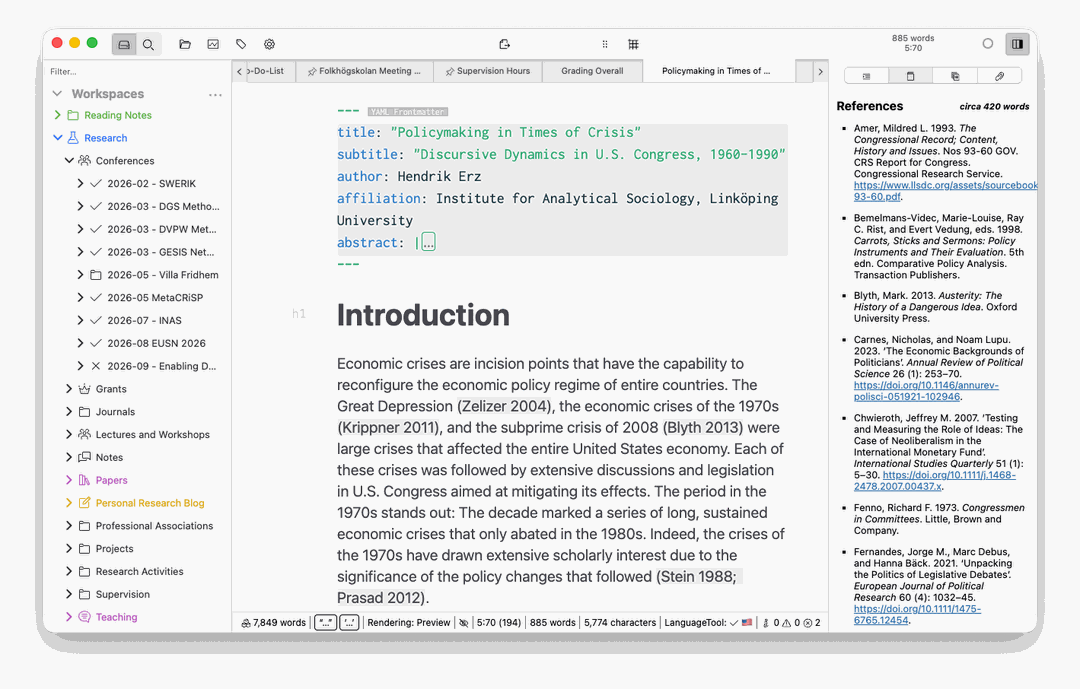
Zettlr 是一款面向学术写作的开源编辑器,把 Markdown 写作、文献引用和出版导出整合到同一个工作台里。它支持 Zotero 等文献管理器、Zettelkasten 笔记法、全文搜索和自定义主题,还能借助 Pandoc 与 LaTeX 导出成 Word、PDF 等格式。适合需要写论文、整理笔记又不想被商业软件绑住的学者、学生和写作者。
核心亮点:
- 支持 Zotero、JabRef 等文献管理器,引用插入更省事
- 内置 Zettelkasten 笔记法与全文搜索,资料好找
- 借助 Pandoc 与 LaTeX 导出 Word、PDF 等出版格式
- 主题、暗色模式与自定义 CSS 可自由调整界面
当前版本 v4.11.0(2026-11-26 发布),开源协议 GPL-3.0,GitHub 13,965 star。


核心信息
| 软件名称 | Zettlr(Zettlr/Zettlr) |
| 当前版本 | v4.11.0 |
| 更新日期 | 2026-11-26 |
| 开源协议 | GPL-3.0 |
| 软件分类 | Windows 效率工具 |
| 关键词 | desktop、docx、electron、html、languages、libreoffice |
本次更新内容
- 修复安全漏洞,防止恶意代码执行,保障用户数据与系统安全
- 优化编辑器快捷键,统一注释功能操作逻辑,提升日常写作效率
- 新增支持从Linux桌面环境同步主题配色,界面风格更贴合系统
查看官方英文更新日志(原文)
**Security Fixes | Quality of Life Improvements**

This update is mostly a maintenance update that improves Zettlr's security by addressing two recently mentioned advisories. Specifically, this update fully fixes the previously opened `GHSA-qp9r-5xcv-35gx` (arbitrary shell execution) and addresses `GHSA-4c93-g77j-cx8w` (potential for remote code execution). We personally believe that nobody was affected by this. But, in the spirit of "better safe than sorry" we addressed them as best as we could. Some more details below.

The only two important additions for this update to mention are, first, that Zettlr is now finally able to retrieve the accent color from supporting Linux desktop environments (such as KDE Plasma). Note that D-Bus access is required for this to work. Where this is not available, the app still falls back to Zettlr green. Second, after discovering some issues with the keyboard shortcuts in the editor, the shortcuts for comments have now been adjusted. Previously, both `Cmd/Ctrl-Shift-C` and `Cmd/Ctrl-/` would allow the user to insert comments with slightly different behavior. The former shortcut was broken for many people, and this update restores it. However, to harmonize the intended use of both comment tools, we have changed the shortcut to `Cmd/Ctrl-Alt-M`, which is the default across many word processors to add a comment at the cursor position. `Cmd/Ctrl-/` now reliably only toggles comments for all lines touched by selections, with no in-situ commenting.

> **Do you enjoy Zettlr? Then consider making a donation to help us pay for the development costs. You can donate [monthly on Patreon](https://www.patreon.com/zettlr) or [once via PayPal](https://www.paypal.me/hendrikerz). Additionally, you can directly [sponsor Hendrik Erz on GitHub](https://github.com/sponsors/nathanlesage) or [send a tip on Ko-Fi](https://ko-fi.com/hendrikerz). Thanks for your support!**

## Some Notes on `GHSA-qp9r-5xcv-35gx` and `GHSA-4c93-g77j-cx8w`

Before the changelog below, some short notes of reassurance on these two security advisories. Strictly speaking they refer to security issues, but we have strong reasons to believe users should have been fine.

The fix for `GHSA-qp9r-5xcv-35gx` is a continuation from an earlier attempt at mitigating arbitrary shell execution. Basically, when you had a custom command configured, and used this to export either a project or a single file, the path to the project folder or file was provided to the command as-is. That means that, if the path contained valid shell commands, they would be executed and could potentially be used maliciously. In a first attempt to fix the issue, we merely quoted the paths, but that measure was easy to circumvent. This time around we implemented proper shell escaping so that regardless of the odd characters that may be in a path, they will not execute any shell commands. We went further: Not all custom commands actually need shell access, so by default, Zettlr 4.11 disab
下载地址
以下为官方原包,本站不二次打包,点击直接下载:
Zettlr-4.11.0-x64.exe(官方安装程序 | 158.5 MB)
✅ 上方 SHA256 与官方发布值一致,可自行核对。
快速上手
- 运行下载好的安装包,按向导完成安装并启动 Zettlr。
- 首次启动后,选择一个文件夹作为工作区,用于存放你的笔记与文稿。
- 在编辑区撰写文稿,利用代码高亮与片段功能快速插入常用内容。
- 通过全文搜索在全部笔记中定位所需内容,快速检索信息。
- 使用导出功能,借助 Pandoc 或 LaTeX 将文稿导出为所需格式。
提示:导出前先确认已安装 Pandoc,否则部分格式无法使用。
讨论(0 条)