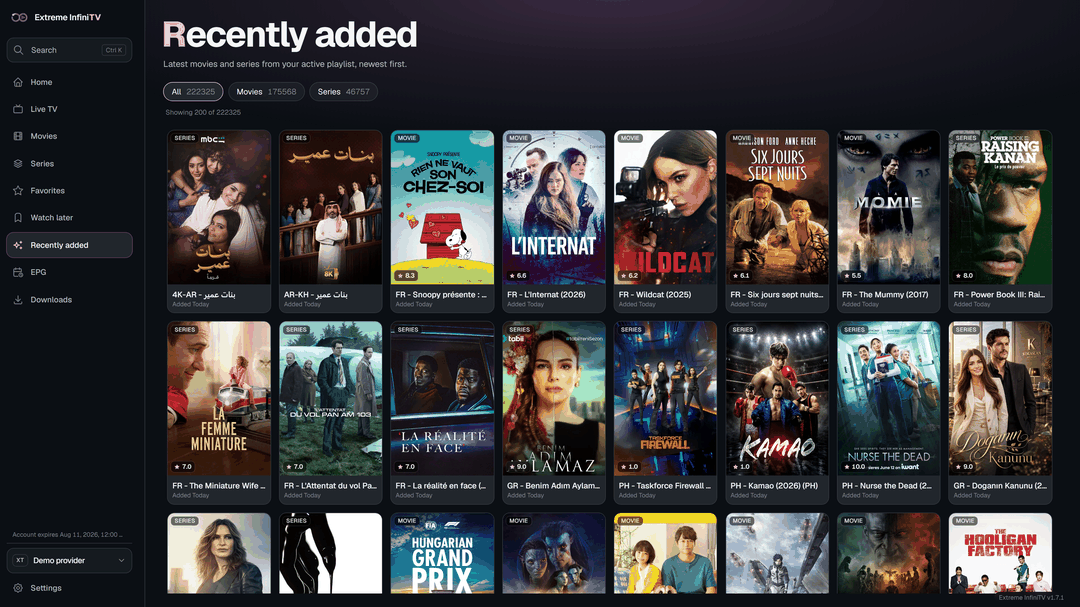
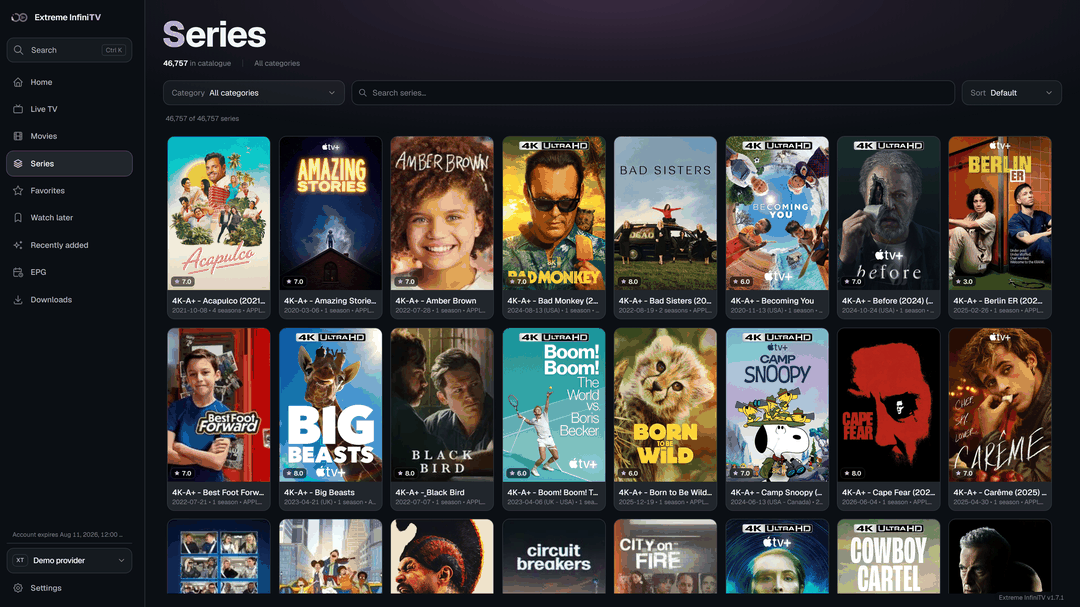
Extreme InfiniTV 是一款开源跨平台 IPTV 播放器,支持 Xtream Codes 账号与 M3U/M3U8 播放列表,提供直播电视、EPG 节目单、回看、影视点播、剧集与离线下载,并针对电视大屏做了遥控器方向键导航适配。适合想在电视盒子、手机或电脑上统一管理订阅源、追求大屏观影体验的用户。
核心亮点:
- 支持 Xtream Codes 与 M3U/M3U8 播放列表
- 直播电视带 EPG 节目单与回看功能
- 内置影视点播、剧集与离线下载
- 适配电视遥控器方向键大屏操作
当前版本 v1.9.0(2026-08-31 发布),开源协议 GPL-3.0,GitHub 213 star。

核心信息
| 软件名称 | Extreme InfiniTV(infinitel8p/Extreme-InfiniTV) |
| 当前版本 | v1.9.0 |
| 更新日期 | 2026-08-31 |
| 开源协议 | GPL-3.0 |
| 软件分类 | TV 盒子软件 |
| 关键词 | android、cross-platform、epg、iptv、iptv-application、iptv-m3u |
本次更新内容
- 新增电视大屏界面,在电视设备上自动切换为遥控器友好的卡片式布局,无需手动设置。
- 支持设备间投屏,用配对码把手机或电脑上的直播、电影和剧集发送到另一台设备播放。
- 元数据默认无需密钥即可显示海报、简介和分类,新安装也能直接看到完整信息。
- 新增环境屏保,空闲时轮播片库海报,电视上还可作为系统屏保使用。
- 启动速度提升,缓存内容先显示再后台刷新,不再因存储问题卡住或丢失数据。
- 新增多种主题强调色,并支持每次启动随机切换配色。
查看官方英文更新日志(原文)
<p align="center">
  <img src="https://raw.githubusercontent.com/infinitel8p/Extreme-InfiniTV/refs/heads/main/src-tauri/icons/logos/readme-lockup-2x.png" alt="Extreme InfiniTV logo" width="400"/>
</p>

<p align="center">
  <a href="https://discord.gg/GH5V3AkzfA"><img alt="Join the Discord community" src="https://img.shields.io/badge/Discord-join%20the%20community-5865F2?logo=discord&logoColor=white" height="28"/></a>
</p>

**A real Android TV interface, casting between your own devices, and metadata that needs no API key.**

> [!IMPORTANT]
> 💬 **There is a Discord now.** Come ask for help, follow the betas, or push for the feature you want: [discord.gg/GH5V3AkzfA](https://discord.gg/GH5V3AkzfA). There is a link in Settings too.

## ✨ Highlights

> [!TIP]
> **The app has a TV interface now.** On an Android TV, Fire TV Stick or any leanback device, Extreme InfiniTV opens a dedicated 10-foot UI built for a remote: home rails, a card-based Live TV with now/next progress, movie and series grids, detail pages, search, downloads and settings. There is no switch to flip, a TV device is detected and every screen routes to its TV twin automatically.

<img src="https://github.com/infinitel8p/Extreme-InfiniTV/releases/download/v1.9.0/feature-tv-home.png" alt="Android TV home screen with an artwork hero and a favorites rail" width="100%"/>

- 📡 **Cast from one device to another.** Any install can become a receiver: pair it with a code and send live channels, movies, series episodes and catch-up replays to it from your phone or desktop. You get a full remote (fullscreen on mobile, a side panel on desktop), a floating "casting to TV" pill, and cast playback counts toward Continue Watching. Discovery works over mDNS and Android NSD, with a subnet sweep for networks that block multicast.
- 🎬 **Metadata without an API key.** TheTVDB is now the default source and needs no key at all, so cast, artwork, descriptions and genres show up on a fresh install. A TMDb key is still supported and fills any gaps, and a plot in your own language is no longer overwritten with the English one.
- 🌌 **Ambient screensaver.** When a receiver goes idle it drifts through artwork from your own library, led by what is trending and topped up with what you have been watching, with channel and title logos instead of plain text. On Android TV it also installs as a system daydream.
- ⚡ **Opens faster.** Cached content now paints immediately and refreshes behind you instead of holding the screen until everything is hydrated, and a wedged storage backend can no longer block the first paint or quietly lose writes.
- 🎨 **Five new accent colors** (gold, lime, teal, silver, white) plus an option that rolls a random one on every launch.

<img src="https://github.com/infinitel8p/Extreme-InfiniTV/releases/download/v1.9.0/feature-receiver.png" alt="Receiver mode idle screen showing the address and pair code" width="49%"/> <img src="https://github.com/infinitel8p/Extreme-Infini
下载地址
以下为官方原包,本站不二次打包,点击直接下载:
Extreme-InfiniTV.apk(Android 安装包 | 44.4 MB)
✅ 上方 SHA256 与官方发布值一致,可自行核对。
快速上手
- 运行下载好的安装包,按提示完成安装后启动 Extreme InfiniTV。
- 首次启动后进入播放列表设置,选择 Xtream Codes 方式,填入服务商提供的账号信息并保存。
- 也可选择 M3U / M3U8 方式,粘贴播放列表地址或导入列表文件完成添加。
- 回到首页从 Live TV、Movies、Series 等分类进入,点选频道或影片开始播放。
- 在播放界面可查看节目单与回看内容,用遥控器方向键浏览和切换。
提示:用遥控器方向键操作更顺手,可提前在设置里整理常用播放列表。
讨论(0 条)