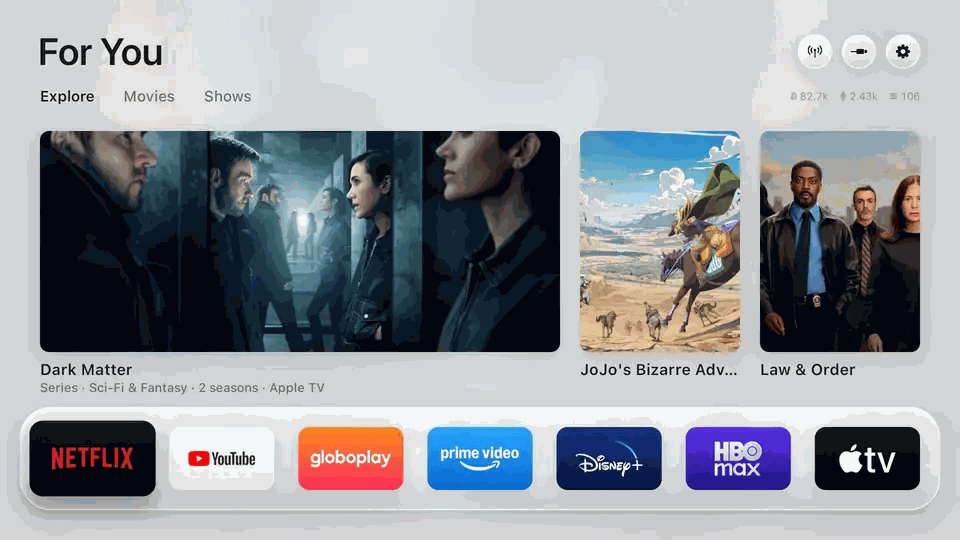
FreeMyTV 是一款给 Google TV、LG 和三星电视用的轻量启动器,主打彻底去广告:没有赞助行、横幅或自动播放的推广。它把常用流媒体应用摆上玻璃架,按你的喜好排序,还能显示热门推荐、天气、加密货币行情和继续观看。适合厌倦电视首页广告、想清爽快速看电视的用户。
核心亮点:
- 彻底去广告,无赞助行、横幅和自动播放推广
- 常用应用上玻璃架,可在电视上直接排序
- 每小时更新热门推荐,只来自你已装的应用
- 支持继续观看、天气行情和日落自动切换主题
当前版本 v1.5.0(2026-11-13 发布),开源协议 MIT,GitHub 6,333 star。

核心信息
| 软件名称 | FreeMyTV(simbasjungles/free-my-tv) |
| 当前版本 | v1.5.0 |
| 更新日期 | 2026-11-13 |
| 开源协议 | MIT |
| 软件分类 | TV 盒子软件 |
| 关键词 | android-tv、claude-code、google-tv、home-screen、launcher、no-ads |
本次更新内容
- 新版本允许用户自定义输入源列表,可显示或隐藏、调整顺序,并支持将顶部按钮设为打开HDMI输入。
- 在内存较小的电视上优化了性能,减少内存占用,界面更流畅;继续观看卡片现在显示影片自身图片而非应用图标。
- 新增阿拉伯语支持,界面从右到左排列,使用阿拉伯数字和日期;天气卡片可提示即将下雨或正在下雨。
- 扩展了遥控器按键功能,如应用键打开所有应用、输入键打开输入源,并支持更多流媒体设备上的专用按钮。
- 修复了断电后开机直接进入直播电视的问题,并改进了应用架排序选项,可设置最后打开的应用优先。
查看官方英文更新日志(原文)
Free My TV 1.5: choose and reorder your inputs, Arabic on LG and Samsung, the titles' own pictures in Continue Watching, half the memory on TVs with little of it, and more remotes.

**Install**
- **Google TV and Android TV:** on the 1.3 or 1.4 APK, *Home Settings* → *Updates* installs it, with Android asking first. Or download `FreeMyTV.apk` below and install it with `adb install -r FreeMyTV.apk` (the README's *The ready APK* has the steps). If you built Free My TV yourself before, switch back to *Original* and uninstall it first: the two are signed with different keys. On TCL TVs, run the README's `appops` line again after that uninstall.
- **Samsung (2017 and newer):** in TizenBrew Installer, *Install from GitHub* → `simbasjungles/free-my-tv`. It takes `FreeMyTV-tizen.wgt` from this release and updates the one you have. This version asks the TV for one more permission (its channel list, for Live TV). It has only run on a 2023 TV so far: if yours refuses the update, remove Free My TV on the TV and install it again, and please tell us the model. On 2015 and 2016 TVs, build it yourself (the README has the steps).
- **LG (webOS 3 and newer):** the webOS Homebrew Channel updates it (repository `https://freemytv.io/webos/apps.json`), or install `FreeMyTV-webos.ipk` through Developer Mode (`python3 webos/install.py <TV's IP>`).

**On every TV**
- **Your inputs, your way:** *Inputs* lists Live TV and the HDMI ports: OK shows or hides one, ← → change the order, and the drawer follows. On LG and Samsung it's in *Home Settings* and takes the place of the *Live TV* switch (what you had set carries over); on Google TV and Android TV it's in Free My TV's settings. (#497 by @cjean-fr, #488, #458)
- **Live TV button:** the first top button can open an HDMI input instead of Live TV on Google TV, Android TV and Fire TV too, as on LG and Samsung. (#503 by @nestormaldonado)
- **Thai:** Live TV is รายการสด everywhere. (#487 by @wanball)

**Google TV and Android TV**
- **Lighter on TVs with little memory:** every TV under 3 GB of RAM now takes the cheaper drawing paths, Android 13 and 14 included. On a 2.6 GB TCL the home screen went from 193 to 110 MB and moves more smoothly, with the same look (#491 by @ValdemirBSJr). The shadows are cached on every TV (#429 by @SobusaDriver).
- **Continue Watching with the titles' own pictures:** where an app leaves a picture's address instead of the picture (Netflix does), the card now shows it and no longer the app's logo. The TV fetches it from the app's own servers: `https` only, never an address on your home network, pictures only. (#506 by @midasmatterhorn, with the checks @yudizaxay proposed in #174)
- **Shelf order:** *Free My TV* → *Shelf* → *Last opened first* keeps the app you opened last in first place. Off until you pick it. (#300 by @Ugoyo)
- **Weather:** the card says when the next rain comes, or that it's raining now. (#428 by @SobusaDriver)
- **Remotes:** the Apps key opens All Apps, and closes it again (#426 by
下载地址
以下为官方原包,本站不二次打包,点击直接下载:
FreeMyTV.apk(Android 安装包 | 1.6 MB)
✅ 上方 SHA256 与官方发布值一致,可自行核对。
快速上手
- 在电视上打开文件管理器,找到并运行下载好的 FreeMyTV.apk 完成安装
- 首次启动后按屏幕提示选择语言、所在城市和温度单位
- 进入 Home Settings,在 TMDB key 处用手机扫描二维码并粘贴密钥
- 在 Home Settings 中挑选要显示在玻璃架上的应用并调整顺序
- 按需在 Home Settings 里开启 Continue Watching、状态图标或屏保等选项
提示:设置项都在 Home Settings 里,可随时调整应用顺序和显示内容。
讨论(0 条)