Plume Launcher 是一款专为 Android TV 和 Google TV 打造的超轻量无广告桌面,安装包极小,几乎不占资源。它用玻璃质感的磁贴展示应用和继续观看内容,没有赞助推荐、无需账号、不追踪用户。适合厌倦电视自带桌面臃肿广告、想要干净快速体验的电视盒子用户。
核心亮点:
- 玻璃质感磁贴设计,选中项浮起并带边缘高光
- 内置大量动态壁纸与航拍场景,也可用本地视频
- 支持继续观看列表,聚合多个应用播放进度
- 可重映射遥控器按键,并从顶栏切换 HDMI 输入
当前版本 v1.8(2026-11-23 发布),开源协议 GPL-3.0,GitHub 405 star。


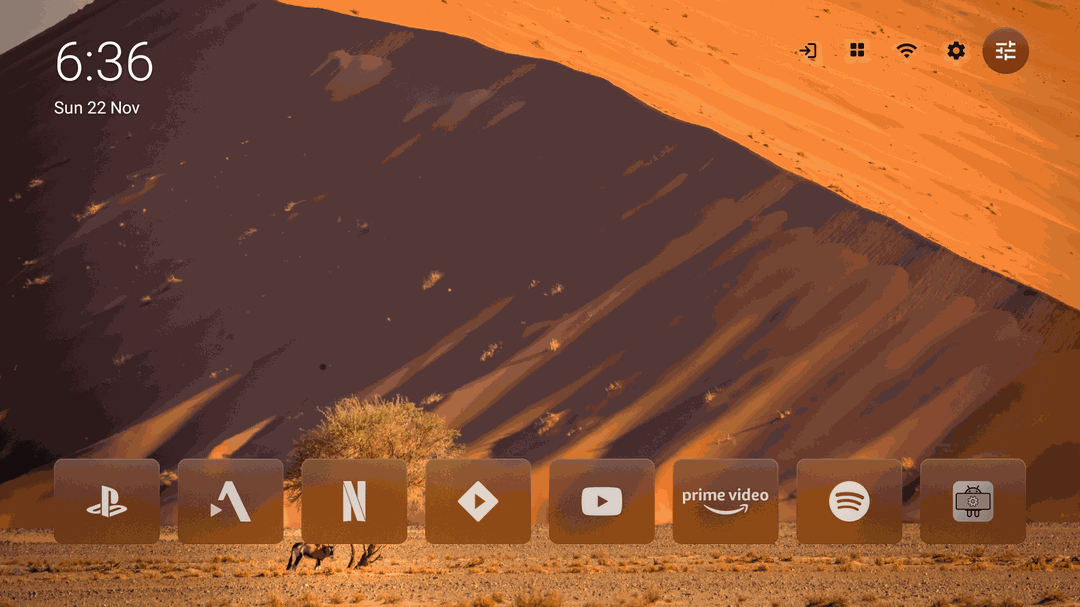
核心信息
| 软件名称 | Plume Launcher(aradhyas8/Plume_Launcher) |
| 当前版本 | v1.8 |
| 更新日期 | 2026-11-23 |
| 开源协议 | GPL-3.0 |
| 软件分类 | TV 盒子软件 |
| 关键词 | TV 盒子软件 |
本次更新内容
- 全新引入智能信息卡片,实时显示音乐、倒计时及通知,提升信息获取效率
- 新增应用图标包与自定义功能,支持更换应用图片,满足个性化界面需求
- 优化最近应用切换与壁纸管理,支持快速预览及一键应用,操作更流畅
- 改进滚动体验与界面布局,修复多品牌电视兼容性问题,整体更稳定美观
查看官方英文更新日志(原文)
## Plume 1.8

Meet Cue, Recent apps and icon packs. Plume 1.8 is the biggest update yet.

### Cue
- **Meet Cue.** A live glass tile at the top of your home screen. See your music, timers, alerts, rain and live scores at a glance. Pin a game, or follow your teams.
- **Alerts over any app.** Calls, doorbells and finished timers show over your movie. Press Up to open one. Select **Plume settings → Cue → Alerts over apps**.
- **Timers.** Start a timer or a stopwatch from the top bar. Your last 4 lengths are one press away.

### New
- **Recent apps.** Press Home two times to see your open apps, with a preview of each app's last screen on Android 11 and later. Press Left or Right to jump between them.
- **Icon packs.** Give every app a new look with an icon pack that you install. Select **Plume settings → Apps row → Icon pack**.
- **Your app, your picture.** Hold **OK** on an app and select **Change picture**. Upload a new icon or banner from your phone.
- **Settings backup.** Save your home screen setup. Restore it on another TV in seconds.
- **Edit the top bar in place.** Hold **OK** on an icon, then move, add or remove icons right on the bar.
- **Hola.** Plume now speaks Spanish.

### Wallpaper and screensaver
- **Wallpaper gallery.** Browse every wallpaper source in one place. Preview a slideshow of your own photos before you apply it.
- **One press to apply.** Press **OK** one time to apply a photo that you uploaded from your phone.
- **Bing picture of the day.** A fresh photo greets you on a new install.
- **Screensaver control.** Select **Start after** to choose when it starts, or **Never**. Preview every screensaver in Plume.
- **Sharper show art.** **Your shows** uses pictures that fill the screen, in 4K on supported TVs. Add a TMDB key from your phone for even better art.

### Feels better
- **Silky scrolling.** Hold a direction button and the rows glide. Soft sounds follow your every move.
- **A new look.** Plume has a new app icon and TV launcher banner.
- **Shows row sources.** Select **Plume settings → Shows row → Rows**, then **Mixed**, **By title** or **Per channel**. The row slides in the direction that you press, with dots that show where you are.
- **Your clock, your format.** Pick a date and time format in **Clock & weather**, or type your own.
- **More remote buttons.** Assign **Mute**, **Plume All apps** or **Plume recent apps** to any button. On some TVs, the **Apps** button on your remote opens **All apps**.
- **A cleaner home.** **All apps** hides the mobile apps that came with your TV. Press Right on the last app to go back to the first. Plume settings shows more on each screen, and the home screen rows sit closer together.

### Fixes
- **Faster Home on Fire TV.** Plume opens sooner after you press Home.
- HDMI plays inside Plume on Fire TVs with DroidLogic inputs.
- Plume shows a message when the TV blocks an app, and no longer closes.
- Plus 10 more fixes for Fire TV, Shield, Google TV, Xiaomi, CVTE, Hisense and Philips TVs.
下载地址
以下为官方原包,本站不二次打包;多个文件为不同包型,按需选择其中一个下载即可:
Plume-1.8.apk(Android 安装包 | 563.2 KB)
Plume.apk(Android 安装包 | 563.2 KB)
✅ 上方 SHA256 与官方发布值一致,可自行核对。
快速上手
- 在电视上运行下载好的安装包,按提示完成安装并打开 Plume Launcher。
- 首次启动后按屏幕指引授予必要权限,让桌面能读取应用与继续观看列表。
- 在设置里挑选壁纸或内置动态场景,也可选玻璃样式与明暗主题。
- 整理应用行:调整顺序、隐藏不需要的应用,或按最常使用排序。
- 在遥控键设置中为电视、Netflix 或设置键指定动作,并可从顶栏切换 HDMI 输入。
提示:设置里可开启 PIN 锁,防止小孩误改桌面布局。
讨论(0 条)