SonoBus 是一款跨平台的实时网络音频串流工具,主打低延迟点对点传输,让乐队远程合练、播客录制或线上教学像面对面一样自然。它既能独立运行,也能作为音频插件嵌入 DAW,适合音乐人、播客主播和需要远程协作的音频工作者。
核心亮点:
- 点对点低延迟串流,远程合练几乎无感
- 支持独立运行与音频插件两种形态
- 可调压缩、噪声门、均衡与混响效果
- 音频质量与延迟可按用户单独调节
当前版本 v1.7.2(2023-12-11 发布),开源协议 GPL-3.0,GitHub 2,242 star。

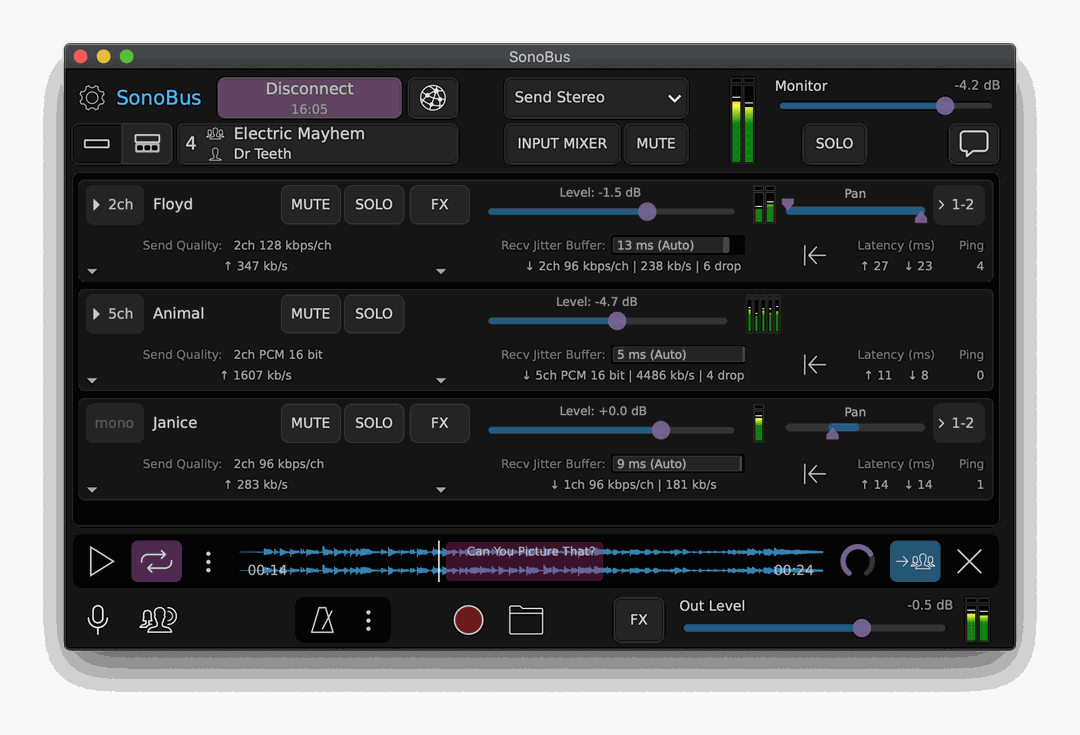

核心信息
| 软件名称 | Sonobus(sonosaurus/sonobus) |
| 当前版本 | v1.7.2 |
| 更新日期 | 2023-12-11 |
| 开源协议 | GPL-3.0 |
| 软件分类 | macOS 软件 |
| 关键词 | aax、audio、audiounit、linux、low-latency、macos |
本次更新内容
- 新版本优化了字体设置,默认关闭通用字体以提升性能,需要多语言字符支持时可手动开启。
- 新增“建议新群组”功能,可快速邀请当前群组中的部分成员组建新群组,方便私下交流。
- 改进VDO.Ninja链接生成器,新增专用按钮,修复浏览器打开问题,并支持同时生成摄像头和屏幕共享链接。
- 新增重置所有抖动缓冲区按钮及快捷键,增加Linux LV2插件,完善音板音量控制和发送到群组功能。
- 修复了录音时静音控制不生效的问题,现在默认遵循静音设置,并解决了文件拖放、滚动区域和录音崩溃等问题。
查看官方英文更新日志(原文)
SonoBus 1.7.2 Release Notes

- Made the use of the universal font optional (defaulting to off), because it was causing slowdowns on some systems. Only enable it if you need to have universal language character support.

From 1.7.1

- Added dedicated button on main window for getting to VDO.Ninja group video link (for those who didn't even know it was there!)
- Fixed VDO.Ninja link generator, Open in browser now operates properly (which it never did)
- Fixed font size issue on Windows
- Other minor fixes

From 1.7.0:

- Added "Suggest New Group" feature. From the group popup (the button just below Connect showing group info) a new item was added that lets you pick who from the currently connected group you would like to join you in a new group, makes the request and connects you to the new group. If the others accept they will immediately connect to the new group with you. This feature can be used in the situation where you are in a public group, but would like to continue to play/talk with a subset of them in a new private (or public) group, with the least amount of effort.

- Added Reset All Jitter Buffer button (near the bottom next to FX) with keybinding (cmd/ctrl-J)

- Added additional features to the VDO.Ninja link generator, allowing you to create links for both webcam and screenshare usage, which you can use at the same time in multiple browser windows/tabs. Also, an option was added to generate the link so that your content is only pushed, viewing no one... which can be handy if you are using both webcam and screenshare at the same time, and pick one to not view anyone.

- Added LV2 plugin for Linux (could be other platforms too if people request it)

- Added Soundboard volume control and send-to-group controls at the bottom of the Soundboard

- The used font now supports all translated languages, so you can use Chinese, Japanese, or Korean text in names or chat messages, even if the app isn't set for that language. It has fewer other symbols, however.

- Added an option (and made it the default to on) to make the Mute controls in the Input Mixer and the overall input mute at the top be respected when recording yourself. Before the self-recordings would include the input even though they were muted. You can get back to the old way with a new option in the recording options.

- Fixed drag and drop of files onto Soundboard

- Fixed user scrolling area size issue

- Fixed occasional crash on record
下载地址
以下为官方原包,本站不二次打包,点击直接下载:
sonobus-1.7.2-mac.dmg(官方原包 | 134.2 MB)
✅ 上方 SHA256 与官方发布值一致,可自行核对。
快速上手
- 运行下载好的安装包,将 SonoBus 拖入应用程序文件夹完成安装。
- 首次启动后,在界面中填写一个独特的组名,可选设置密码,然后点击连接加入该组。
- 连接成功后,在音频设置中选择输入输出设备,并调节延迟、音质与混音等参数。
- 需要时开启输入压缩、噪声门、均衡效果或主混响,并可录制组内所有人的音频。
- 将任意音频内容播放给全组,实现与多人实时共享音频。
提示:使用麦克风时请佩戴耳机,避免回声和啸叫。
讨论(0 条)